About the Ultimate Trend Signals Forex Indicator
The Ultimate Trend Signals Forex Indicator for MetaTrader 4 is a signal-based trading tool that delivers clear buy and sell opportunities through an integrated dashboard on the left side of the chart.
It is designed to analyze market conditions quickly and present trend information in a practical way without overcrowding the chart.
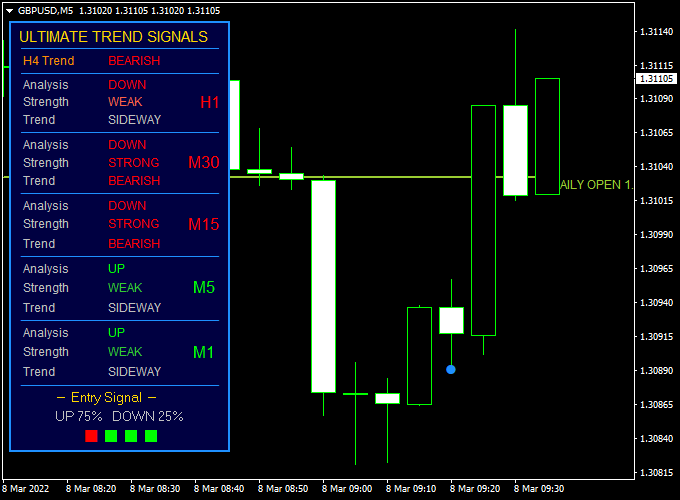
This indicator evaluates each currency pair across multiple timeframes, including M1, M5, M15, M30, and H1.
For every timeframe, it shows whether the trend is bullish or bearish, the overall trend direction, and the strength behind the move.
Once conditions align, the indicator highlights a precise entry signal, helping traders act with confidence.
The Ultimate Trend Signals Forex Indicator is well suited for scalpers and intraday traders who rely on timing and confirmation.
By combining trend direction and strength in one dashboard, it helps traders stay focused, reduce hesitation, and avoid trades that go against prevailing momentum.
Free Download
Download the “ultimate trading signals.ex4” indicator for MT4
Key Features
- Provides buy and sell signals directly on the MT4 chart.
- Analyzes multiple timeframes from M1 to H1 simultaneously.
- Displays trend direction, strength, and market bias.
- Includes a compact dashboard positioned on the chart.
- Works on all major and minor forex pairs.
Indicator Chart
The chart below shows the Ultimate Trend Signals Forex Indicator applied to an MT4 price chart.
The dashboard illustrates trend direction and strength across several timeframes, while buy and sell signals appear when bullish or bearish conditions align.

Guide to Trade with Ultimate Trend Signals Forex Indicator
Buy Rules
- Wait until both trend signals on the dashboard are colored green.
- Confirm that trend direction and strength support bullish movement.
- Open a buy trade at the start of the confirmed signal.
Sell Rules
- Wait until both trend signals on the dashboard are colored red.
- Confirm that trend direction and strength support bearish movement.
- Open a sell trade at the start of the confirmed signal.
Stop Loss
- Set the stop loss below the recent swing low for buy trades.
- Set the stop loss above the recent swing high for sell trades.
Take Profit
- Place take profit at the nearest support or resistance level.
- Optionally trail the position while the signal remains active.
Ultimate Trend Signals + Gann Trend Oscillator Forex Day Trading Strategy for MT4
This day trading strategy combines the Ultimate Trend Signals Forex Indicator for MT4 with the Gann Trend Oscillator MTF Indicator for MT4 to identify high-probability intraday trades with
clear visual confirmation.
The combination helps traders capture the strongest part of daily price moves by synchronizing dashboard trend strength with momentum oscillation.
It’s a clean and practical system that works best on 15-minute and 1-hour charts for pairs like EUR/USD, GBP/JPY, and AUD/CHF.
The Ultimate Trend Signals indicator acts as a multi-symbol dashboard showing the current market direction.
When both trend signals in the dashboard turn green, a bullish condition is confirmed. When both are red, the market is bearish.
The Gann Trend Oscillator MTF provides a momentum filter — blue bars represent bullish pressure, while violet bars indicate bearish sentiment.
When both tools agree, day traders can confidently enter with the trend.
Buy Entry Rules
- Wait until both trend signals on the Ultimate Trend Signals dashboard turn green.
- Confirm that the Gann Trend Oscillator shows blue bars on your chosen time frame.
- Enter a buy position on the next candle after both confirmations align.
- Place a stop loss below the previous swing low or 25–30 pips below entry, depending on volatility.
- Take profit when the dashboard turns neutral or the Gann bars shift to violet.
Sell Entry Rules
- Wait until both trend signals on the Ultimate Trend Signals dashboard turn red.
- Confirm that the Gann Trend Oscillator shows violet bars on the chart.
- Open a sell position on the next candle after both indicators align.
- Set your stop loss above the previous swing high or 25–30 pips above the entry.
- Take profit when the dashboard returns to neutral or when Gann bars turn blue.
Advantages
- Combines directional and momentum confirmation for stronger accuracy.
- Visual dashboard simplifies analysis of multiple pairs at once.
- Works well across major and cross pairs with moderate volatility.
- Provides intraday setups that last several hours with low stress.
Drawbacks
- Not suitable for scalpers who need rapid-fire entries or exits.
- May perform poorly in tight-ranging markets with no clear direction.
Case Study 1: AUD/CHF 1-Hour Chart
On the AUD/CHF pair, both trend signals on the Ultimate Trend Signals dashboard turned green early Monday morning.
The Gann Trend Oscillator also switched to blue bars at the same time, confirming bullish momentum near 0.5925.
A buy order was executed, and the pair climbed to 0.5980 before reversing, yielding around 55 pips in profit during the London session.
The trade was closed once the Gann bars started to fade toward neutral.
Case Study 2: GBP/JPY 30-Minute Chart
During mid-week trading, GBP/JPY showed both red trend signals on the Ultimate Trend dashboard, while the Gann Trend Oscillator confirmed bearish momentum with violet bars.
A sell position was taken near 196.80, and the pair declined to 195.20 before the Tokyo session closed, producing a 160-pip move.
The trade was exited when the dashboard signaled mixed conditions, preserving the majority of the intraday profit.
Strategy Tips
- Focus on trading during the London and early New York sessions when volatility is higher.
- Avoid trading when the dashboard colors constantly switch between green and red, as this indicates market indecision.
- Use a higher time frame confirmation (H1 or H4) before taking signals on smaller charts.
- Consider partial profit-taking when the price moves 30–40 pips in your favor.
- Refrain from trading around high-impact news events that can distort dashboard readings.
Download Now
Download the “ultimate trading signals.ex4” indicator for Metatrader 4
FAQ
Which timeframes does the Ultimate Trend Signals Forex Indicator analyze?
The indicator analyzes M1, M5, M15, M30, and H1 timeframes. This allows traders to see short-term and intraday trend alignment in one place.
How reliable are the buy and sell signals?
The signals are based on trend direction and strength. They perform best when traded in liquid market sessions and combined with basic price action awareness.
Should the default settings be changed?
The default inputs are suitable for most traders. More experienced users can experiment with settings to better match their trading style and preferred pairs.
Summary
The Ultimate Trend Signals Forex Indicator for MT4 offers a practical way to trade trends using clear visual signals and multi-timeframe confirmation.
Its dashboard-based design helps traders quickly assess market conditions and focus on high-probability setups.
By combining trend direction, strength, and entry signals in one tool, it supports faster decision-making and disciplined trading.
While no indicator is perfect, this one performs well when used with sound risk management and session awareness.
With regular testing and thoughtful use, it can become a reliable part of an MT4 trading strategy.


