
About the ZCOMFX Daily Trend Indicator
The ZCOMFX Daily Trend indicator for MetaTrader 4 is a multi-pair trend monitoring tool that allows traders to follow up to six currency pairs from a single chart window.
It is designed to give a fast overview of market direction without switching between charts.
The indicator is built around data derived from the daily timeframe and is therefore best used on the higher timeframes.
It evaluates trend conditions and displays them using directional arrows, making it easy to assess whether a market is bullish, bearish, or moving sideways.
ZCOMFX Daily Trend supports full customization of currency pairs.
Traders can replace any of the default symbols with their preferred instruments, keeping in mind that the indicator supports a maximum of six pairs at once.
This makes it useful for traders who focus on a fixed watchlist.
Free Download
Download the “zcomfx-daily-trend-indicator.ex4” MT4 indicator
Key Features
- Displays trends for up to six currency pairs simultaneously.
- Lime arrows indicate bullish trend conditions.
- Red arrows indicate bearish trend conditions.
- Blue arrows highlight sideways market behavior.
- Customizable symbol inputs.
- Clear visual trend overview in one window.
Indicator Chart
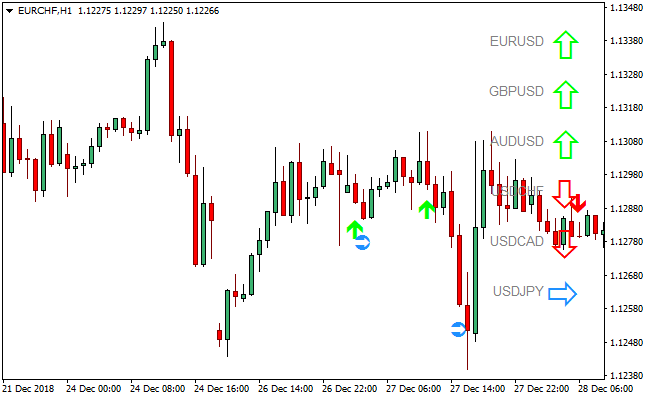
This chart example shows the ZCOMFX Daily Trend indicator displayed on an MT4 chart.
The arrows summarize the current trend state for each selected currency pair, allowing traders to quickly decide which markets deserve closer attention.
Guide to Trade with ZCOMFX Daily Trend Indicator
Buy Rules
- Use the indicator on the H1 timeframe.
- Look for currency pairs marked with a lime upward-pointing arrow.
- Confirm bullish conditions using price action or a secondary indicator.
- Enter buy trades on pullbacks within the broader uptrend.
Sell Rules
- Use the indicator on the H1 timeframe.
- Look for currency pairs marked with a red downward-pointing arrow.
- Confirm bearish conditions using price action or trend filters.
- Enter sell trades on retracements within the downtrend.
Stop Loss
- Place the stop loss beyond the most recent H1 swing level.
- Allow additional room when trading more volatile currency pairs.
- Reassess stop placement if the trend arrow changes direction.
Take Profit
- Target the next significant intraday support or resistance area.
- Use partial exits to lock in profits as price advances.
- Close remaining positions when a sideways arrow appears.
MT4 ZCOMFX Daily Trend + Pips Hunter Day Trading Strategy
This strategy pairs the ZCOMFX Daily Trend MT4 Indicator with the Pips Hunter MT4 Indicator.
The ZCOMFX indicator displays the daily trend for up to six major currency pairs (EUR/USD, GBP/USD, AUD/USD, USD/CHF, USD/CAD, and USD/JPY) in a single chart window, providing a broad view of underlying momentum.
The Pips Hunter provides precise entry signals with blue arrows for buys and red arrows for sells.
By combining these, you can capitalize on intraday trends in alignment with daily strength, which helps filter out noise and trade with greater confidence.
This strategy works best on intraday timeframes such as M15, M30, and H1 because you rely on the daily trend for filtering and use the Pips Hunter indicator for precise entries.
It is ideal for day traders who prefer structured setups that align short-term entries with broader market direction.
Buy Entry Rules
- The ZCOMFX Daily Trend must show a bullish daily trend for the currency pair you are trading.
- On your intraday chart, wait for the Pips Hunter indicator to print a blue arrow.
- Enter a long position at the close of the candle that prints the blue arrow.
- Place the stop loss below the most recent intraday swing low.
- Set take profit at 1.5 to 2 times the stop loss distance or use a trailing stop.
Sell Entry Rules
- The ZCOMFX Daily Trend must show a bearish daily trend for the pair you are trading.
- Wait for the Pips Hunter indicator to print a red arrow on your intraday timeframe.
- Enter short at the close of the candle with the red arrow.
- Place the stop loss above the nearest intraday swing high.
- Set take profit at 1.5 to 2 times risk, or trail your stop to follow the trend.
Advantages
- Aligns daily trend analysis with precise intraday entries.
- Helps avoid counter-trend trades.
- Clear rules make it easy to follow.
- Works well across all major currency pairs.
- Provides structured stop loss and take profit rules.
Drawbacks
- Fewer signals during sideways or consolidating markets.
- Daily trend changes can reduce the reliability of intraday signals.
- May require monitoring multiple charts if trading several pairs.
Example Case Study 1
On the GBP/USD M30 chart, the ZCOMFX Daily Trend showed a clear bullish daily trend.
Shortly after the London session opened, the Pips Hunter indicator printed a blue arrow.
A long position was opened at the candle close. The stop loss was placed 25 pips below the recent swing low, and the take profit was set at 50 pips.
With strong intraday momentum behind the trade, the take-profit target was reached smoothly.
Example Case Study 2
On the USD/JPY H1 chart, the ZCOMFX indicator displayed a bearish daily trend.
During the early New York session, the Pips Hunter indicator printed a red arrow.
A short trade was opened at the candle close with a 30 pip stop loss above the previous swing high. The take profit target was set at 60 pips.
The pair dropped quickly and reached the profit target within the same session.
Strategy Tips
- Check the ZCOMFX daily trend before every trading session so you always know whether you should focus on buys or sells.
- Allow the Pips Hunter arrow to fully close before entering, as early entries often lead to unnecessary losses.
- If the market moves strongly in your favor, consider locking in profit by moving the stop loss to breakeven.
- When the daily trend is weak or mixed, reduce position size or skip trades until direction becomes clearer.
- Focus on pairs that show clean daily movement because they tend to produce more reliable Pips Hunter signals.
Download Now
Download the “zcomfx-daily-trend-indicator.ex4” Metatrader 4 indicator
FAQ
What does the sideways arrow mean?
The blue right-pointing arrow signals a ranging or non-directional market.
Can I change the default currency pairs?
Yes. You can replace any of the symbols in the inputs, up to a maximum of six pairs.
Should arrows be shown on other timeframes?
If applying the indicator to other timeframes, it is recommended to set the ShowArrows option to false.
Summary
The ZCOMFX Daily Trend MT4 indicator is a practical solution for traders who want a compact overview of multiple market trends.
Its arrow-based display makes trend direction easy to interpret at a glance.
By focusing on the H1 timeframe and combining the indicator with confirmation tools, traders can streamline market selection and stay aligned with prevailing trend conditions.


