About the Scalper Dream Indicator
The Scalper Dream indicator is a free, premium forex scalper indicator that can be loaded on MT4.
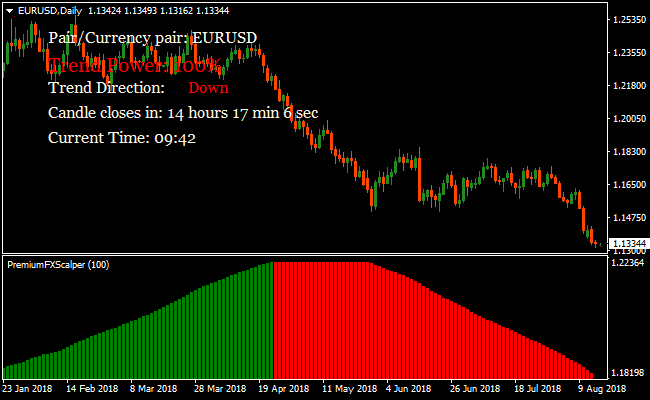
The indicator follows the trend and provides you with easy to read buy and sell histogram bars in a separate window below the main activity chart.
Green scalpers bars: trend is bullish and traders go long.
Red scalper bars: trend is bearish and traders go short.
This trading tool also provides you with some more interesting information:
Trend Power (strength of the current trend), time left for the current candle to close and the current time.
You can also change the indicator period settings directly from the input tab, for faster signals, change the value to a shorter period; for slower signals, change to a longer period.
Free Download
Download the “scalper-dream.ex4” MT4 indicator
Key Features
- Plots green and red histogram bars to signal buy and sell opportunities.
- Displays trend power for current market momentum.
- Shows time left for the candle to close and current market time.
- Adjustable period settings for faster or slower signals.
- Optimized for MT4 scalping, day trading, and short-term strategies.
Indicator Chart
The chart shows the Scalper Dream Indicator in a separate window below the main price chart.
Green bars reflect bullish pressure, and red bars reflect bearish pressure.
Traders monitor the histogram to enter trades with the trend and exit when an opposite bar appears, ensuring alignment with momentum.
Guide to Trade with the Scalper Dream Indicator
Buy Rules
- Confirm overall market trend is bullish with a trend-following indicator.
- Wait for the first green histogram bar to appear.
- Open a buy trade at the close of the green bar.
- Take trades only in line with the dominant trend.
Sell Rules
- Confirm overall market trend is bearish using a trend-following tool.
- Wait for the first red histogram bar to appear.
- Open a sell trade at the close of the red bar.
- Only take sell trades that follow the main trend.
Stop Loss
- Set the stop just beyond the nearest swing high or low.
- Widen the stop during volatile sessions.
Take Profit
- Close the trade when the histogram shows the opposite color bar.
- Use nearby support or resistance levels as alternative exit points.
- Hold trades longer when trend strength is confirmed by the trend power indicator.
Scalper Dream and Visual MACD Forex Scalping Strategy for MT4
This MT4 scalping strategy combines trend direction from the Scalper Dream Metatrader 4 Forex Indicator with momentum confirmation from the Visual MACD Metatrader 4 Forex Indicator.
The Scalper Dream indicator shows green bars when the trend is bullish and red bars when the trend is bearish.
The Visual MACD indicator displays a dark slate blue cloud to confirm bullish momentum and a maroon cloud to confirm bearish momentum.
By using both indicators together, traders can filter out weak or noisy signals and focus on high-probability scalping setups on lower timeframes.
This strategy works well on M1, M5, and M15 charts, making it suitable for day traders who want fast, structured entries and exits.
It is most effective during active market sessions when price movement is strong and momentum follows trend direction.
The goal is to capture short-term price swings of around 5–20 pips while staying aligned with the dominant momentum.
Buy Entry Rules
- The Scalper Dream must show green bars, indicating a bullish trend.
- The Visual MACD cloud must be dark slate blue, confirming upward momentum.
- Enter a buy trade at the close of the candle following confirmation from both indicators.
- Place the stop loss below the most recent swing low or a nearby support level.
- Set the take profit between 5 and 20 pips based on volatility and timeframe.
- Exit the trade early if the Scalper Dream bars turn red or the Visual MACD cloud changes to maroon.
Sell Entry Rules
- The Scalper Dream must show red bars, indicating a bearish trend.
- The Visual MACD cloud must be maroon, confirming downward momentum.
- Enter a sell trade at the close of the candle following confirmation from both indicators.
- Place the stop loss above the most recent swing high or a nearby resistance level.
- Set the take profit between 5 and 20 pips based on volatility and timeframe.
- Exit the trade early if the Scalper Dream bars turn green or the Visual MACD cloud changes to dark slate blue.
Advantages
- Combines trend direction with momentum confirmation to reduce false signals.
- Clear bar and cloud visuals make it easy to identify trade setups quickly.
- Suitable for multiple timeframes, giving traders flexibility in their scalping approach.
- Helps traders stay aligned with the dominant price movement rather than entering randomly.
- Can be applied to a variety of currency pairs for frequent intraday opportunities.
Drawbacks
- Lower timeframe scalping requires constant chart monitoring, which can be intensive.
- Profit targets are small, and spread costs can impact net gains on some currency pairs.
- Overtrading can happen if signals are taken without regard for market context.
Case Study 1
On EURJPY M5 during the London session, the Scalper Dream indicator displayed consecutive green bars while the Visual MACD cloud remained dark slate blue, confirming bullish momentum.
A buy trade was initiated and closed for 18 pips as the price approached a minor resistance area and showed signs of slowing, capturing a quick upward move during the session.
Case Study 2
On GBPUSD M15 during the New York session, the Scalper Dream bars turned red while the Visual MACD cloud shifted to maroon, indicating strong bearish momentum.
A sell trade was entered and later in the day closed for 37 pips when the price reached a support zone and momentum began to weaken, successfully capturing the short-term intraday downward move.
Strategy Tips
- Wait for both the Scalper Dream bars and the Visual MACD cloud to match direction before entering any trade.
- Use M1 for very quick scalping, M5 for balanced intraday moves, and M15 for slightly larger moves within the trading day.
- Avoid trading during low liquidity periods, such as early Asian hours, when momentum may be weak.
- Set stop losses beyond recent swing highs or lows to avoid being stopped out by minor fluctuations.
- Consider partial profit-taking near key price levels while letting the remainder ride if momentum persists.
- Track which currency pairs and session times provide the most consistent signals for this strategy.
- Maintain discipline and only enter when both indicators clearly align in direction.
Download Now
Download the “scalper-dream.ex4” Metatrader 4 indicator
FAQ
Can I adjust the signal speed?
Yes, changing the indicator period in the inputs allows faster or slower histogram signals depending on your trading style.
Does the Scalper Dream Indicator repaint?
No, once a histogram bar closes, its signal is fixed and does not change.
Do I need a trend filter?
While not mandatory, combining the indicator with a trend-following tool improves signal reliability and avoids countertrend trades.
Summary
The Scalper Dream Indicator offers traders a straightforward way to identify short-term trends and capture quick momentum moves on MT4.
Its histogram bars provide clear buy and sell cues, while additional trend information helps improve decision-making.
With adjustable settings, it adapts to both fast scalping and slightly longer intraday trades.
Used alongside a trend-following indicator, it becomes a reliable tool for traders seeking structured, high-probability entries in dynamic markets.






