
About the Stochastic Shade Signals Indicator
The Stochastic Shade Signals Indicator for MT4 is a visual momentum tool that simplifies the traditional stochastic oscillator into a color-coded histogram.
Operating on a scale from 0 to 100, it uses green shades to represent bullish momentum and red shades to mark bearish pressure.
This indicator is designed to pinpoint high-probability reversal zones, specifically targeting the oversold (20) and overbought (80) levels.
It works well for any trading style.
Free Download
Download the “stochastic-with-shade.mq4” MT4 indicator
Key Features
- Displays momentum shifts using intuitive green and red histogram shades.
- Features a dedicated 0 to 100 scale to identify overextended market conditions.
- Highlights precise entry triggers at the institutional 20 and 80 levels.
- Works efficiently across all currency pairs and timeframes on the MT4 platform.
- Pairs easily with moving averages to filter signals in the direction of the main trend.
Indicator Chart
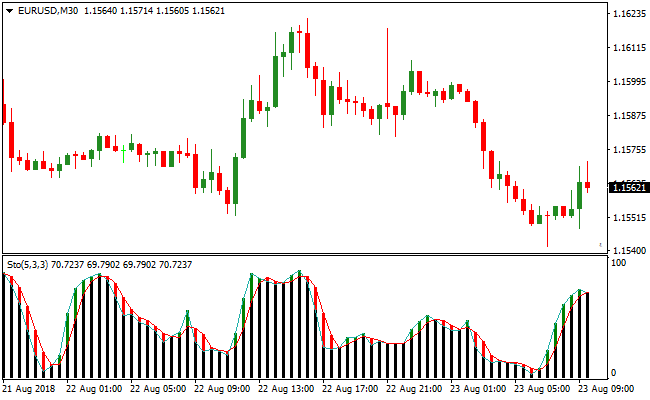
The Stochastic Shade Signals Indicator appears in a separate window below the main chart.
It features vertical histogram bars that fluctuate between 0 and 100.
Green shades at the lower levels suggest the market is oversold, while red shades at the upper levels indicate it is overbought.
This layout allows for an instant assessment of market conviction and potential turning points.
Guide to Trade with Stochastic Shade Signals Indicator
Buy Rules
- Confirm the overall trend is bullish using a moving average or price action.
- Wait for the indicator reading to drop near the 20 level.
- Enter a long trade when the histogram shade turns green in this oversold zone.
- Ensure the signal is confirmed by a closed candle on the activity chart.
Sell Rules
- Verify that the primary market trend is bearish through technical analysis.
- Monitor the indicator as it rises toward the 80 level.
- Execute a short trade when the histogram shade turns red in this overbought zone.
- Confirm the bearish shift on the candle close before entering the market.
Stop Loss
- For buy trades, place the stop loss a few pips below the recent swing low.
- For sell trades, position the stop loss slightly above the nearest swing high.
- Adjust your stop levels based on volatility to avoid being hit by minor price spikes.
Take Profit
- Set a target at the next major horizontal support or resistance level.
- Alternatively, exit when the indicator reaches the opposite extreme (80 for buys, 20 for sells).
- Close the position manually if an opposing color shade appears against your trade.
Stochastic Shade Signals and Laser Forex Reversal MT4 Strategy
This MT4 forex strategy combines momentum context from the Stochastic Shade Signals Metatrader 4 Forex Indicator with reversal timing from the Laser Forex Reversal Indicator MT4.
The Stochastic Shade Signals indicator helps identify potential oversold and overbought conditions by shading green near the 20 level for buy opportunities and red near the 80 level for sell opportunities.
The Laser Forex Reversal Indicator provides precise entry signals with blue arrows for buy trends and red arrows for sell trends.
This strategy works well on lower timeframes such as M5, M15, and H1 and is suitable for day trading and intraday reversals.
The idea is to enter trades when momentum reaches extreme levels and a reversal signal appears, capturing quick directional moves.
This approach helps avoid entering too early or too late by combining both momentum extremes and reversal timing.
Buy Entry Rules
- The Stochastic Shade Signals indicator must be near the 20 level and shaded green, indicating oversold conditions.
- A blue buy arrow must appear from the Laser Forex Reversal Indicator following the oversold setup.
- Enter a buy trade at the close of the candle where the blue arrow appears.
- Place the stop loss below the recent swing low or below the nearest support area.
- Set a take profit near the first visible resistance level or use a fixed pip profit target.
- Close the trade early if the Stochastic Shade Signals indicator moves away from the oversold area without a reversal arrow.
Sell Entry Rules
- The Stochastic Shade Signals indicator must be near the 80 level and shaded red, indicating overbought conditions.
- A red sell arrow must appear from the Laser Forex Reversal Indicator following the overbought setup.
- Enter a sell trade at the close of the candle where the red arrow appears.
- Place the stop loss above the recent swing high or above the nearest resistance area.
- Set a take profit near the first visible support level or use a fixed pip profit target.
- Close the trade early if the Stochastic Shade Signals indicator moves away from the overbought area without a reversal arrow.
Advantages
- Combines extreme momentum conditions with precise reversal signals for better timing.
- Helps traders avoid entering prematurely before actual trend reversals occur.
- Well suited for M5, M15, and H1 charts to capture intraday price swings.
- Clear rules make the strategy easy to follow for both beginners and experienced traders.
- Provides frequent reversal opportunities.
Drawbacks
- Requires patience to wait for the stochastic to reach extreme levels before entering trades.
- Not ideal for very slow markets where reversals are weak or unpredictable.
- Reversal arrows may lag slightly in fast-moving price action, causing delayed entries.
Case Study 1
On EURUSD M5 during the London session, the Stochastic Shade Signals indicator approached the 20 level and turned green, showing oversold conditions.
Shortly after, a blue arrow appeared from the Laser Forex Reversal Indicator.
A buy trade was entered and later closed for 29 pips when price reached the nearby resistance area, successfully capturing the bounce from oversold conditions.
Case Study 2
On GBPJPY H1 during the New York session, price approached the 80 level on the Stochastic Shade Signals indicator and turned red, indicating overbought conditions.
A red arrow from the Laser Forex Reversal Indicator confirmed the sell entry.
The trade was executed and closed for 78 pips when price reached a visible support area, capturing the intraday reversal move.
Strategy Tips
- Wait for the stochastic to approach extreme levels before considering reversal signals for greater accuracy.
- Use M5 for quick scalps, M15 for balanced intraday trades, and H1 for larger moves during the day.
- Avoid trading solely on stochastic extremes without a confirming reversal arrow to reduce poor entries.
- Focus on major currency pairs and gold for smoother price action and stronger reversal signals.
- Place stop losses near swing highs or lows to protect your account from sudden spikes.
- Avoid taking trades during low liquidity sessions when momentum may not fully develop.
- Consider partial profit-taking near key support or resistance levels to lock in gains.
Download Now
Download the “stochastic-with-shade.mq4” Metatrader 4 indicator
FAQ
What is the benefit of the “shade” system?
The shade system eliminates the confusion of crossing lines.
It acts as a clear roadmap, indicating exactly when the bulls or bears are in charge and when it’s wiser to stay on the sidelines.
Why only trade signals at the 20 and 80 levels?
These levels represent the points where a trend is most likely to exhaust its current move.
Trading at these extremes allows you to “buy the dip” or “sell the rip” with a higher probability of success.
Summary
The Stochastic Shade Signals Indicator is a professional utility that brings clarity to momentum trading.
By translating complex data into simple green and red shades, it helps you time your entries with precision.
Its primary strength lies in identifying high-conviction zones within an established trend.
To maximize results, always trade in the direction of the dominant market trend.





