
About the Chimp Scalper Oscillator
The Chimp Scalper Oscillator for MT4 is designed to help forex traders identify short-term market trends with speed and precision.
This indicator operates in a separate window and measures momentum by fluctuating above and below the zero level.
Green bars above zero signal bullish momentum, while red bars below zero indicate bearish momentum.
Traders can quickly assess the market direction and make informed scalping decisions.
The indicator is particularly useful for intraday trading and can be combined with trend-following tools like the 50 SMA or 75 EMA to align trades with the overall market direction.
Using this method increases the probability of successful trades and reduces exposure to false signals.
Free Download
Download the “chimp-scalper.mq4” MT4 indicator
Key Features
- Displays bullish and bearish momentum through green and red bars.
- Signals appear above and below the zero level for instant trend reading.
- Can be combined with trend indicators to confirm trades.
- Suitable for forex scalping and intraday trading.
- Simple setup with easy-to-read signals for fast decision-making.
Indicator Chart
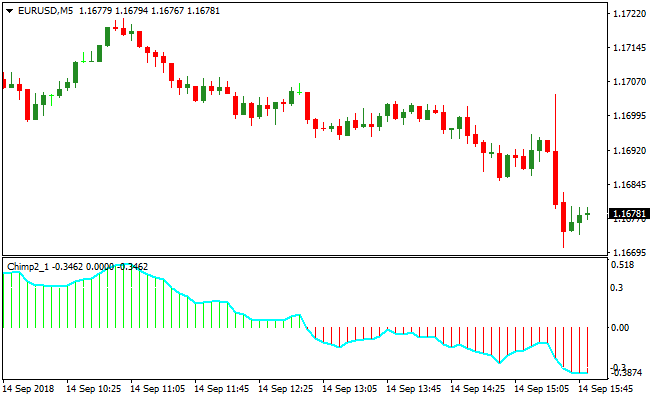
The chart shows the Chimp Scalper Oscillator in action.
Green bars appear above zero when bullish momentum dominates, signaling potential buy opportunities.
Red bars appear below zero when bearish momentum dominates, signaling potential sell opportunities.
This allows traders to visually track the trend and time entries efficiently.
Guide to Trade with Chimp Scalper Oscillator
Buy Rules
- Wait for green bars to appear above the zero line.
- Confirm the price is above a trend indicator like 50 SMA or 75 EMA.
- Enter a buy trade when the next candle opens above the previous green bar.
- Avoid buying if bars turn red or price falls below the trend indicator.
Sell Rules
- Wait for red bars to appear below the zero line.
- Confirm the price is below a trend indicator like 50 SMA or 75 EMA.
- Enter a sell trade when the next candle opens below the previous red bar.
- Avoid selling if bars turn green or price rises above the trend indicator.
Stop Loss
- Place stop loss a few pips beyond the recent swing high for sell trades.
- Place stop loss a few pips beyond the recent swing low for buy trades.
- Use trend confirmation to reduce the chance of hitting the stop prematurely.
Take Profit
- Close buy trades if green bars reverse to red.
- Close sell trades if red bars reverse to green.
- Alternatively, target nearby support or resistance levels for profit.
- Adjust take profit based on market volatility and trend strength.
Chimp Oscillator and Hodrick Prescott Channel Forex Strategy MT4
This MT4 strategy combines the Chimp Scalper Oscillator with the Hodrick Prescott Channel Indicator.
It is designed for traders who want clear trend and momentum confirmation.
The Chimp Oscillator shows green bars above zero for buy pressure and red bars below zero for sell pressure.
The Hodrick Prescott Channel displays rising channels as bullish and declining channels as bearish.
This combination allows traders to enter trades in the direction of the main trend while avoiding false signals.
This strategy works best on M15, M30, and H1 charts but can also be adapted to H4 for swing trades.
It is suitable for traders who prefer visual signals and want to combine trend following with momentum.
By waiting for both oscillator and channel confirmation, traders can enter trades with higher probability setups.
Buy Entry Rules
- Identify an uptrend on the Hodrick Prescott Channel where the channel is rising.
- Check that the Chimp Scalper Oscillator displays green bars above the zero level.
- Enter a buy trade after both conditions align.
- Place a stop loss below the most recent swing low inside the channel.
- Take profit at previous resistance levels or use a 2:1 reward-to-risk ratio.
Sell Entry Rules
- Identify a downtrend on the Hodrick Prescott Channel where the channel is declining.
- Confirm that the Chimp Scalper Oscillator shows red bars below the zero level.
- Enter a sell trade once both conditions are met.
- Place a stop loss above the recent swing high inside the channel.
- Take profit at previous support levels or a 2:1 reward-to-risk ratio.
Advantages
- Combines trend and momentum for higher probability trades.
- Works well on multiple time frames and major currency pairs.
- Can be adapted for intraday or swing trading styles.
- Reduces false signals by requiring both indicators to confirm.
Drawbacks
- May generate late entries during fast market moves.
- Choppy markets can produce whipsaws inside the channel.
- Profit targets may need adjustment based on volatility.
Case Study 1
On USDJPY H30, the Hodrick Prescott Channel was rising, signaling a bullish trend.
The Chimp Scalper Oscillator turned green above zero, confirming momentum.
A buy trade was opened with a stop loss below the recent swing low.
Price moved upward, reaching resistance at 45 pips before taking profit.
The trend alignment and oscillator confirmation provided a strong trade with minimal hesitation.
Case Study 2
On AUDUSD M15, the Hodrick Prescott Channel showed a declining channel, indicating a downtrend.
The Chimp Scalper Oscillator displayed red bars below zero, confirming sell pressure.
A sell trade was opened with a stop loss above the recent swing high.
The market continued downward for 32 pips before hitting support.
Waiting for both indicators avoided premature entries and improved trade accuracy.
Strategy Tips
- Wait for the Chimp Scalper Oscillator to clearly show green bars above zero for buys and red bars below zero for sells.
- Only enter trades when both the oscillator and Hodrick Prescott Channel align with the trend.
- Set stop loss based on recent swing highs or lows, not a fixed pip distance.
- Adjust trade size according to the volatility of the currency pair.
- Focus on active market sessions like London or early New York for stronger moves.
- Avoid trading during low liquidity periods or just before major news releases.
- Be patient and do not chase trades; wait for both indicators to confirm.
- Consider scaling out portions of your position for longer trend moves.
- Keep a trade journal to review patterns and refine entry timing.
- Backtest the strategy on multiple pairs and time frames to improve accuracy and confidence.
Download Now
Download the “chimp-scalper.mq4” Metatrader 4 indicator
FAQ
What timeframes work best with the Chimp Scalper Oscillator?
It works best on short-term charts like M1, M5, and M15 for scalping. Combining with higher timeframes can help confirm the trend direction.
Can this indicator be used alone?
While it provides clear signals, pairing it with a trend-following indicator improves accuracy and reduces false trades.
How do I adjust the indicator for different currency pairs?
Use the default settings initially, then fine-tune sensitivity for pairs with higher or lower volatility. Testing on a demo account is recommended.
Summary
The Chimp Scalper Oscillator for MT4 is a reliable tool for spotting short-term trends and timing entries.
Its color-coded bars simplify trend reading and integrate seamlessly with trend indicators like the 50 SMA or 75 EMA.
Traders gain a faster decision-making process, reduced exposure to false signals, and increased confidence in scalping setups.
With proper practice and alignment with the overall market trend, this indicator enhances intraday trading efficiency and precision.





