

About the Fibonacci MTF Channel Indicator
The Fibonacci MTF Channel indicator for MT4 is a dynamic trend-following tool that calculates trading channels based on the distance between price and a moving average.
It helps traders identify the overall market trend and optimal entry points for buy and sell trades.
In an uptrend, the channel rises, while in a downtrend, the channel declines.
Two colored entry lines—Aqua for buys and Magenta for sells—signal potential trade entries when the price crosses them in the direction of the trend.
The outer dotted dark orange bands can be used for taking profits.
All default Fibonacci level settings are fully adjustable via the indicator’s inputs menu.
This makes it flexible for different currency pairs, timeframes, and trading strategies.
Free Download
Download the “channelsfibo-mtf.mq4” MT4 indicator
Key Features
- Dynamic trading channel based on Fibonacci levels and price distance from a moving average.
- Aqua and Magenta entry lines indicate potential buy and sell trades.
- Outer dotted bands serve as take profit targets.
- Fully adjustable Fibonacci levels via the inputs menu.
- Visualizes trends and entry points for easy trade interpretation.
Indicator Chart
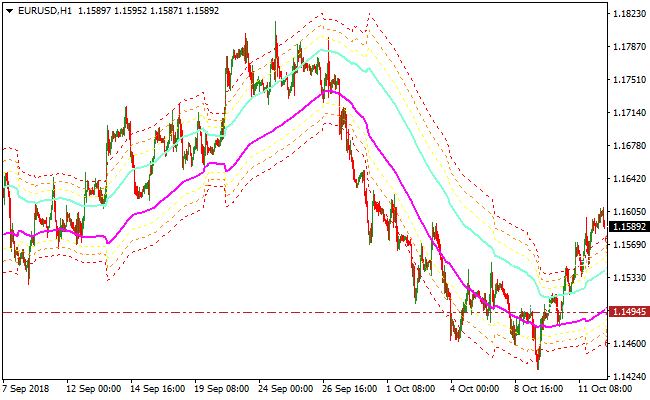
The Fibonacci MTF Channel indicator below shows price action relative to the dynamic channel.
Aqua and Magenta lines highlight potential buy and sell entry points aligned with the trend, while the outer dotted bands suggest profit-taking zones.
Traders can follow the lines to enter trades in the direction of the prevailing trend.
Guide to Trade with the Fibonacci MTF Channel Indicator
Buy Rules
- Confirm the overall trend is upward using the channel direction.
- Wait for the price to cross back above the Aqua entry line from below.
- Enter a buy trade at the close of the confirming candle.
- Ignore buy signals if the channel is declining or momentum is weak.
Sell Rules
- Confirm the overall trend is downward using the channel direction.
- Wait for the price to cross back below the Magenta entry line from above.
- Enter a sell trade at the close of the confirming candle.
- Ignore sell signals if the channel is rising or momentum is weak.
Stop Loss
- For buy trades, place the stop loss slightly below the Aqua line or recent swing low.
- For sell trades, place the stop loss slightly above the Magenta line or recent swing high.
- Exit early if price moves strongly against the channel direction.
Take Profit
- Close buy trades when price reaches the upper dotted dark orange band or shows signs of reversal.
- Close sell trades when price reaches the lower dotted dark orange band or shows signs of reversal.
- Optionally, secure partial profits at intermediate Fibonacci levels.
Fibonacci MTF Channel + Awesome Oscillator MT4 Scalping Strategy
This MT4 scalping strategy combines trend identification from the Fibonacci MTF Channel Indicator with momentum signals from the Awesome MT4 Indicator.
The Fibonacci MTF Channel shows the overall trend direction. When the channel slopes upward, the trend is bullish. When it slopes downward, the trend is bearish.
The Awesome Indicator provides buy or sell timing using its histogram. Green bars above 0 signal a buy, while red bars below 0 indicate a sell.
This combination allows scalpers to enter trades in the direction of the trend while using the histogram to time precise entries.
It is best suited for liquid pairs such as EUR/USD, GBP/USD, USD/JPY, and AUD/USD and works well on lower timeframes such as M5 and M15.
Buy Entry Rules
- The Fibonacci MTF Channel must be sloping upward, confirming a bullish trend.
- The Awesome Indicator histogram must be above 0 with green bars.
- Enter a buy trade at the close of the candle when the histogram first turns green above 0 while the channel is upward.
- Place a stop loss below the recent swing low or the lower boundary of the channel.
- Set take profit at the next significant resistance level or previous swing high.
Sell Entry Rules
- The Fibonacci MTF Channel must be sloping downward, confirming a bearish trend.
- The Awesome Indicator histogram must be below 0 with red bars.
- Enter a sell trade at the close of the candle when the histogram first turns red below 0 while the channel is downward.
- Place a stop loss above the recent swing high or the upper boundary of the channel.
- Set take profit at the next significant support level or previous swing low.
Advantages
- The Fibonacci MTF Channel filters trades to match the overall trend, reducing counter-trend entries.
- The Awesome Indicator histogram provides clear and quick entry signals.
- Works well in trending sessions and liquid currency pairs.
- Simple to follow and suitable for consistent scalping execution.
- Focuses on price action and trend alignment rather than fixed risk to reward ratios.
Drawbacks
- Lower timeframes require quick decision-making to catch short-term moves.
- Sudden spikes in volatility can trigger stop losses before momentum fully develops.
- Traders need to monitor the channel slope and histogram actively to avoid false entries.
Example Case Study 1 – EUR/USD M5
During the London session, EUR/USD was in an uptrend with the Fibonacci MTF Channel sloping upward.
The Awesome Indicator histogram turned green above 0 at 1.0878.
A buy order was opened at 1.0878.
Stop loss was placed below the recent swing low at 1.0865.
The market moved upward and the take profit at the next resistance level of 1.0895 was reached, giving a gain of 17 pips.
The channel remained upward and the histogram stayed green, confirming the trend throughout the trade.
Example Case Study 2 – GBP/USD M15
GBP/USD during the New York session showed a downward-sloping Fibonacci MTF Channel.
The Awesome Indicator histogram turned red below 0 at 1.2560.
A sell order was entered at 1.2560.
Stop loss was set at 1.2572 above the swing high.
Price moved downward and reached the previous swing low at 1.2535. The trade closed with a profit of 25 pips.
The channel slope remained downward and the histogram remained red, providing clear confirmation of the trade direction.
Strategy Tips
- Use this strategy on major currency pairs with high liquidity for better execution and lower spreads.
- Focus on active trading sessions such as London and New York where trends are stronger and more reliable.
- Do not enter trades if the channel slope is flat or ambiguous, even if the histogram changes color.
- Set take profit at key support or resistance levels rather than using a fixed risk to reward ratio to maximize flexibility.
Download Now
Download the “channelsfibo-mtf.mq4” Metatrader 4 indicator
FAQ
Can the Fibonacci MTF Channel be used on all timeframes?
Yes, it works on multiple timeframes.
Lower timeframes are useful for scalping and intraday trades, while higher timeframes help identify broader trends.
Are the entry lines adjustable?
Yes, the Aqua and Magenta lines, as well as all Fibonacci levels, can be modified through the indicator’s input settings for customization.
Does it provide trend confirmation?
Yes, the rising or declining channel visually confirms the market trend, allowing traders to enter trades only in the direction of the prevailing trend.
Summary
The Fibonacci MTF Channel indicator helps traders identify trend direction and high-probability entry points using dynamic entry lines and Fibonacci levels.
It highlights buy and sell opportunities aligned with the trend and provides visual zones for taking profits.
By combining the indicator with trend analysis and proper risk management, Forex traders can make informed entries and exits.
It is suitable for scalping, intraday, and trend-following strategies across all MT4 instruments.





