
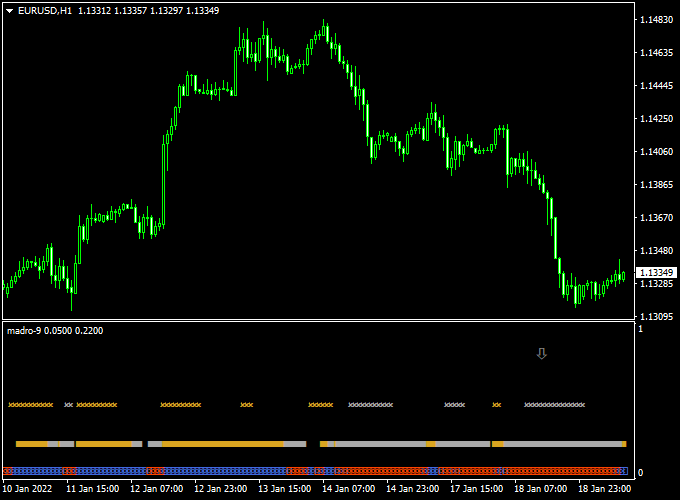
About the Madro Golden Filter Indicator
The Madro Golden Filter Indicator for MetaTrader 4 is a reliable trend-following tool designed to help traders spot buy and sell opportunities with clear arrow signals.
It simplifies trend analysis and provides actionable guidance for entries and exits.
Displayed in the sub-window of the MT4 platform, the indicator uses up and down arrows to signal bullish and bearish momentum.
Traders can follow the arrows for standalone trading or use them as an additional filter alongside their existing strategy.
Its straightforward signals make it suitable for scalping, intraday, and swing trading.
Free Download
Download the “Madro golden filter.mq4” indicator for MT4
Key Features
- Displays precise buy and sell arrows in a separate MT4 window
- The up arrow indicates a buy signal
- The down arrow indicates a sell signal
- Works as a standalone trading tool or trend filter
- Ideal for multiple timeframes and currency pairs
- Helps traders spot trend reversals quickly
Indicator Chart
The chart below shows the Madro Golden Filter Indicator in action.
Up arrows appear when bullish momentum is detected, while down arrows indicate bearish momentum.
Traders can reverse trades as soon as the opposite arrow appears.

Guide to Trade with Madro Golden Filter Indicator
Buy Rules
- Enter a buy trade when an up arrow appears
- Confirm momentum with price action or trend direction
- Maintain the trade until a down arrow signals a reversal
Sell Rules
- Enter a sell trade when a down arrow appears
- Confirm momentum with price action or trend direction
- Maintain the trade until an up arrow signals a reversal
Stop Loss
- Place a stop loss a few pips beyond the last signal arrow in the opposite direction
- For buy trades, set it slightly below the most recent down arrow
- For sell trades, set it slightly above the most recent up arrow
- Use tighter stops on lower timeframes and wider stops on higher timeframes
Take Profit
- Close trades when the opposite signal arrow appears
- Partial profits can be taken if momentum slows before reversal
Practical Tips
- Wait for the arrow to fully form before entering a trade
- Combine with key support and resistance zones for safer entries
- Trade during active sessions for clearer momentum signals
- Monitor the speed of arrow changes to avoid overtrading
- Use it alongside other indicators to filter weak signals
Scalping Strategy: Madro Golden Filter & Holt Double Exponential Smoothing Trend (MT4)
This scalping strategy combines the Madro Golden Filter Indicator and the Holt Double Exponential Smoothing Trend Indicator on MetaTrader 4 (MT4) to identify quick high-probability trades.
The Madro Golden Filter provides clear trend direction with UP and DOWN arrows.
The Holt Double Exponential Smoothing Trend indicator confirms momentum with green and orange histogram bars.
This strategy works well on M1 and M5 charts for pairs like EUR/USD, USD/JPY, and GBP/USD.
Buy Entry Rules
- Wait for the Madro Golden Filter to display a white UP arrow, indicating a buy trend.
- Confirm that the Holt Double Exponential Smoothing Trend histogram is green, indicating bullish momentum.
- Enter a buy position when both conditions are met.
- Set a stop loss below the most recent swing low or a fixed number of pips (e.g., 10-15 pips).
- Set a take profit target at a nearby resistance level or aim for a 1:1.5 risk-to-reward ratio.
Sell Entry Rules
- Wait for the Madro Golden Filter to display a white DOWN arrow, indicating a sell trend.
- Confirm that the Holt Double Exponential Smoothing Trend histogram is orange, indicating bearish momentum.
- Enter a sell position when both conditions are met.
- Set a stop loss above the most recent swing high or a fixed number of pips (e.g., 10-15 pips).
- Set a take profit target at a nearby support level or aim for a 1:1.5 risk-to-reward ratio.
Advantages
- Combines trend and momentum indicators for more reliable scalping signals.
- Clear visual signals reduce decision-making time during fast-moving markets.
- Works well on M1 and M5 charts for intraday scalping.
- Helps identify short-term trend reversals and continuations effectively.
Drawbacks
- Scalping can result in higher transaction costs due to tight stop losses and frequent entries.
- Overtrading is possible if signals are followed blindly without confirmation.
- Limited effectiveness on low-volume or exotic currency pairs.
Case Study 1: EUR/USD M1 Buy
On the EUR/USD M1 chart, a white UP arrow appeared on the Madro Golden Filter, and the Holt Double Exponential Smoothing Trend histogram was green.
A buy position was entered at 1.1050.
The stop loss was set at 1.1040 (-10 pips), and the take profit target was set at 1.1065 (+15 pips).
The trade hit the take profit level within 20 minutes, resulting in a +15 pip gain.
Case Study 2: USD/JPY M5 Sell
During the Tokyo session on USD/JPY M5, a white DOWN arrow appeared on the Madro Golden Filter, and the Holt Double Exponential Smoothing Trend histogram turned orange.
A sell position was entered at 148.20.
The stop loss was set at 148.35 (+15 pips), and the take profit target was 147.95 (-25 pips).
The price moved downward and reached the take profit level within the session, resulting in a +25 pips profit.
Strategy Tips
- Use M1 and M5 charts for faster scalping opportunities.
- Focus on major pairs like EUR/USD, USD/JPY, and GBP/USD for better liquidity and tighter spreads.
- Keep positions small and apply strict risk management.
- Monitor market sessions to trade during higher volatility periods.
- Combine with support and resistance levels to improve trade accuracy.
Download Now
Download the “Madro golden filter.mq4” indicator for Metatrader 4
FAQ
Do the arrows repaint?
No. Once an arrow appears, it remains fixed on the chart, allowing traders to rely on past signals for analysis.
Can I use this indicator as part of another strategy?
Yes. It can serve as a trend filter to confirm entries and exits from your existing system or trading strategy.
Which currency pairs work best?
The indicator is effective on major and minor pairs. Stick to pairs with tight spreads for scalping and intraday trading.
Summary
The Madro Golden Filter Indicator for MT4 delivers straightforward buy and sell arrows for trend trading.
Up arrows signal bullish momentum, while down arrows indicate bearish momentum.
This tool can be used alone or as a filter alongside other strategies.
It is suitable for scalping, intraday, and swing trading, offering a simple and visual way to follow market trends.





