
About the Lot Profit Forex Indicator
The Lot Profit Forex Indicator for Metatrader 4 is a utility tool that displays the size of your trading position and the real-time profit or loss right on the chart.
Instead of checking separate windows or account panels, you can instantly see critical trade metrics where you need them most.
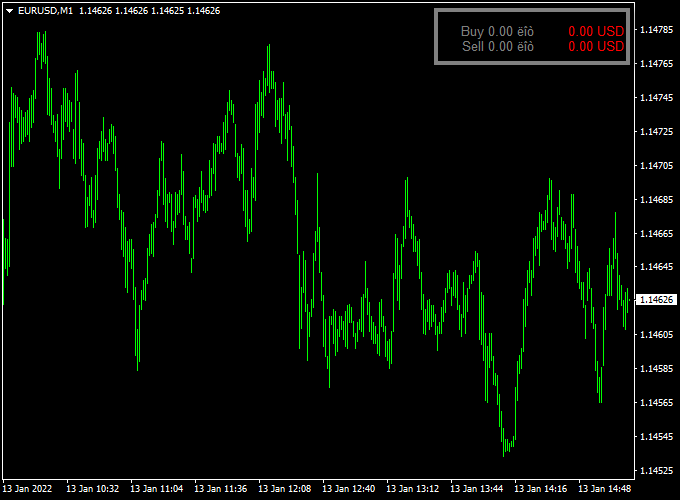
Once attached to any chart, the indicator shows the lot size and current profit in the upper right corner of the activity chart.
This display updates live as price moves, giving you a clear view of how your position is performing without cluttering your workspace.
This indicator is especially useful for active traders, scalpers, and anyone who wants better visual feedback on risk and reward during a live trade.
It helps you monitor your performance and adjust your management plan as the market evolves.
By keeping essential trade information visible at all times, the Lot Profit Forex Indicator supports smarter decision-making and better discipline when managing open positions.
Free Download
Download the “lot_profit.mq4” indicator for MT4
Key Features
- Displays current lot size and profit on the chart
- Shows real-time updates as price changes
- Located in the upper right corner for quick reference
- No manual calculations needed
- Works on any currency pair
- Compatible with live and demo accounts
Indicator Chart
The chart shows the Lot Profit Forex Indicator attached to an MT4 chart.
The upper right corner of the chart displays your current position’s lot size and profit or loss, making it easy to monitor performance at a glance.
Guide to Trade with Lot Profit Forex Indicator
Buy Rules
- This utility does not generate buy signals
- Use with your existing entry signal system
- Attach before entering a trade to monitor position stats
Sell Rules
- This indicator does not provide sell signals
- Combine with any strategy that defines entry rules
- Keep the indicator active while managing the open position
Stop Loss
- Stop loss placement remains based on your trading rules
- Use the displayed profit info to confirm risk is within your plan
- This indicator does not calculate stops automatically
Take Profit
- Take profit levels are set according to your system
- Use displayed profit for real-time management
- Combine with trailing stop methods as needed
Practical Tips
- Attach before active sessions begin
- Use it with your primary entry and exit indicator
- Adjust trade size based on real-time profit visibility
Lot Profit and 4 TF Ergodic CCI MT4 Day Trading Strategy
This MT4 day trading strategy combines the Lot Profit Forex Indicator and the 4 TF Ergodic CCI Arrows Trend Indicator to provide clear entry and exit signals while helping traders manage position sizing and potential profit levels.
The Lot Profit Indicator shows your lot size and potential profit in real time, which is useful for day traders who want to track risk and gains instantly.
The 4 TF Ergodic CCI Arrows Trend Indicator gives directional signals across four timeframes, making it easier to confirm trend alignment before entering trades.
This strategy works best on 15-minute and 30-minute charts, though it can be adapted for hourly charts for those who prefer slightly longer trades.
It is suitable for traders of all experience levels who want a straightforward system to capture short-term market movements.
Buy Entry Rules
- Wait for a green arrow from the 4 TF Ergodic CCI Arrows Trend Indicator, indicating a buy signal.
- Confirm that the Lot Profit Indicator shows the potential lot/profit size aligns with your risk management rules.
- Enter the trade immediately after the green arrow appears.
- Place a stop loss below the most recent swing low to protect against unexpected reversals.
- Set your take profit target at a level that offers at least a 1:2 risk-to-reward ratio or use the projected profit shown on the Lot Profit Indicator.
Sell Entry Rules
- Wait for a red arrow from the 4 TF Ergodic CCI Arrows Trend Indicator, indicating a sell signal.
- Check the Lot Profit Indicator to ensure the trade size and projected profit fit your trading plan.
- Enter the trade immediately after the red arrow appears.
- Place a stop loss above the most recent swing high to minimize potential losses.
- Set a take profit level based on a 1:2 risk-to-reward ratio or according to the potential profit displayed by the Lot Profit Indicator.
Advantages
- Combines trend confirmation with real-time position/profit tracking.
- Easy to use and suitable for day trading on multiple currency pairs.
- Helps traders manage risk by showing potential profits before entering trades.
- Works well on lower timeframes for capturing intraday moves.
- Signals are clear and easy to follow, even for beginner traders.
Drawbacks
- Requires attention to the chart for the correct timing of entries and exits.
- False signals may occur during low liquidity or ranging markets.
- Overtrading is possible if arrows appear too frequently without trend confirmation.
Case Study 1
On the EUR/USD 15-minute chart, a green arrow appeared at 10:15 AM while the Lot Profit Indicator projected a potential 0.5 lot position with a 20-pip gain.
The trader entered a buy trade with a stop loss below the recent swing low.
The price moved in favor, reaching the take profit target of 20 pips within an hour, achieving the projected profit shown on the Lot Profit Indicator.
Case Study 2
On the GBP/USD 30-minute chart, a red arrow appeared at 2:00 PM with the Lot Profit Indicator showing a 0.3 lot size and 25 pips potential profit.
The trader entered a sell position, placed a stop loss above the recent swing high, and allowed the trade to run.
Within 90 minutes, the price hit the take profit level, and the trade resulted in a gain very close to the projected profit, demonstrating effective trend alignment and risk management.
Strategy Tips
- Use this strategy during active market hours to avoid low liquidity periods.
- Combine with basic market analysis, such as support and resistance levels, to improve trade accuracy.
- Always adhere to your risk management rules and adjust lot sizes based on account size.
- Check multiple timeframes for trend alignment to reduce false signals.
- Track past trades to refine stop loss and take profit placement for consistent results.
Download Now
Download the “lot_profit.mq4” indicator for Metatrader 4
FAQ
Does the indicator show both entry and exit profits?
Yes, it displays the current profit or loss of your open position in real time.
Can I customize the location of the display?
The default position is the upper right corner. If customization is supported in inputs, adjust as needed.
Will it show profit in pips?
This indicator shows profit in currency value based on lots and the current price.
Does it work with multiple open trades?
Typically, the display reflects the active chart’s position, not all open trades.
Summary
The Lot Profit Forex Indicator for MT4 provides a simple way to monitor your open trade’s lot size and profit without leaving the price chart.
By placing key information where you can see it during live trading, this utility supports better money management and discipline.
While it does not generate signals on its own, it works seamlessly with other indicators in the strategy section to enhance trade execution and management.





