

About the Multiple Days Pivot Point Indicator
The Multiple Days Pivot Point Indicator for Metatrader 4 displays pivot points and their related trading levels for several previous days directly on the chart.
Professional traders widely use these levels to identify areas where price is likely to react during the trading session.
Unlike standard pivot indicators that only show the current day, this tool keeps multiple days of pivot levels visible.
This provides traders with valuable context, especially when the price reacts to older levels that are still respected by the market.
The indicator appears in the main MT4 chart window and automatically calculates pivot points based on historical price data.
This makes it suitable for traders who rely on intraday reactions, session opens, and short-term momentum.
Because pivot points are based on objective calculations, they offer a consistent reference for entries, exits, and risk management across different market conditions.
Free Download
Download the “LNX_Pivots_v1.mq4” indicator for MT4
Key Features
- Displays pivot points for multiple previous trading days
- Automatically updates levels at the start of each new session
- Shows central pivot with accompanying support and resistance levels
- Works on all currency pairs and timeframes
- Designed for intraday and short-term trading
- No manual calculations required
Indicator Chart
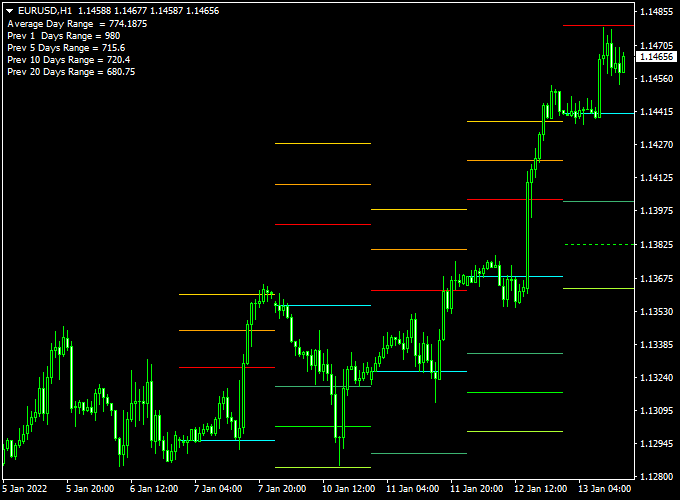
The chart illustrates the Multiple Days Pivot Point Indicator applied to an MT4 chart.
Several daily pivot levels are visible, allowing traders to observe how price reacts when crossing or testing these zones during the session.
Guide to Trade with Multiple Days Pivot Point Indicator
Buy Rules
- Wait for the price to approach the current day pivot point
- Enter a buy trade when a candlestick crosses and closes above the pivot point
- Confirm momentum is supportive on the active timeframe
Sell Rules
- Wait for the price to approach the current day pivot point
- Enter a sell trade when a candlestick crosses and closes below the pivot point
- Avoid entries during very low volatility periods
Stop Loss
- Place the stop loss just below the pivot point for buy trades
- Place the stop loss just above the pivot point for sell trades
- Alternatively, use the next pivot support or resistance level
Take Profit
- Set the first target at the nearest pivot support or resistance level
- Use a fixed take profit target
Practical Tips
- Pivot points work best during active market sessions
- Pay attention to reactions at the previous day’s pivot levels
- Combine with a trend or momentum indicator for better timing
Multiple Days Pivot Point + Entry Take Profit Winner MT4 Intraday Strategy
This MT4 intraday strategy combines classic pivot point trading with a precision entry signal system.
The Multiple Days Pivot Point Indicator for MT4 automatically plots daily pivot levels, helping traders identify the market’s directional bias.
When the price is trading above the central pivot point, it indicates a bullish market tone, while trading below it suggests a bearish bias.
The Entry Take Profit Forex Winner Indicator for MT4 provides well-timed buy and sell signals, marked by blue and red arrows, to guide traders toward high-probability entries.
This setup is best suited for intraday traders operating on M15 or M30 timeframes.
The pivot levels act as a map, while the signal arrows mark the turning points, making trade execution straightforward and disciplined.
Buy Entry Rules
- Wait for the price to move and close above the central pivot point on the chart.
- Confirm that a blue arrow appears from the Entry Take Profit Forex Winner Indicator after the breakout.
- Enter a buy trade at the close of the signal candle.
- Place the stop loss 10–15 pips below the central pivot point or below the previous swing low.
- Set your take profit near the first resistance (R1) level or aim for a fixed target of 25–40 pips, depending on volatility.
Sell Entry Rules
- Wait for the price to move and close below the central pivot point.
- Confirm that a red arrow appears from the Entry Take Profit Forex Winner Indicator.
- Enter a sell trade at the close of the signal candle.
- Place the stop loss 10–15 pips above the central pivot point or above the recent swing high.
- Set your take profit near the first support (S1) level or target 25–40 pips, depending on market conditions.
Advantages
- Combines pivot-based trend direction with clear entry signals.
- Ideal for structured intraday trading with defined stop and target levels.
- Works across major pairs and timeframes from M15 to H1.
- Reduces emotional trading decisions by relying on rule-based entries.
- Pivot points automatically adjust daily, keeping levels relevant and up to date.
Drawbacks
- Whipsaw movements around the central pivot can cause small losses.
- Performance can vary during low-volatility Asian sessions.
- False signals may appear if the market consolidates near pivot levels.
- Requires discipline to avoid overtrading multiple signals in a single day.
Example Case Study 1
On EUR/USD M15, the day opened slightly below the central pivot at 1.0908.
After the London session started, the price broke above the pivot line, and a blue arrow appeared from the Entry Take Profit Forex Winner Indicator at 1.0912.
A buy entry was taken at the close of that candle with a stop loss at 1.0898.
The pair rallied smoothly up to the R1 level at 1.0945, delivering 33 pips profit within two hours.
This move confirmed how pivot levels combined with the signal indicator provide quick intraday setups.
Example Case Study 2
On GBP/USD M30, the price opened above the central pivot point at 1.2830 but later reversed sharply.
A red arrow appeared from the Entry Take Profit Forex Winner Indicator right after the price dropped below the pivot.
A sell entry was taken at 1.2825 with a stop at 1.2840.
The market moved strongly downward toward the S1 level near 1.2790, reaching a 35-pip target before consolidating.
The setup followed all the rules and demonstrated how momentum can accelerate once the price breaks below the pivot.
Strategy Tips
- Focus on trading during the London and New York sessions for higher volatility and cleaner breakouts.
- Always check the overall daily trend from the previous day to align trades with the broader direction.
- Use the R1 and S1 levels as realistic daily profit targets instead of holding trades too long.
- Skip trades when the price is fluctuating right at the central pivot to avoid choppy entries.
- Adjust stop losses slightly wider on high-volatility pairs like GBP/JPY to avoid premature exits.
- Keep a trading journal to track pivot reactions and refine entry timing over time.
Download Now
Download the “LNX_Pivots_v1.mq4” indicator for Metatrader 4
FAQ
Why are multiple days of pivot points useful?
Markets often react to older pivot levels that remain relevant. Seeing several days at once helps identify areas with repeated price reactions.
Does the indicator recalculate past pivot levels?
No, pivot levels for completed days remain fixed. Only the current day levels update when a new session begins.
Which timeframe is best for trading pivot points?
Lower timeframes such as M5 to H1 are commonly used, as pivot points are primarily an intraday trading tool.
Can pivot points be used for breakouts and reversals?
Yes, traders use pivot points both as breakout triggers and as areas where price may reverse, depending on momentum.
Summary
The Multiple Days Pivot Point Indicator for MT4 provides a reliable way to monitor key intraday price levels across several sessions.
Keeping historical pivots visible adds useful context to short-term trading decisions.
The indicator is easy to use and fits naturally into most intraday strategies.
When combined with a complementary trend or momentum indicator in the strategy section, it can significantly improve trade timing and confidence.





