
About the Ichimoku Forex Indicator
The Ichimoku Forex Indicator for MT4 is a trend-following tool that shows market direction using a colored cloud on the chart.
It is widely used by traders to identify trend strength and direction without complex calculations.
Orange clouds indicate a rising market, while blue clouds suggest a declining market, allowing traders to align trades with the overall trend.
Beginner-friendly and ready to use out of the box, the indicator works on all currency pairs and timeframes.
By visualizing trends in a single cloud, it simplifies trade decisions and helps traders find optimal buy and sell entries while minimizing guesswork.
Free Download
Download the “Ichimoku.ex4” indicator for MT4
Key Features
- Displays trend direction using colored clouds
- Orange cloud signals a bullish trend, blue cloud signals a bearish trend
- Supports all MT4 timeframes and currency pairs
- Helps identify strong trend entries and exits
- Can be combined with momentum or support/resistance indicators for better accuracy
Indicator Chart
The chart below shows the Ichimoku Forex Indicator in action.
Colored clouds indicate trend direction: orange for bullish markets and blue for bearish markets.
Traders can use the cloud as a guide to enter or exit trades based on market momentum.
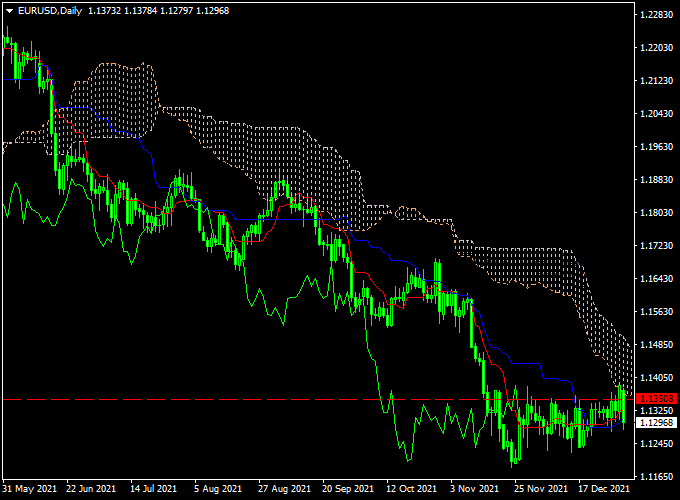
Guide to Trade with Ichimoku Forex Indicator
Buy Rules
- Enter a buy trade when the cloud turns orange
- Confirm with upward price momentum or support levels
- Close or reverse the trade if the cloud changes to blue
Sell Rules
- Enter a sell trade when the cloud turns blue
- Confirm with downward momentum or resistance levels
- Close or reverse the trade if the cloud changes to orange
Stop Loss
- Place below the bottom edge of the cloud for buy trades
- Place above the top edge of the cloud for sell trades
Take Profit
- Set near the next trend reversal cloud or key support/resistance level
- Or trail the price along the cloud while the trend continues
Practical Tips
- Wait for the cloud color change to confirm trend direction before entering a trade
- Combine with momentum or volume indicators to filter weak trends
- Trail stop losses along the cloud edges to lock in profits
- Test entries on a demo account to understand cloud behavior across different pairs
Ichimoku Cloud Indicator + The Secret TR MT4 Forex Scalping Strategy
This scalping strategy uses the Ichimoku Forex Indicator for MT4 together with the The Secret TR Forex Signal Indicator for MT4.
The aim is to capture short-term price moves with high probability by combining trend direction from Ichimoku with precise buy and sell signals from the Secret TR histogram.
This combination allows traders to enter trades quickly during intraday sessions while avoiding counter-trend setups.
The Ichimoku indicator highlights bullish momentum with an orange cloud and bearish momentum with a blue cloud.
The Secret TR Forex Signal Indicator displays a blue histogram for buy signals and a red histogram for sell signals.
By entering trades only when both indicators align, traders can increase the accuracy of short-term scalping setups.
This strategy is best applied on M5 and M15 charts and works well on major forex pairs such as EURUSD, GBPUSD, and USDJPY.
It is suitable for traders who prefer fast trades with defined entry and exit rules and want to capitalize on short intraday trends.
Buy Entry Rules
- Wait for the Ichimoku cloud to turn orange, indicating bullish momentum.
- Confirm that the Secret TR histogram is blue, signaling a buy opportunity.
- Enter a buy trade at the open of the next candle after both conditions are met.
- Place a stop loss below the most recent swing low or below the Ichimoku cloud.
- Set take profit at 1.5 to 2 times the stop loss distance or exit when the Ichimoku cloud turns blue.
Sell Entry Rules
- Wait for the Ichimoku cloud to turn blue, indicating bearish momentum.
- Confirm that the Secret TR histogram is red, signaling a sell opportunity.
- Enter a sell trade at the open of the next candle after both conditions are met.
- Place a stop loss above the most recent swing high or above the Ichimoku cloud.
- Set take profit at 1.5 to 2 times the stop loss distance or exit when the Ichimoku cloud turns orange.
Advantages
- Combines trend confirmation and signal timing for accurate scalping entries.
- Quick visual signals make it easy to spot trades in real time.
- Works well on short timeframes for intraday opportunities.
- Reduces false signals by requiring alignment between two indicators.
- Can be applied to multiple currency pairs.
Drawbacks
- May produce late signals during extremely volatile conditions.
- Less effective in sideways or choppy markets.
- Requires discipline to exit trades when the trend changes.
- Scalping demands focus and quick reaction time.
- Stop loss and take profit placement are crucial for consistent results.
Example Case Study 1
On the EURUSD M5 chart, the Ichimoku cloud turned orange while the Secret TR histogram showed blue.
A buy entry was triggered at 1.1052 with a stop loss at 1.1045.
The trade captured 12 pips within 20 minutes before the Ichimoku cloud started turning blue, signaling an exit.
This trade demonstrates the accuracy of combining trend and histogram confirmation for quick intraday gains.
Example Case Study 2
On GBPUSD M15, the Ichimoku cloud turned blue while the Secret TR histogram showed red.
A sell trade was entered at 1.2820 with a stop loss at 1.2830.
The price fell to the target for a 20-pip profit within 35 minutes.
The setup clearly illustrates how alignment between trend and histogram increases the probability of a successful scalping trade.
Strategy Tips
- Focus on M5 and M15 charts for fast scalping opportunities.
- Trade only when both Ichimoku and Secret TR align to reduce false signals.
- Avoid trading during major news releases or low liquidity periods.
- Use a trailing stop if the trade moves strongly in your favor to secure profits.
- Backtest the strategy on multiple pairs to adjust settings for optimal performance.
Download Now
Download the “Ichimoku.ex4” indicator for Metatrader 4
FAQ
How does the Ichimoku Forex Indicator work?
It displays a colored cloud that reflects trend direction: orange for bullish and blue for bearish markets, helping traders align trades with the prevailing trend.
Do I need other indicators to trade effectively?
While the Ichimoku cloud can be used alone, combining it with momentum or support/resistance indicators improves entry accuracy and trend timing.
What are the best practices for using the cloud?
Focus on the cloud color change for trend confirmation, use higher timeframes for strong signals, and trail stops along cloud edges to protect profits.
Summary
The Ichimoku Forex Indicator is a versatile trend-following tool for MT4, displaying colored clouds to guide trading decisions.
Orange clouds indicate bullish trends, and blue clouds indicate bearish trends, allowing traders to align positions with market momentum.
It is beginner-friendly and works across all currency pairs and timeframes.
Combining this indicator with momentum, volume, or support/resistance analysis enhances trade accuracy.
Using trailing stops along the cloud and following trend changes can help traders capture longer trends while minimizing risk.





