About the Indicator
The DeMark Forex Indicator for MetaTrader 4 (MT4) is a custom-built tool designed to display the proven DeMark trading algorithm on your chart.
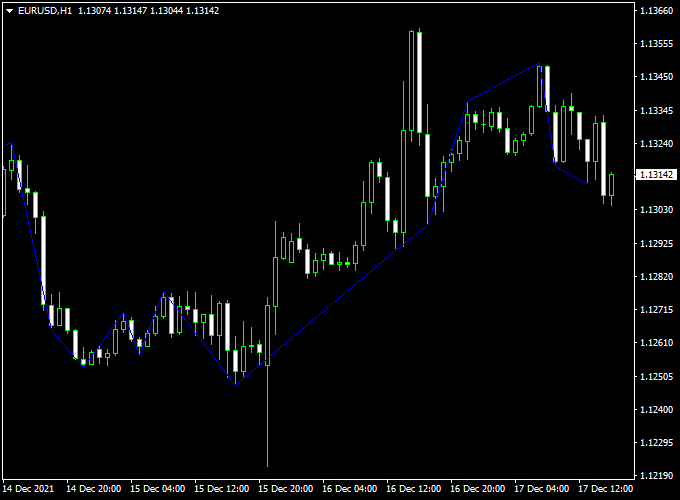
This indicator appears in a separate MT4 chart window as blue-colored lines, providing visual cues for potential market movements.
Trade Idea
- Open a buy trade as soon as the Demark signal line is positioned below the candlesticks.
- Open a sell trade as soon as the Demark signal line is positioned above the candlesticks.
Free Download
Download the “demark-indicator.ex4” indicator for MT4
Key Features
- Custom-built for MT4, displaying the DeMark trading algorithm.
- Appears as green-colored bars in a separate chart window.
- Can be used for both trade entry and exit signals.
- Serves as a confirmation tool for buy and sell setups from other strategies.
- Free to download and easy to install on your MT4 platform.
Indicator Example Chart (EUR/USD H1)
See the DeMark MT4 Indicator in action on the chart below, illustrating how it identifies key market opportunities

Download Now
Download the “demark-indicator.ex4” indicator for Metatrader 4
Demark + Algorithmic Megatrend Forex Strategy
Overview
This strategy combines the Demark Forex Indicator with the Algorithmic Megatrend to provide clear trend direction and momentum signals.
The Demark indicator is designed to spot potential trend reversals and signal optimal entry points for trades.
Meanwhile, the Algorithmic Megatrend measures the strength and direction of the current trend.
By confirming whether the market momentum aligns with the Demark signals, it helps traders make more confident and informed trading decisions.
Buy Entry Conditions
- The Demark indicator is below the candlesticks.
- Algorithmic Megatrend’s histogram turns blue, and a blue arrow appears, indicating strong bullish momentum.
- Enter a buy trade at the close of the confirming candle.
- Set a stop loss below the recent swing low or key support level.
- Exit the trade when Demark signals a bearish reversal or the Algorithmic Megatrend histogram turns red with a red arrow.
Sell Entry Conditions
- The Demark indicator is positioned above the candlesticks.
- Algorithmic Megatrend’s histogram turns red, and a red arrow appears, signaling strong bearish momentum.
- Enter a sell trade at the close of the confirming candle.
- Set a stop loss above the recent swing high or key resistance level.
- Exit when Demark signals a bullish reversal or the Algorithmic Megatrend histogram turns blue with a blue arrow.
Trader Case Studies
Here are examples of traders from different countries who have applied this strategy successfully on various currency pairs and timeframes.
Amina Z – Kenya
Amina, a swing trader from Nairobi, used this strategy on the AUD/USD and EUR/USD pairs over 30 days. By following the rules and managing risk well, she gained +473 pips during this period.
Javier L – Mexico
Javier, a full-time trader from Mexico City, applied this strategy on USD/MXN and GBP/USD pairs for 40 days. His consistent approach resulted in a total profit of +409 pips.
Keiko H – Japan
Keiko, a day trader from Tokyo, used this system on USD/JPY, EUR/JPY, and AUD/USD pairs for 32 days. She achieved a solid gain of +210 pips during that time.
Disclaimer: These case studies are for educational purposes only. Trading results will vary based on market conditions, risk management, and individual discipline.
Advantages
- Combines reversal signals with strong trend confirmation.
- Effective across multiple timeframes and currency pairs.
- Reduces false entries by requiring confirmation from both indicators.
Drawbacks
- May provide fewer signals during ranging markets.
- Exit signals might lag slightly, impacting profit-taking.
Strategy Conclusion and Tips
This strategy leverages the Demark indicator’s reversal setups combined with the Algorithmic Megatrend’s trend strength signals to enhance trade accuracy.
Waiting for both indicators to agree before entering trades can increase your chances of success.
Practice on a demo account to become familiar with how these indicators perform in live markets.
Indicator Specifications
| Specification | Details |
|---|---|
| Platform | MetaTrader 4 (MT4) |
| Type | Trend Indicator |
| Timeframes | All MT4 Timeframes |
| Currency Pairs | Major, Minor, and Exotic Pairs |
| Inputs | Variable (inputs tab), color settings & style |
| Signals | Buy/Sell Confirmation |
| Alerts | None |
Frequently Asked Questions (FAQ)
1. Can the DeMark Indicator be used for scalping on lower timeframes?
Yes. It works on M5 and M15, but the signals are more frequent. Combine with a moving average filter (e.g., EMA 50) and trade only in the higher-timeframe trend to reduce false entries.
2. Is the DeMark Indicator effective during high news volatility?
Use caution. News spikes can create premature or whipsaw signals. Avoid entries right before major releases and wait for the candle to close for confirmation.
3. What markets can I apply the DeMark Indicator to?
It’s price-action-based, so you can use it on Forex, indices, commodities, and crypto pairs within MT4. Always backtest per instrument due to different volatility profiles.
4. Can I combine the DeMark Indicator with RSI or MACD?
Yes. Use RSI (e.g., 14) to confirm momentum or MACD to validate trend direction. Take trades only when DeMark and the momentum filter align.
Final Words
The DeMark Forex Indicator for MT4 is a valuable tool for traders seeking to identify potential market turning points and make informed trading decisions.
By combining this indicator with other technical analysis tools and practicing sound risk management, traders can enhance their trading strategies and improve their chances of success.





