
About the Advanced ADX Indicator
The Advanced ADX indicator for MT4 measures trend strength using the Average Directional Index.
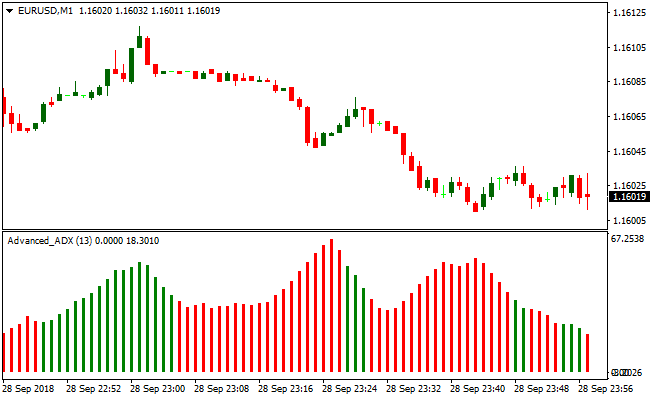
It displays colored price bars in a separate histogram below the main chart, making it easy to spot bullish or bearish conditions.
Green bars indicate a bullish trend, while red bars indicate a bearish trend.
Use this indicator alongside a trend-following tool or price action to improve accuracy.
Following the main trend reduces the likelihood of false signals.
For example, if the trend is upward, focus on trades signaled by green bars.
If the trend is downward, follow the red bars.
The default ADX period is 13, but you can adjust it in the inputs tab to suit your preferred trading strategy.
Free Download
Download the “advanced-adx.mq4” MT4 indicator
Key Features
- Measures trend strength using the ADX method.
- Displays green and red price bars for bullish and bearish trends.
- Compatible with trend-following indicators or price action strategies.
- Adjustable ADX period to match your trading style.
- Suitable for scalping, day trading, and swing trading.
Indicator Chart
The chart shows green and red histogram bars indicating bullish or bearish trend strength.
Green bars suggest a long bias, red bars suggest a short bias.
Traders can quickly gauge the market trend and identify potential trade opportunities.
Guide to Trade with Advanced ADX Indicator
Buy Rules
- Open a buy trade when green ADX bars appear.
- Confirm the overall trend is upward with a trend-following indicator or price action.
- Focus on green bars that appear in line with the main trend.
- Avoid buying if the trend is downward or the market is range-bound.
Sell Rules
- Open a sell trade when red ADX bars appear.
- Confirm the overall trend is downward with a trend-following indicator or price action.
- Focus on red bars that appear in line with the main trend.
- Avoid selling if the trend is upward or the market is range-bound.
Stop Loss
- For buy trades, place the stop slightly below the most recent swing low or green bar.
- For sell trades, place the stop slightly above the most recent swing high or red bar.
- Alternatively, use the last opposite color bar as a reference for your stop.
Take Profit
- Close buy trades when red ADX bars appear.
- Close sell trades when green ADX bars appear.
- Optionally, consider using a fixed reward level aligned with your strategy.
Advanced ADX and SuperTrend MTF Forex Day Trading Strategy
This MT4 day trading strategy combines the Advanced ADX MT4 Indicator and the SuperTrend MTF MT4 Indicator to create a reliable day trading setup.
The Advanced ADX shows green histogram bars for bullish momentum and red bars for bearish momentum.
The SuperTrend MTF confirms trends with a green line for buy and a red line for sell trends.
This combination ensures you trade only when momentum and trend align.
It works well on M5, M15, and H1 charts and is suitable for traders looking for clear and actionable signals.
Buy Entry Rules
- Open a buy trade when the Advanced ADX shows green histogram bars and the SuperTrend MTF line is green.
- Set the stop loss below the most recent swing low or below the SuperTrend MTF line.
- Set the take profit at the next resistance level, a previous high, or when the green ADX histogram begins to weaken.
Sell Entry Rules
- Open a sell trade when the Advanced ADX shows red histogram bars and the SuperTrend MTF line is red.
- Set the stop loss above the most recent swing high or above the SuperTrend MTF line.
- Set the take profit at the next support level, a previous low, or when the red ADX histogram begins to weaken.
Advantages
- Combining trend and momentum filters out false signals.
- Works on multiple time frames for flexible day trading strategies.
- Dynamic take profit based on price action captures maximum trend movement.
- Suitable for both beginners and experienced traders.
Drawbacks
- May produce late entries in very fast-moving markets.
- Stop losses may be triggered during minor trend retracements.
- Requires monitoring price levels for take profit instead of relying on fixed ratios.
Example Case Studies
Case Study 1: EUR/USD M15
On the M15 chart, the Advanced ADX showed green histogram bars and the SuperTrend MTF line turned green.
A buy trade was opened at 1.1250 with a stop loss at 1.1235.
Take profit was set at the next resistance level near 1.1285.
The price followed the trend and hit the take profit, resulting in 35 pips gain.
The strategy effectively captured the upward trend while avoiding premature exits.
Case Study 2: GBP/USD H1
On the H1 chart, red histogram bars appeared on the Advanced ADX, and the SuperTrend MTF line also turned red.
A sell trade was opened at 1.3150 with a stop loss at 1.3180.
Take profit was set at the next support level near 1.3085.
The price moved down strongly and reached the target, capturing 65 pips.
Strategy Tips
- Trade during active market hours when liquidity is high, such as London and New York sessions, to improve signal reliability.
- Combine this strategy with higher time frame trend analysis to avoid trading against the overall market direction.
- Use a small position size at the start to test the strategy and adjust as you gain confidence and experience.
- Consider waiting for a pullback to the SuperTrend line before entering a trade to reduce the risk of entering at the extreme of a move.
- Keep an eye on candlestick patterns near the entry point for additional confirmation, such as pin bars or engulfing candles.
- Track multiple currency pairs simultaneously to find the best setups according to the strategy rules.
- Regularly review your trading journal to identify which time frames and currency pairs give the best results.
- Be patient and avoid overtrading; only take trades that meet all criteria of both indicators.
- Combine this strategy with proper money management rules to protect your account during losing streaks.
Download Now
Download the “advanced-adx.mq4” Metatrader 4 indicator
FAQ
Can this indicator be combined with other tools?
Yes, it works best when used with trend-following indicators or price action analysis to confirm the market direction.
How do the colored bars indicate trend strength?
Green bars show bullish strength, red bars show bearish strength. Taller bars indicate a stronger trend.
Can I change the ADX period?
Yes, the default is 13, but you can adjust it in the inputs tab to suit your trading style.
Summary
The Advanced ADX indicator for MT4 gives Forex traders a clear view of trend strength using colored price bars.
Green and red bars highlight bullish and bearish trends, making it easier to align trades with the market.
This indicator is ideal for identifying trend direction and timing entries across multiple timeframes.
Using it alongside a trend-following indicator or price action enhances trade accuracy and helps manage risk effectively.





