

About the Aroon Horn Scalper Indicator
The Aroon Horn Scalper indicator for MT4 is a scalping-focused oscillator designed to capture short-term momentum shifts in the forex market.
It plots a histogram that moves above and below a central zero line to reflect immediate bullish or bearish pressure.
Blue histogram bars above the zero level point to short-term bullish momentum, while red bars below the zero line signal bearish momentum.
The indicator reacts quickly to price changes, which helps scalpers time entries with precision.
Because of this sensitivity, it performs best when traded in the direction of a broader market trend.
Many traders combine the Aroon Horn Scalper with a moving average to filter signals.
When price aligns with the dominant trend, the oscillator highlights momentum pullbacks and continuation points.
This combination reduces false signals and keeps trading decisions aligned with market flow.
Free Download
Download the “custom-aroon-horn-oscillator.mq4” MT4 indicator
Key Features
- Histogram-based oscillator that tracks short-term momentum.
- Zero-line logic for identifying bullish and bearish conditions.
- Fast signal response suited for scalping strategies.
- Works effectively with trend-following filters like moving averages.
- Simple visual interpretation without complex calculations.
Indicator Chart
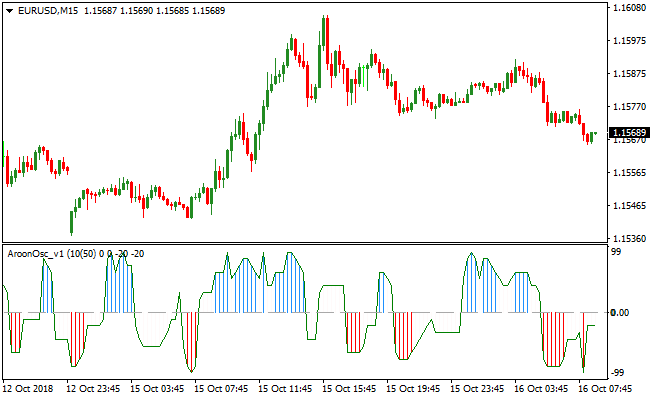
The image below shows the Aroon Horn Scalper indicator applied to a live price chart.
Blue and red histogram bars reflect short-term buy and sell pressure.
The chart also demonstrates how signals align when traded in the direction of the prevailing trend.
Guide to Trade with the Aroon Horn Scalper Indicator
Buy Rules
- Confirm the overall trend is bullish using a moving average.
- Ensure price is trading above the selected moving average.
- Wait for the first blue histogram bar to appear above the zero line.
- Enter a buy trade at the close of the signal candle.
Sell Rules
- Confirm the overall trend is bearish using a moving average.
- Ensure price is trading below the selected moving average.
- Wait for the first red histogram bar to appear below the zero line.
- Enter a sell trade at the close of the signal candle.
Stop Loss
- Set the stop loss a fixed number of points beyond the entry candle.
- Keep the stop loss small to match short-term scalping conditions.
Take Profit
- Close the trade when the histogram changes color against the position.
- Exit if the histogram crosses back toward the zero line.
- Use nearby support or resistance as an alternative target.
- Prioritize consistent small gains over extended targets.
Aroon Horn and XTC Trend Indicator MT4 Scalping Strategy
This MT4 strategy combines the Aroon Horn Scalper Metatrader 4 Forex Indicator and the XTC Forex Trend Indicator MT4 to create a powerful scalping method for short-term trades.
The Aroon Horn indicator shows the strength and direction of the market trend with a blue histogram indicating buy signals and a red histogram indicating sell signals.
The XTC Forex Trend Indicator confirms these signals with its trend histogram, where blue indicates a bullish trend and red indicates a bearish trend.
This strategy works best on 5-minute and 15-minute charts, making it ideal for scalpers who want to take advantage of small price movements during active market sessions.
It can also be applied on 1-minute charts for experienced traders.
The combination of a precise entry signal from Aroon Horn and trend confirmation from XTC reduces false signals and increases the probability of successful trades.
Buy Entry Rules
- Enter a buy trade when the Aroon Horn histogram turns blue and the XTC Forex Trend histogram confirms a blue trend.
- Set the stop loss below the most recent swing low to limit risk.
- Take profit at a predefined target of 20–30 pips for 5-minute charts, or trail the stop to lock in profits as the price moves in your favor.
Sell Entry Rules
- Enter a sell trade when the Aroon Horn histogram turns red and the XTC Forex Trend histogram confirms a red trend.
- Set the stop loss above the most recent swing high.
- Take profit at a target of 20–30 pips on 5-minute charts, or use a trailing stop to capture more extended moves in a strong trend.
Advantages
- Combines two indicators for higher signal accuracy.
- Works well for scalping in fast-moving markets.
- Easy to follow with clear histogram signals.
- Can be used on multiple time frames for flexibility.
- Reduces the risk of entering trades against the trend.
Drawbacks
- Requires constant monitoring due to short time frames.
- Not suitable for long-term trading strategies.
- Smaller profits per trade compared to swing trading.
Case Study 1
On the EUR/USD 5-minute chart, the Aroon Horn histogram turned blue while the XTC Forex Trend histogram confirmed a blue trend.
A buy trade was entered at 1.1120 with a stop loss at 1.1110.
The price moved upward steadily, and the trade reached the take profit target of 1.1145, resulting in a gain of 25 pips.
The trend confirmation helped avoid entering too early and reduced the risk of a false breakout.
Case Study 2
On the GBP/USD 15-minute chart, the Aroon Horn histogram turned red while the XTC Forex Trend histogram confirmed a red trend.
A sell trade was executed at 1.3450 with a stop loss at 1.3462.
The market dropped quickly, and the position reached the 30-pip take profit target at 1.3420.
Strategy Tips
- Always check both indicators for confirmation. Aroon Horn alone may give early signals, but XTC confirms the trend direction.
- Use a small lot size when testing on new currency pairs.
- Focus on sessions with high volatility, such as London and New York.
- Combine with price action patterns for additional confidence.
- Adjust take profit and stop loss based on the time frame and volatility.
Download Now
Download the “custom-aroon-horn-oscillator.mq4” Metatrader 4 indicator
FAQ
What market conditions suit the Aroon Horn Scalper best?
The indicator performs best during active market sessions with steady momentum.
London and New York sessions often provide the volatility needed for clean scalping signals.
Low-volatility conditions may reduce signal quality.
Which moving averages work well with this indicator?
Many traders use a 75-period simple moving average or a 50-period exponential moving average.
These settings help define the broader trend without lagging excessively.
The goal is to trade only signals that align with this trend filter.
Summary
The Aroon Horn Scalper MT4 indicator offers a practical way to trade short-term momentum in the forex market.
Its histogram-based design makes bullish and bearish conditions easy to read at a glance.
When combined with a reliable trend filter, it helps traders focus on higher-probability scalping setups.
The indicator suits traders who prefer fast decision-making and disciplined trade management.
Overall, it delivers a focused approach to momentum-based scalping.





