About the Binary Options Trading Simulator
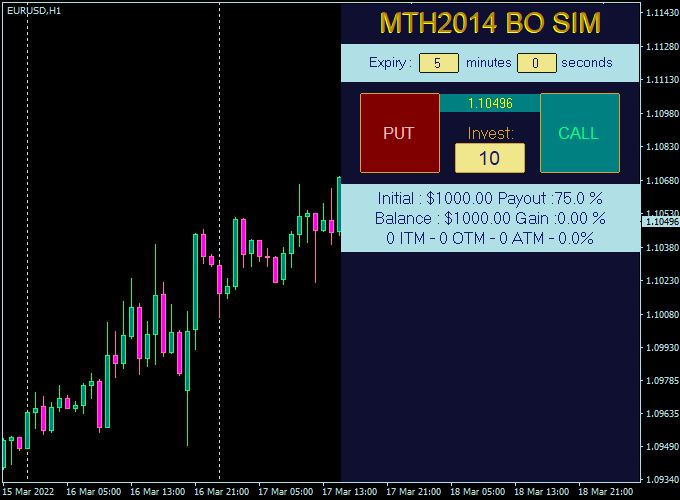
The Binary Options Trading Simulator for MT4 is a practical training tool designed for traders who want to practice binary options trading in a real market environment without risking real money.
It runs directly inside the MetaTrader 4 platform and allows users to simulate call and put trades using live price data.
This simulator is ideal for beginners who want to understand binary options mechanics, as well as experienced traders testing new strategies.
You can apply the simulator to any available trading instrument and timeframe, making it flexible for different trading styles.
By allowing full control over expiry times and payout settings, the indicator helps traders develop discipline and consistency before moving to live binary options trading.
Free Download
Download the “binary-options-trading-simulator.ex4” MT4 indicator
Key Features
- Allows practice of binary options trading without financial risk.
- Uses real-time market prices from MT4.
- Works on all currency pairs and trading instruments.
- Customizable expiry time in minutes and seconds.
- Adjustable payout percentage for realistic simulation.
Indicator Chart
The Binary Options Trading Simulator appears directly on the MT4 chart where trades are placed.
It works alongside price action and technical indicators without interfering with chart analysis.
The chart shows simulated call and put trades based on real market movement, allowing traders to evaluate timing, direction, and expiry accuracy.

Guide to Trade with Binary Options Trading Simulator
Buy Rules
- Open a call trade based on your technical or price action analysis.
- Confirm market direction before entering the trade.
- Execute the buy trade using the simulator controls.
Sell Rules
- Open a put trade when your analysis signals a downward move.
- Ensure market conditions support short-term price movement.
- Execute the sell trade through the simulator interface.
Stop Loss
- Binary options trades do not use traditional stop loss levels.
- Risk is predefined by the trade amount selected.
- Focus on position sizing and trade quality instead.
Take Profit
- Profit is determined by the preset payout percentage.
- The trade outcome is finalized at the selected expiry time.
- Use consistent expiry rules to evaluate strategy performance.
Binary Options Scalping Strategy for MT4
This strategy combines the Binary Options Trading Simulator MT4 with the Best Forex Scalping Indicator MT4 to create a fast and simple approach for short-term trades.
It is designed for traders who enjoy quick decisions and high-frequency trading on the 1 and 5-minute charts.
The Binary Options Simulator helps you practice and understand timing, expiry management, and entry precision without risking real money.
The Best Forex Scalping Indicator provides clear buy and sell signals through blue and red arrows.
Together, they form a compact trading setup where timing and discipline matter most.
How the Strategy Works
This method focuses on entering short-term trades following the arrow signals, using the binary options simulator to set a realistic expiry period.
The 1-minute chart offers high activity for fast testing, while the 5-minute chart delivers smoother setups with fewer false moves.
Buy Entry Rules
- Wait for a blue arrow from the Best Forex Scalping Indicator to appear.
- Confirm the overall direction is up by checking the recent candle structure.
- In the Binary Options Simulator, open a Call (Buy) trade.
- Set the expiry time between 2 and 5 minutes, depending on volatility.
- Optional stop loss (for comparison) below the most recent swing low.
- Take profit when the option expires in the money.
Sell Entry Rules
- Wait for a red arrow from the indicator to appear.
- Confirm the short-term structure is trending down.
- Open a Put (Sell) trade in the Binary Options Simulator.
- Set expiry between 2 and 5 minutes.
- Optional stop loss above the recent swing high if testing with a stop-based method.
- Take profit when the option expires profitably.
Advantages
- Quick setups are ideal for traders with limited time.
- Useful for learning binary trading logic without real risk.
- Clear visual entry and expiry structure.
- Can be adapted to any currency pair.
- Immediate feedback helps improve discipline.
Drawbacks
- High exposure to market noise on lower timeframes.
- Requires strong emotional control and focus.
- Not ideal for traders who prefer slower trading styles.
- Binary outcomes mean limited flexibility once entered.
Example Case Study 1 – EUR/USD 1 Minute Chart
On the EUR/USD 1-minute chart, a blue arrow appeared after a short retracement.
A Call trade was placed with a 3-minute expiry.
The price quickly moved in the direction of the arrow and closed above the entry, resulting in a winning trade.
Within 20 minutes of trading, three setups produced two wins and one small loss.
Average profit per winning trade was 75% of the invested amount.
Example Case Study 2 – GBP/JPY 5 Minute Chart
On the 5-minute timeframe, a red arrow appeared during a clear downtrend.
A Put option was executed with a 5-minute expiry.
The pair continued lower for the full period, closing well below entry.
Across six trades that day, four ended in profit while two expired out of the money.
This produced a consistent 67% win rate using strict signal following.
Strategy Tips
- Trade only during high liquidity sessions like London and New York for cleaner signals.
- Use the Binary Options Trading Simulator to practice expiry timing and trade duration control.
- Follow the arrow direction from the Best Forex Scalping Indicator strictly and avoid countertrend setups.
- Wait for the candle to close before confirming the signal to avoid false starts.
- Keep a trading journal to record entries, expiry, and results for every test session.
- Use major pairs like EUR/USD or GBP/JPY for better price action.
- Start with short expiries on the 1-minute chart, then move to longer ones as you gain confidence.
- Never open multiple trades at once; focus on one setup at a time.
- Adjust expiry time when market volatility increases to allow price movement enough time.
- Once consistent on demo, apply similar timing and logic on live trading if you move beyond simulation.
Download Now
Download the “binary-options-trading-simulator.ex4” MT4 indicator
FAQ
Is this simulator suitable for beginners?
Yes, it is an excellent learning tool for traders who want to understand binary options without risking capital.
Can I use my own strategy with the simulator?
Yes, the simulator does not provide signals and is designed to work with any trading strategy.
Does the simulator use live market prices?
Yes, all trades are executed using real-time price data from the MT4 platform.
Can expiry times be customized?
Yes, traders can set expiry times in both minutes and seconds for precise testing.
Summary
The Binary Options Trading Simulator for MT4 is a valuable practice tool for traders who want hands-on experience in a realistic trading environment.
It allows full control over trade timing and payout simulation while using live market prices.
By removing financial risk, the simulator helps traders refine decision-making, test strategies, and build confidence before transitioning to live binary options trading.


