About the Darvas Box Breakout indicator
The Darvas Box Breakout indicator for MT4 was developed by Nicolas Darvas and focuses on spotting emerging trends through price breakouts.
It builds price boxes based on recent highs and lows, then tracks when the market escapes those boundaries.
The indicator draws an upper and lower box directly on the chart.
These levels act as reference points for breakout trades in trending conditions.
When price moves beyond the box, the indicator highlights a potential trade opportunity aligned with momentum.
By focusing on breakouts, the Darvas Box Breakout indicator aims to capture sustained moves rather than frequent small trades.
Free Download
Download the “darvas-boxes.mq4” MT4 indicator
Key Features
- Automatically plots Darvas boxes based on recent price action.
- Identifies bullish and bearish breakouts using price-based logic.
- Supports trend-following strategies on higher timeframes.
- Helps reduce overtrading by filtering low-momentum periods.
Indicator Chart
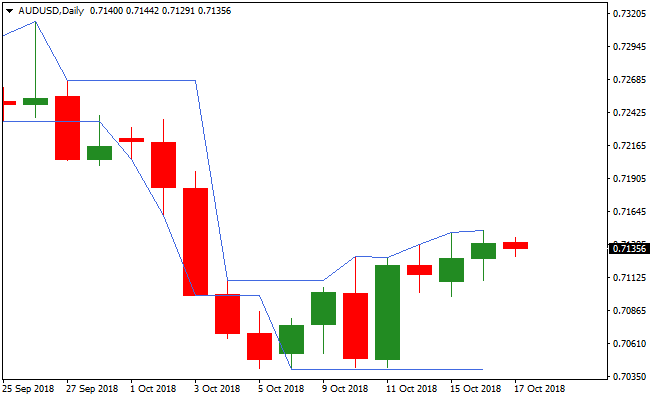
The image below shows the Darvas Box Breakout indicator applied to a daily forex chart.
The upper and lower box levels mark key breakout zones.
Buy and sell signals appear when price closes beyond these levels, pointing to potential trend continuation.

Guide to Trade with the Darvas Box Breakout Indicator
Buy Rules
- Wait for the price to close above the upper Darvas box.
- Confirm that the breakout aligns with the current market momentum.
- Enter a buy trade at the close of the breakout candle.
- Avoid entries during narrow or overlapping boxes.
Sell Rules
- Wait for the price to close below the lower Darvas box.
- Confirm that downside momentum supports the breakout.
- Enter a sell trade at the close of the breakout candle.
- Skip trades if price repeatedly re-enters the box.
Stop Loss
- For buy trades, place the stop loss a few pips below the lower box line.
- For sell trades, place the stop loss a few pips above the upper box line.
- Do not tighten stops until price confirms direction.
Take Profit
- Close the entire buy trade if price closes back inside the box.
- Close the entire sell trade if price closes back inside the box.
- Alternatively, target the next major support or resistance level.
Darvas Box Breakout + Coppock Indicator Strategy for MT4
This strategy combines the breakout detection of the Darvas Box Breakout Indicator with the trend confirmation of the Coppock Indicator.
The Darvas Box identifies potential breakout points when price moves beyond the upper or lower box borders.
The Coppock Indicator confirms the trend direction, with the histogram above zero indicating a buy trend and below zero indicating a sell trend.
Combining both provides precise entries aligned with the short-term trend on M1 and M5 charts.
This method works best on lower timeframes where breakouts can provide quick profits.
Trades are taken only when the breakout direction aligns with the Coppock trend signal.
Tight stop losses and targeted take profits help manage risk while allowing multiple scalps per session.
Buy Entry Rules
- Coppock histogram is above zero, confirming a bullish trend.
- Price breaks above the upper border of the Darvas Box.
- Enter a buy trade at the candle close of the breakout.
- Place a stop loss a few pips below the breakout candle low or the lower Darvas Box border.
- Take profit when the price reaches a small target (e.g. 5–15 pips on M1, 10–20 pips on M5) or when the Coppock histogram moves back below zero.
Sell Entry Rules
- Coppock histogram is below zero, confirming a bearish trend.
- Price breaks below the lower border of the Darvas Box.
- Enter a sell trade at the candle close of the breakout.
- Place a stop loss a few pips above the breakout candle high or the upper Darvas Box border.
- Take profit when the price reaches a small target or when the Coppock histogram moves back above zero.
Advantages
- Combines breakout detection with trend confirmation for higher probability trades.
- Effective on M1 and M5 for quick scalping opportunities.
- Clear entry signals make it easy to follow and execute.
- Allows flexible exits using either small pip targets or trend reversal signals.
- Reduces risk of entering false breakouts by requiring trend alignment.
Drawbacks
- Breakouts can fail in low volatility or range-bound markets, causing false entries.
- High frequency of trades increases exposure to spreads and commissions.
- Small profit targets mean losses from one trade can cancel multiple small wins if the stop loss is hit.
Case Study 1 – Buy Trade on EURUSD M5
During a London session, the Coppock histogram moved above zero, indicating bullish momentum.
Price broke above the upper Darvas Box border on EURUSD M5.
A buy trade was placed at the close of the breakout candle, with a stop loss set 6 pips below the box lower border.
Price rose and 12 pips profit was taken when the Coppock histogram started to flatten.
Case Study 2 – Sell Trade on GBPJPY M1
On GBPJPY M1 during a New York session, the Coppock histogram dropped below zero, signaling a bearish trend.
Price broke below the lower Darvas Box border.
A sell trade was placed at the candle close with a stop loss 5 pips above the breakout candle high.
Price moved downward quickly and 10 pips profit was taken when the Coppock histogram showed signs of flattening.
Strategy Tips
- Use the strategy during active sessions for stronger breakout moves and higher liquidity.
- Focus on pairs with tight spreads and good volatility, such as EURUSD, GBPJPY, USDJPY, and AUDUSD.
- Use small lot sizes to manage risk because multiple trades may occur in a short period.
- Only take trades when the breakout direction matches the Coppock trend confirmation to reduce false signals.
- Consider moving the stop loss to break-even once the price moves favorably to protect profits while allowing potential further gains.
Download Now
Download the “darvas-boxes.mq4” Metatrader 4 indicator
FAQ
Which timeframe works best with the Darvas Box Breakout indicator?
The indicator performs strongest on the daily timeframe. This reduces false breakouts and aligns better with its trend-following logic.
Is the indicator suitable for part-time traders?
Yes. Daily signals and simple rules make it practical for traders who cannot monitor charts throughout the day.
Summary
The Darvas Box Breakout indicator offers a disciplined way to trade trend breakouts using price-based boxes.
It focuses on meaningful market moves and avoids unnecessary complexity.
The indicator fits traders who prefer higher timeframes and straightforward decision-making.
Its main strength lies in simplicity and consistency.
While it may benefit from confirmation tools like volume or trend filters, it already provides a solid foundation for breakout trading.