About the Double Fibonacci Indicator
The Double FIB Forex Indicator for MT4 combines two Fibonacci-based calculations to highlight high-probability support and resistance zones, trend direction, and potential reversal areas.
It overlays two separate Fibonacci structures — one calculated from a shorter swing and one from a larger swing — and then visually prioritizes zones where those levels cluster.
This makes it easier to spot confluence areas where price is likely to slow, reverse, or continue in the direction of the trend.
Free Download
Download the “double-fib-indicator.mq4” indicator for MT4
Key Features
- Dual Fibonacci structures (short and long swing) for confluence detection.
- Automatic drawing of common Fibonacci retracement levels (23.6, 38.2, 50, 61.8, 78.6).
- Shaded confluence zones where both fibs overlap — highlights stronger levels.
- Adjustable lookback period and swing sensitivity for both Fibonacci calculations.
- Option to show or hide individual fib levels and labels for a clean chart view.
- Multi-timeframe compatibility — works across M1 to D1 (and higher).
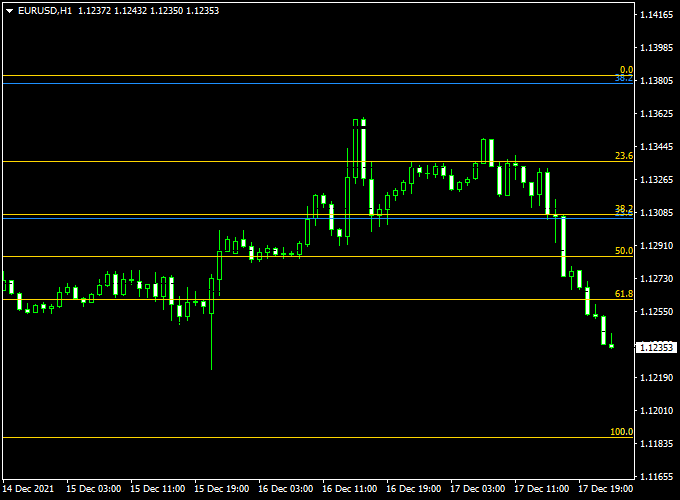
Indicator Chart (EUR/USD H1)
The example chart below displays the Double Fib MT4 indicator in action on the trading chart.

Buy and Sell Trading Rules
General approach
Trade with the dominant trend whenever possible.
Use the Double FIB confluence zones to locate low-risk entries on pullbacks, and validate signals with price action or a momentum filter (for example, RSI or MACD).
Buy Rules
- Price pulls back into a confluence zone created by overlapping fib levels from both swings.
- Confirm with a bullish price action signal: bullish engulfing, hammer, or a close above the immediate resistance on the smaller timeframe (e.g., M15 within an H1 setup).
- Optional confirmation: RSI rising above 50 or MACD histogram turning positive.
- Entry: place a buy order at the first bullish candle close above the confluence zone, or place a limit buy inside the zone for better risk.
- Stop loss: below the next fib level or below the confluence zone low — size SL so it matches your account risk (e.g, 1–2% per trade).
- Take profit: target the next structural fib level or use a risk-reward ratio of at least 1:2; consider partial exits at the first fib target and trailing the rest behind a moving average or recent swing low.
Sell Rules
- Price rallies into a confluence zone where the short and long fibs overlap and the dominant trend is bearish.
- Confirm with bearish price action: bearish engulfing, shooting star, or a close below immediate support on the lower timeframe.
- Optional confirmation: RSI below 50 or MACD histogram turning negative.
- Entry: place a sell order at the first bearish candle close under the confluence zone or use a limit sell inside the zone.
- Stop loss: above the next fib level or above the confluence zone high; adjust according to account risk.
- Take profit: aim for the next fib support level or set a minimum 1:2 risk-reward; consider scaling out in portions and trailing the remainder.
Double Fib + ZWinner Trend MT4 Strategy: Fibonacci-Based Trend Trading
This strategy combines the Double Fibonacci (Double Fib) Indicator and the ZWinner Trend Indicator for MT4.
It is ideal for traders who want to enter trades in the direction of the trend, using Fibonacci retracement and extension levels for precise entries and exits.
Aligning trend confirmation with key Fibonacci levels helps reduce risk and improve trade accuracy.
Buy Entry Rules
- Trend Confirmation: Ensure the ZWinner Trend Indicator is green, signaling an uptrend.
- Fibonacci Support: Look for price retracement to a key Fibonacci support level (38.2%, 50%, or 61.8%) identified by the Double Fib Indicator.
- Entry Signal: Enter a buy trade when the price shows signs of bouncing off the Fibonacci support.
- Stop Loss: Place below the recent swing low or below the next Fibonacci support level.
- Take Profit: Set at the next Fibonacci extension level (161.8%, 200%) or a recent resistance level.
Sell Entry Rules
- Trend Confirmation: Ensure the ZWinner Trend Indicator is red, signaling a downtrend.
- Fibonacci Resistance: Look for price retracement to a key Fibonacci resistance level (38.2%, 50%, or 61.8%) identified by the Double Fib Indicator.
- Entry Signal: Enter a sell trade when the price shows signs of rejecting the Fibonacci resistance.
- Stop Loss: Place above the recent swing high or above the next Fibonacci resistance level.
- Take Profit: Set at the next Fibonacci extension level (161.8%, 200%) or a recent support level.
Advantages
- Provides clear entry and exit levels using Fibonacci retracements and extensions.
- Aligns trades with the prevailing trend for higher probability setups.
- Adaptable to multiple timeframes and currency pairs.
- Helps manage risk with clearly defined stop loss and take profit levels.
- Effective for swing and trend trading strategies.
Drawbacks
- Requires monitoring multiple conditions, which may be complex for beginners.
- May not perform well in highly volatile news events without adjustment.
Example Case Studies
Case Study 1: USD/CAD (15-Minute Chart)
On the USD/CAD 15-minute chart, the ZWinner Trend Indicator showed a bullish trend (green).
The Double Fib Indicator identified a 50% retracement from a recent swing low.
Price bounced off this level, confirming continuation of the uptrend.
A buy trade was entered at the candle close, with the stop loss below the 61.8% retracement and the take profit at the 161.8% extension level.
The trade was closed for a 32 pip profit.
Case Study 2: EUR/JPY (1-Hour Chart)
On the EUR/JPY 1-hour chart, the ZWinner Trend Indicator showed a bearish trend (red).
The Double Fib Indicator identified a 38.2% retracement from a recent swing high.
Price rejected this level, confirming continuation of the downtrend.
A sell trade was executed with the stop loss above the 50% retracement and the take profit at the 161.8% extension.
The trade achieved a 3:1 risk-to-reward ratio.
Strategy Tips
- Combine with oscillators like RSI or Stochastic to avoid overbought or oversold entries.
- Monitor major economic news to avoid trades during high-impact events.
- Adjust stop loss and take profit levels based on market volatility to protect capital.
Download Now
Download the “double-fib-indicator.mq4” indicator for Metatrader 4
Indicator Specifications
| Specification | Detail |
|---|---|
| Platform | MetaTrader 4 (MT4) |
| File type | MQ4 / EX4 (indicator file) |
| Timeframes | Works on M1, M5, M15, M30, H1, H4, D1 |
| Pairs | Forex majors, minors, cross pairs, and most CFDs |
| Inputs | Short swing length, long swing length, show/hide levels, alert on touch, sensitivity |
| Default settings | Sensible defaults included for immediate testing |
| License | Free download |
FAQ
Does the indicator repaint?
The Double Fibonacci indicator draws levels based on completed swings and does not repaint historical signals once those swings are fixed.
If you use very short swing lengths, the indicator may recalculate more frequently — choose settings that match your chosen timeframe.
Which timeframe is best?
For day trading, use M15–H1. For swing trading, H4–D1 gives stronger fib structures.
The indicator works on all timeframes; pick the one that suits your trading horizon and backtest accordingly.
Can I combine it with other indicators?
Yes. It pairs well with momentum filters (RSI, MACD), trend indicators (EMA 50/200), and price action confirmation.
Summary
The Double Fibonacci Forex Indicator is a practical tool for traders who want clearer, objective zones to trade off.
By combining two Fibonacci calculations, it highlights areas of confluence which often act as stronger supports or resistances than single fib levels alone.
This improves entry timing and helps reduce guesswork when placing stops and targets.
To improve results, combine the Double Fibonacci with a momentum filter and trade only in the direction of the higher timeframe trend.
Use position sizing rules and backtest the indicator across multiple pairs and timeframes to find the settings that match your style.


