About the Dynamic Zone Stochastic Indicator
The Dynamic Zone Stochastic Indicator for MT4 is a sophisticated tool designed to highlight potential buy and sell opportunities using adaptive stochastic channels.
By tracking momentum within a colored channel, the indicator provides clear visual guidance for market entries aligned with trend direction.
Displayed in a separate MT4 window, the stochastic signal line moves dynamically between upper and lower channel bands.
Trades can be identified when the line crosses these bands in the direction of the prevailing trend, helping traders align with market momentum.
Dynamic Zone Stochastic is versatile and can serve as a primary signal source, a confirmation filter for other strategies, or a guide for timing trade exits.
Free Download
Download the “dynamic-zone-stochastic.mq4” indicator for MT4
Key Features
- Dynamic stochastic channels for identifying trade entries
- Colored channel bands indicate potential overbought and oversold areas
- Signals based on trend-aligned crossovers
- Works on all currency pairs and multiple timeframes
- Can be used for entries, confirmation, or exit timing
- Helps filter trades according to market momentum
Indicator Chart
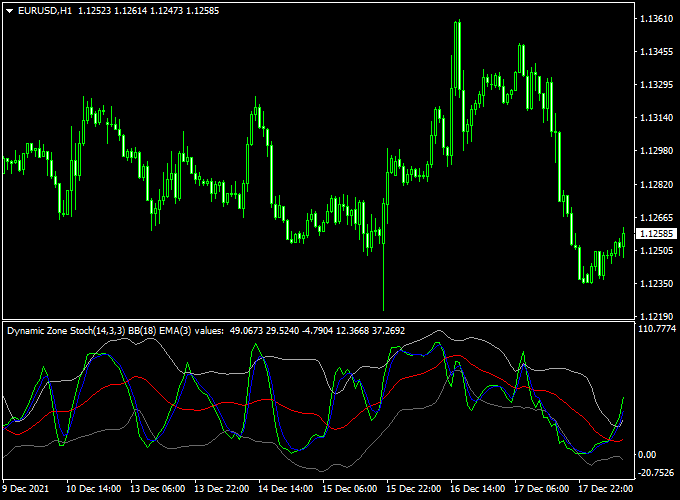
The chart below shows the Dynamic Zone Stochastic Indicator within its MT4 oscillator window.
Colored bands indicate the upper and lower dynamic zones while the signal line moves within these boundaries.
When the signal line crosses the lower band from bottom to top during an uptrend, a buy opportunity may be present.
Conversely, when it crosses the upper band from top to bottom during a downtrend, it signals a potential sell.

Guide to Trade with the Dynamic Zone Stochastic Indicator
Buy Rules
- Enter a buy trade when the stochastic signal line crosses the lower band upward
- Ensure the overall trend is bullish
- Confirm with a candle close above the crossing point
- Use higher timeframe trend direction for additional confirmation
Sell Rules
- Enter a sell trade when the stochastic signal line crosses the upper band downward
- Ensure the overall trend is bearish
- Confirm with a candle close below the crossing point
- Check higher timeframe alignment to reduce false signals
Stop Loss
- Place a stop loss slightly beyond the nearest swing high or low opposite your trade
- Adjust according to market volatility and channel width
- Provide enough room to prevent normal fluctuations from triggering the stop
Take Profit
- Target levels near the opposite dynamic zone band or previous swing points
- Consider partial exits as price approaches key support/resistance areas
- Use trailing stops if the trend extends favorably
Practical Tips
- Combine with trend filters or moving averages for higher probability setups
- Look for cluster signals across multiple timeframes for stronger entries
- Be cautious during low-volume sessions where signals may be less reliable
- Monitor for divergence between price action and stochastic for early warning
Dynamic Zone Stochastic Indicator + Wolfe Wave MT4 Strategy
This MT4 strategy combines the Dynamic Zone Stochastic Indicator with the Wolfe Wave Forex Indicator.
The Dynamic Zone Stochastic helps identify overbought and oversold conditions, while the Wolfe Wave Indicator detects potential reversal patterns based on five-wave structures.
Together, they provide a framework for capturing high-probability reversal trades.
This strategy is suitable for scalping, intraday, and swing traders who prefer structured setups.
Buy Entry Rules
- The price must be in an uptrend, confirmed by higher highs and higher lows.
- Identify a completed Wolfe Wave pattern with five distinct waves.
- The Dynamic Zone Stochastic moves from the oversold zone (below 20) to above 20, signaling upward momentum.
- Enter a buy trade at the close of the candle.
- Stop Loss: Place below the lowest point of wave 4.
- Take Profit: Set at the projected target level based on the Wolfe Wave pattern.
Sell Entry Rules
- The price must be in a downtrend, confirmed by lower highs and lower lows.
- Identify a completed Wolfe Wave pattern with five distinct waves.
- The Dynamic Zone Stochastic moves from the overbought zone (above 80) to below 80, signaling downward momentum.
- Enter a sell trade at the close of the candle.
- Stop Loss: Place above the highest point of wave 4.
- Take Profit: Set at the projected target level based on the Wolfe Wave pattern.
Advantages
- Combines momentum and pattern recognition to improve trade accuracy.
- Can be applied to multiple currency pairs and timeframes.
- Helps traders enter trades closer to optimal reversal points.
Drawbacks
- Identifying Wolfe Wave patterns can be complex for beginners.
- The Dynamic Zone Stochastic is a lagging indicator, which may cause delayed signals.
- False signals may occur in sideways or choppy markets.
Case Study 1 – EUR/USD 15m
The price was in an uptrend. A completed Wolfe Wave pattern was identified. The Dynamic Zone Stochastic moved from below 20 to above 20.
A buy trade was entered at 1.1050. Stop loss was placed at 1.1025, below wave 4.
Take profit was set at 1.1100, based on the Wolfe Wave target.
The trade reached the take profit target, yielding a 2:1 risk-to-reward ratio.
Case Study 2 – GBP/JPY 30m
The price was in a downtrend. A completed Wolfe Wave pattern was identified. The Dynamic Zone Stochastic moved from above 80 to below 80.
A sell trade was entered at 153.50. Stop loss was set at 153.80, above wave 4.
Take profit was set at 152.50, based on the Wolfe Wave target.
The trade reached the take profit, yielding a 3:1 risk-to-reward ratio.
Strategy Tips
- Consider using partial profit-taking and trailing stops to maximize gains.
- Practice identifying Wolfe Wave patterns on historical charts before trading live.
- Combine this strategy with support and resistance levels to further confirm trade validity.
Combining the Dynamic Zone Stochastic and Wolfe Wave indicators provides a systematic MT4 approach.
This strategy allows traders to enter near-optimal reversal points while maintaining proper risk management.
With practice and patience, it can be a reliable tool for scalping, intraday, and swing trading.
Download Now
Download the “dynamic-zone-stochastic.mq4” indicator for Metatrader 4
FAQ
How does the Dynamic Zone Stochastic differ from a standard stochastic?
Unlike standard stochastic indicators, it uses dynamic channels that adjust to market volatility, providing more relevant entry zones rather than fixed overbought and oversold levels.
Can it be applied to all currency pairs?
Yes, it works effectively across major, minor, and exotic pairs, provided there is sufficient market activity.
Which timeframes are best suited for this indicator?
Higher timeframes generally provide more reliable signals, while lower timeframes can capture short-term opportunities with increased signal frequency.
Can this indicator be combined with other tools?
Yes, traders often use it alongside trend indicators, support/resistance levels, or oscillators to confirm signals and reduce false entries.
Summary
The Dynamic Zone Stochastic Indicator for MT4 helps traders identify buy and sell opportunities by monitoring momentum within adaptive stochastic channels.
Its color-coded bands and signal line provide clear visual guidance while adapting to changing market conditions.
It can be used across all currency pairs and timeframes, either as a standalone signal generator or as part of a broader trading system.
When combined with proper risk management and trend analysis, it offers traders a practical method for improving entry timing and aligning trades with market momentum.





