About the Linear Forex Signals Indicator
The Linear Forex Signals Indicator for Metatrader 4 is a channel-based trading tool built around linear regression.
Its main purpose is to help traders identify future market direction while also providing practical areas for trade entries and exits.
By combining trend slope with channel boundaries, the indicator offers a balanced view of direction and price extremes.
The indicator is displayed directly in the main MT4 chart window and consists of three lines: an upper channel line, a lower channel line, and a central linear regression line.
Together, these lines form a dynamic channel that adapts to price movement and highlights whether the market is trending higher, trending lower, or losing momentum.
Linear Forex Signals works well for traders who prefer pullback entries within a trend.
Instead of chasing price, the channel helps you wait for price to reach favorable areas while staying aligned with the broader directional bias.
Free Download
Download the “lineaire.mq4” indicator for MT4
Key Features
- Three-line channel based on linear regression
- Highlights trend direction and pullback zones
- Upper and lower channel lines for trade planning
- Displayed cleanly in the main MT4 chart window
- Suitable for trend-following strategies
Indicator Chart
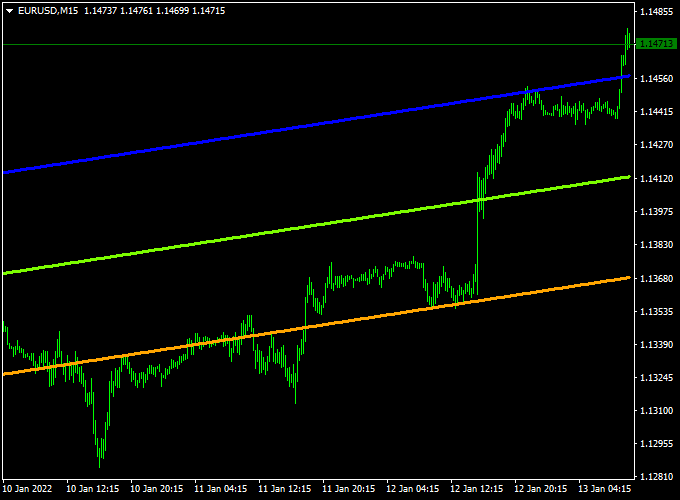
The chart example shows the Linear Forex Signals Indicator applied to an MT4 chart.
The upper and lower channel lines frame price action, while the linear regression line reflects trend direction.
Price reactions at the channel boundaries often offer structured trading opportunities.
Guide to Trade with Linear Forex Signals Indicator
Buy Rules
- Confirm that the Linear channel is pointing upward
- Wait for the price to pull back and touch the lower orange channel line from above
- Enter a buy trade once price shows bullish response at the channel boundary
Sell Rules
- Confirm that the Linear channel is pointing downward
- Wait for the price to retrace and touch the upper blue channel line from below
- Enter a sell trade once price shows bearish response at the channel boundary
Stop Loss
- Place a stop loss slightly outside the channel boundary beyond your entry
- For buy trades, set the stop loss below the lower channel line
- For sell trades, set the stop loss above the upper channel line
Take Profit
- Primary target at the opposite channel line
- Extend targets if the channel slope remains strong and stable
Practical Tips
- Focus on trades that align with the channel slope direction
- Avoid entries when the channel is flat or tightening
- Use higher timeframe trend direction as confirmation
- Combine with momentum tools to improve timing
MT4 Scalping Strategy Using Linear Forex Signals and Waddah Attar Scalping Indicators
This MT4 scalping strategy combines the trend-identifying power of the Linear Forex Signals Indicator with the momentum-confirming signals of the Waddah Attar Scalping Indicator.
It’s designed for traders aiming to capture short-term price movements on volatile currency pairs.
The strategy works best on the 1-minute to 5-minute timeframes, making it ideal for scalpers seeking quick entries and exits.
By using these two indicators together, traders can identify the prevailing trend and confirm entry points with momentum, enhancing the probability of successful trades.
Buy Entry Rules
- Ensure the Linear Forex Signals Indicator displays an upward-sloping channel, indicating a bullish trend.
- Wait for the Waddah Attar Scalping Indicator to show a green histogram, signaling bullish momentum.
- Enter a buy trade at the market price once both conditions are met.
- Set a stop loss just below the recent swing low or the lower boundary of the channel.
- Set a take profit at the upper boundary of the channel or a predetermined number of pips, depending on market conditions.
Sell Entry Rules
- Ensure the Linear Forex Signals Indicator displays a downward-sloping channel, indicating a bearish trend.
- Wait for the Waddah Attar Scalping Indicator to show a red histogram, signaling bearish momentum.
- Enter a sell trade at the market price once both conditions are met.
- Set a stop loss just above the recent swing high or the upper boundary of the channel.
- Set a take profit at the lower boundary of the channel or a predetermined number of pips, depending on market conditions.
Advantages
- Combines trend direction with momentum confirmation for higher accuracy.
- Works effectively in volatile markets where small price movements can be exploited.
- Allows multiple trades per day due to a short time frame focus.
- Suitable for various currency pairs, including EUR/USD, GBP/USD, and USD/JPY.
Drawbacks
- Requires constant attention since trades are on short time frames.
- False signals can occur during low liquidity or news events.
- Stop loss and take profit targets must be carefully managed to avoid losses.
- Not suitable for long-term trading or swing trading.
Case Study 1: EUR/USD on 1-Minute Chart
On the EUR/USD 1-minute chart, the Linear Forex Signals Indicator displayed an upward-sloping channel, indicating a bullish trend.
Shortly after, the Waddah Attar Scalping Indicator produced a green histogram, signaling a buy opportunity.
The trade was entered at 1.1006, with a stop loss at 1.1000 and a take profit of 1.1012.
The trade closed successfully with a 6-pip gain within 10 minutes.
Case Study 2: GBP/USD on 5-Minute Chart
On the GBP/USD 5-minute chart, the Linear Forex Signals Indicator showed a downward-sloping channel, indicating a bearish trend.
A red histogram appeared on the Waddah Attar Scalping Indicator, signaling a sell entry.
The trade was entered at 1.2750, with a stop loss at 1.2756 and a take profit of 1.2740.
The trade reached the take profit target, netting 10 pips in 15 minutes.
Strategy Tips
- Always wait for confirmation from both indicators before entering a trade.
- Use the channel boundaries to set stop loss and take profit levels accurately.
- Monitor market news as high-impact events can cause unexpected price spikes, invalidating scalping signals.
- Adjust take profit levels based on currency pair volatility; some pairs may require tighter targets to maximize success.
- Practice this strategy on a demo account to build timing and confidence before trading with real money.
Download Now
Download the “lineaire.mq4” indicator for Metatrader 4
FAQ
What does the linear regression line represent?
The linear regression line reflects the average price direction over a defined period.
Its slope helps determine whether the market is trending upward, downward, or moving sideways.
Is this indicator better for trending markets?
Yes. The Linear Forex Signals Indicator performs best in trending conditions where pullbacks toward the channel boundaries offer higher-probability entries.
Can I use this indicator on lower timeframes?
Yes. It works on all timeframes, but lower timeframes may require stricter filtering due to increased noise and faster price fluctuations.
Does the channel repaint?
The channel adjusts as new price data forms, but it does not randomly shift past levels.
Changes reflect evolving market conditions rather than repainting past signals.
Summary
The Linear Forex Signals Indicator for MT4 provides a structured way to trade trends using a linear regression channel.
The indicator is easy to read and adapts well across different timeframes and instruments.
Its channel-based logic supports both conservative and active trading styles.
When combined with complementary tools such as momentum confirmation or higher timeframe analysis, the Linear Forex Signals Indicator becomes a reliable component of a well-defined trading strategy.


