
About the LSMA Auto Regression Channel Forex Indicator
The LSMA Auto Regression Channel Forex Indicator for Metatrader 4 is a trend-following tool designed to help traders identify key price levels within a dynamic channel.
The indicator plots three lines on the main MT4 chart: an upper channel line, a lower channel line, and a middle line.
These lines form an adaptive channel that follows the market’s underlying trend.
This tool allows traders to spot potential support and resistance levels with high accuracy.
When the price interacts with the lower or upper channel lines, it often signals a high-probability trade opportunity in the direction of the trend.
The middle line helps gauge mid-channel price behavior and can act as a guide for managing open positions.
The LSMA Auto Regression Channel is suitable for all currency pairs and multiple timeframes.
Traders can use it to trade trend bounces, reversals, or as a filter for their existing strategies, making it a versatile addition to any trading toolbox.
Free Download
Download the “LSMA_Line.mq4” indicator for MT4
Key Features
- Displays an adaptive channel with upper, lower, and middle lines
- Helps identify trend direction and potential entry points
- Supports trading trend bounces and reversals
- Works on all currency pairs
- Effective across multiple timeframes
- Easy to combine with other indicators
Indicator Chart
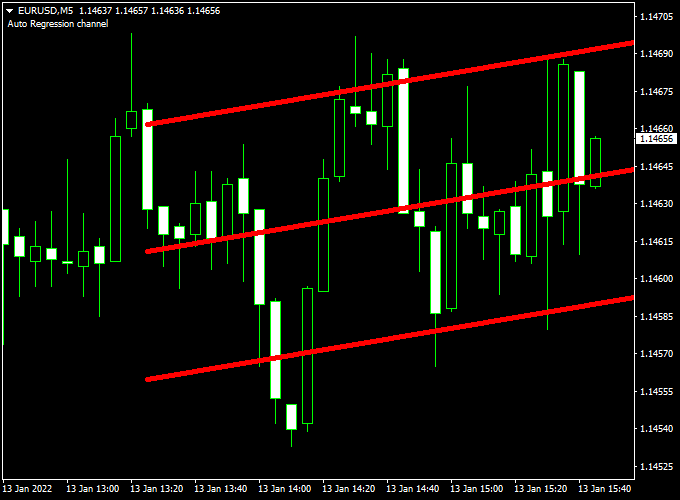
The chart shows the LSMA Auto Regression Channel applied to an MT4 chart.
The red lower line, gray upper line, and middle line outline the dynamic channel, indicating high-probability buy and sell zones based on trend direction.
Guide to Trade with the LSMA Auto Regression Channel Forex Indicator
Buy Rules
- Enter a buy trade when the price touches the lower red channel line
- Confirm that the channel is trending upward
- Use the middle line as a reference for partial exits or trailing stops
Sell Rules
- Enter a sell trade when the price touches the upper gray channel line
- Confirm that the channel is trending downward
- Use the middle line as a reference for partial exits or trailing stops
Stop Loss
- Place the stop just beyond the opposite channel line
- For buy trades, the stop loss goes below the lower line
- For sell trades, the stop loss goes above the upper line
Take Profit
- Exit the trade at the opposite channel line
- Partial profit can be taken at the middle line for risk management
- Adjust targets based on market volatility
Practical Tips
- Use on higher timeframes to filter noise during choppy sessions
- Monitor channel slope to avoid counter-trend entries
LSMA Auto Regression Channel & Waddah Attar Explosion MT4 Scalping Strategy
This MT4 scalping strategy combines the LSMA Auto Regression Channel Indicator and the Waddah Attar Explosion Indicator to capture fast intraday price movements.
The LSMA Auto Regression Channel identifies the trend: a rising channel indicates a bullish trend, while a declining channel indicates a bearish trend.
The Waddah Attar Explosion Indicator provides a green histogram for buy momentum and a red histogram for sell momentum.
This strategy works well on 1-minute and 5-minute charts and is suitable for currency pairs like AUD/USD, USD/CAD, and NZD/USD.
Buy Entry Rules
- Ensure the LSMA Auto Regression Channel is rising, confirming a bullish trend.
- Wait for the Waddah Attar Explosion Indicator to display a green histogram bar.
- Enter a buy position immediately after both conditions are met.
- Place a stop loss just below the most recent swing low.
- Set a take profit target at the upper boundary of the LSMA channel.
- Close the trade immediately if the Waddah Attar histogram turns red.
Sell Entry Rules
- Ensure the LSMA Auto Regression Channel is declining, confirming a bearish trend.
- Wait for the Waddah Attar Explosion Indicator to display a red histogram bar.
- Enter a sell position immediately after both conditions are met.
- Place a stop loss just above the most recent swing high.
- Set a take profit target at the lower boundary of the LSMA channel.
- Close the trade immediately if the Waddah Attar histogram turns green.
Advantages
- Clear entry signals using both trend and momentum indicators.
- Quick scalping trades allow capturing small intraday price movements.
- Works on multiple currency pairs, including AUD/USD, USD/CAD, and NZD/USD.
- Visual indicators make it easier to identify trade setups quickly.
- Channel-based take profit ensures targets adapt to the current market structure.
Drawbacks
- Profit depends on the channel size; narrow channels limit gains.
- Slippage and spread widening during high volatility can reduce gains.
- Not suitable for traders who prefer longer-term positions.
Case Study 1: AUD/USD 1-Minute Chart
The LSMA Auto Regression Channel was rising, indicating a bullish trend.
The Waddah Attar Explosion Indicator displayed a green histogram bar, signaling buying momentum.
A buy trade was entered, with a stop loss below the recent swing low and take profit set at the upper boundary of the LSMA channel.
The trade reached the target quickly, and when the histogram turned red, the remaining position was closed, protecting profits.
Case Study 2: USD/CAD 5-Minute Chart
The LSMA Auto Regression Channel was declining, indicating a bearish trend.
The Waddah Attar Explosion Indicator displayed a red histogram bar, signaling selling momentum.
A sell trade was entered, with a stop loss above the recent swing high and take profit set at the lower boundary of the LSMA channel.
The trade reached the target, and when the histogram turned green, the position was closed to avoid reversals.
Strategy Tips
- Use this strategy during high liquidity sessions for tighter spreads and better execution.
- Combine with support and resistance levels to improve trade accuracy.
- Adjust lot sizes according to account balance and risk tolerance.
- Close trades immediately on histogram color change to protect profits.
- Avoid overtrading by focusing on the most active currency pairs.
Download Now
Download the “LSMA_Line.mq4” indicator for Metatrader 4
FAQ
Can this indicator be used for scalping?
Yes, but it works best on timeframes where trend bounces are reliable. Lower timeframes may produce more frequent but smaller signals.
Does the LSMA Auto Regression Channel repaint?
No, the channel lines are calculated based on completed price data, so signals remain stable once plotted.
Can I trade multiple currency pairs with this indicator?
Yes, the indicator is compatible with all MT4 pairs and can be applied simultaneously to multiple charts.
Is the middle line useful for trade management?
Yes, the middle line can act as a partial take profit level or a dynamic reference for adjusting stop losses as the trend progresses.
Summary
The LSMA Auto Regression Channel Forex Indicator for MT4 is a powerful tool for identifying trend direction and high-probability trade zones.
Its upper, lower, and middle lines make it easy to spot entry and exit levels, while the adaptive channel keeps pace with price action.
This indicator works well alone or in combination with other indicators in a strategy to improve trade timing, confirm trends, and manage risk effectively.


