About the Target Points Forex Indicator
The Target Points Forex Indicator for MT4 is a trading tool designed to calculate potential profit levels and recommended stop losses for each trade.
It helps traders plan entries and exits more efficiently by providing clear, actionable targets.
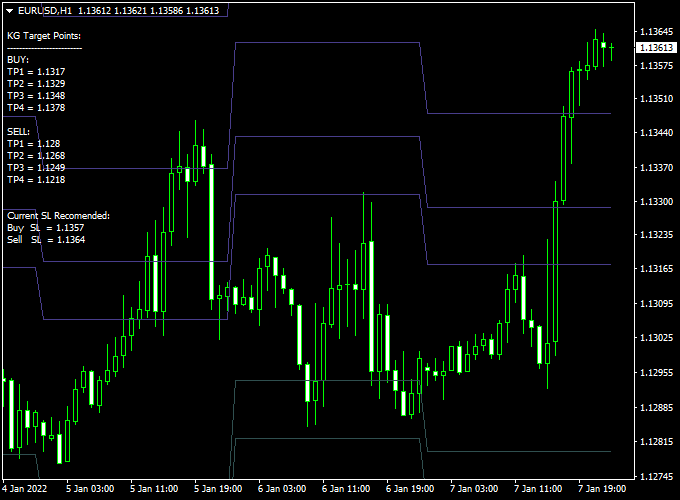
The indicator displays a dashboard on the main MT4 chart, showing four take profit levels for long trades and four for short trades.
It also marks a suggested stop loss level, allowing traders to manage risk and reward with greater precision.
This tool is particularly useful for intraday and swing traders who want a systematic way to define profit targets while keeping risk under control.
Free Download
Download the “kg target points.ex4” indicator for MT4
Key Features
- Shows four take profit levels for long trades and four for short trades
- Displays recommended stop loss for both buy and sell trades
- Provides a clear dashboard for fast reference on the main chart
- Helps traders manage risk/reward efficiently
- Suitable for intraday, swing, and trend-following strategies
Indicator Chart
The chart displays the Target Points Forex Indicator dashboard with all take profit levels and the recommended stop loss.
Long trades are represented with ascending target levels, and short trades with descending target levels.
Traders can use this visual guide to plan entries and exits without second-guessing.

Guide to Trade with Target Points Forex Indicator
Buy Rules
- Enter a buy trade when your strategy confirms an upward move and price aligns with entry conditions.
- Use the dashboard to identify the four suggested take profit levels for your trade.
- Ensure the stop loss level is set according to the dashboard recommendation for proper risk management.
Sell Rules
- Enter a sell trade when the strategy confirms a downward trend and price meets your entry criteria.
- Follow the dashboard’s four take profit levels for short trades to scale exits or secure profits.
- Set the stop loss as suggested to protect the trade against unexpected reversals.
Stop Loss
- Use the recommended stop loss displayed on the dashboard for each trade direction.
- Adjust slightly based on market volatility or recent swing highs/lows for better protection.
- For aggressive traders, partial risk can be taken with tighter stop losses on smaller timeframes.
Take Profit
- Follow the four suggested take profit levels for each trade as displayed on the dashboard.
- Consider taking partial profits at intermediate levels while leaving the rest to run.
- Use trailing stops once price passes initial targets to capture extended moves.
Practical Tips
- Scale out of positions across the four take profit levels to secure gains incrementally.
- Monitor higher timeframes to confirm that the overall trend supports your trade direction.
- Adjust dashboard settings to highlight the most relevant targets for your trading style.
Target Points + SuperTrend MTF MT4 Day Trading Strategy
This day trading strategy combines the Target Points Forex Indicator with the SuperTrend MTF Forex Signal Indicator for MetaTrader 4.
The Target Points Indicator provides clearly defined target levels and stop loss points for both buy and sell trades.
The SuperTrend MTF Indicator displays a green line for bullish signals and a red line for bearish signals.
Together, these indicators help traders identify high-probability day trading opportunities with clear risk management.
This strategy works best on M15 to H1 charts and is suitable for major and minor currency pairs.
Buy Entry Rules
- Confirm a bullish signal when the SuperTrend MTF line turns green.
- Check that the price is above a recent support target level indicated by the Target Points Indicator.
- Enter a buy trade at the market price or on a minor pullback.
- Place the stop loss at the stop loss level suggested by the Target Points Indicator for the buy trade.
- Set the take profit at the target level indicated by the Target Points Indicator or a reasonable intraday target (e.g., 20–30 pips), depending on volatility.
Sell Entry Rules
- Confirm a bearish signal when the SuperTrend MTF line turns red.
- Check that the price is below a recent resistance target level indicated by the Target Points Indicator.
- Enter a sell trade at the market price or on a minor retracement.
- Place the stop loss at the stop loss level suggested by the Target Points Indicator for the sell trade.
- Set the take profit at the target level indicated by the Target Points Indicator or a reasonable intraday target (e.g., 20–30 pips).
Advantages
- Provides clear buy/sell signals combined with predefined stop loss and target levels.
- Helps manage risk with structured trade planning.
- Suitable for day trading across multiple currency pairs.
- Easy to use with clear visual cues from both indicators.
Drawbacks
- Signals may lag slightly in very fast-moving markets.
- During sideways or choppy conditions, the strategy may produce false signals.
- Requires active monitoring to exit trades if price reacts unpredictably to key levels.
Case Study 1 – AUD/USD M15
The SuperTrend MTF line turned green, confirming a bullish trend.
The Target Points Indicator suggested a support level at 0.6650 and a target at 0.6675.
A buy trade was entered at 0.6652, with a stop loss at 0.6640.
The price moved in favor of the trade and hit the target level within the morning session, yielding 23 pips profit.
Case Study 2 – USD/CHF H1
The SuperTrend MTF line turned red, indicating a bearish trend.
The Target Points Indicator identified a resistance at 0.9100 and a target at 0.9075.
A sell trade was entered at 0.9098 with a stop loss at 0.9110.
The market moved downward as expected, reaching the target level for a 23-pip gain during the day trading session.
Strategy Tips
- Always trade in the direction of the SuperTrend MTF signal to avoid counter-trend losses.
- Use higher timeframes to validate target levels and trend strength before entering trades.
- Monitor economic news events that may cause sudden spikes beyond target points.
- Adjust stop loss and take profit levels based on current volatility for better risk management.
- Consider taking partial profits if the price approaches the target level slowly, then let the remainder run for maximum gain.
- Focus on currency pairs with high liquidity for faster execution and tighter spreads.
Download Now
Download the “kg target points.ex4” indicator for Metatrader 4
FAQ
Can this indicator be used on all currency pairs?
Yes, the Target Points Forex Indicator works on any currency pair, but pairs with clear trends usually provide the most accurate targets.
Do the take profit levels update automatically?
Yes, all target levels and recommended stop losses are calculated in real-time based on current market conditions.
Is this suitable for scalping?
Yes, it can be used for short-term scalping or longer swing trades depending on your strategy and timeframe.
Can I adjust the take profit or stop loss levels manually?
Yes, traders can customize the levels if needed, but following the dashboard recommendations ensures a structured risk/reward approach.
Summary
The Target Points Forex Indicator for MT4 provides a structured way to plan trades by showing multiple take profit levels and a recommended stop loss.
It allows traders to scale exits and manage risk efficiently.
By combining this indicator with trend confirmation or momentum tools, traders can improve trade timing, secure profits incrementally, and follow a disciplined risk management plan.
It is ideal for intraday, swing, and trend-following strategies, providing a practical roadmap for successful trading.


