
About the Trade Assistant Indicator
The Trade Assistant indicator is a multi-timeframe trading tool that combines Stochastic, RSI, and CCI into a single visual signal system.
It analyzes market conditions in real time and displays buy or sell arrows based on the combined direction of these three indicators.
Each arrow reflects the trend state of its underlying indicator.
When all arrows turn green, the market shows aligned bullish momentum.
When all arrows turn red, bearish momentum dominates.
This alignment helps traders focus on higher-probability setups rather than mixed or conflicting signals.
The Trade Assistant indicator works great for traders who want confirmation across indicators and timeframes.
It simplifies decision-making by translating complex technical data into easy-to-read signals that can be applied across different trading styles.
Free Download
Download the “trade-assistant.mq4” MT4 indicator
Key Features
- Combines RSI, Stochastic, and CCI into one signal system.
- Displays clear buy and sell arrows on the chart.
- Supports multi-timeframe trend confirmation.
- Highlights strong trend alignment conditions.
- Works well for scalping and day trading.
Indicator Chart
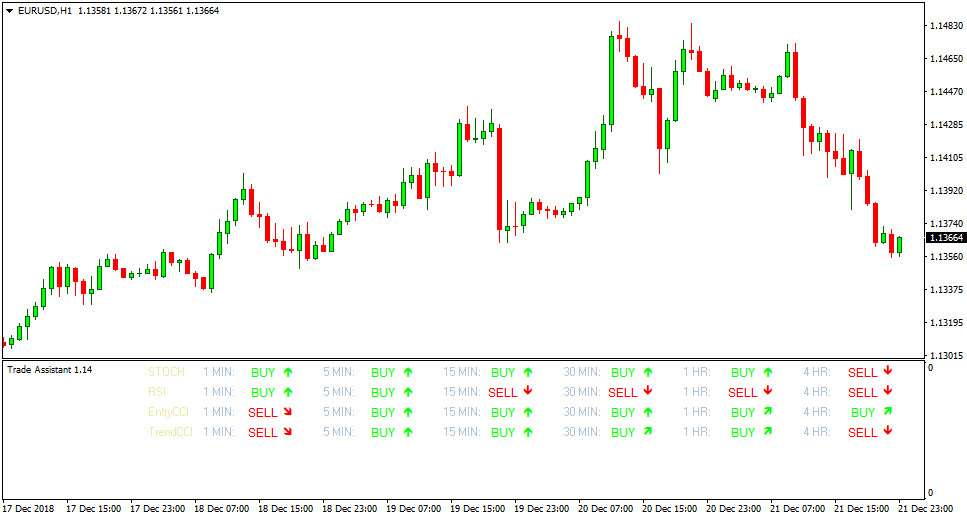
The chart shows the Trade Assistant indicator with multiple colored arrows.
Green arrows indicate bullish alignment across indicators, while red arrows highlight bearish alignment and potential sell zones.
Guide to Trade with Trade Assistant Indicator
Buy Rules
- Confirm that all Trade Assistant arrows are colored green.
- Check a higher timeframe to confirm bullish alignment.
- Enter a buy trade once both timeframes show green arrows.
- Trade only while indicator alignment remains intact.
Sell Rules
- Confirm that all Trade Assistant arrows are colored red.
- Check a higher timeframe to confirm bearish alignment.
- Enter a sell trade once both timeframes show red arrows.
- Trade only while indicator alignment remains intact.
Stop Loss
- Place the stop loss beyond recent intraday price rejection.
- Use nearby support or resistance zones for protection.
- Apply a fixed pip stop based on current volatility.
- Reduce exposure if the indicator alignment weakens.
Take Profit
- Target recent price reaction areas.
- Use a fixed risk-to-reward ratio for consistency.
- Trail profits while all arrows remain aligned.
- Exit the trade when the arrows lose alignment.
Technical Trade Assistant + MACD Day Trading Strategy for MT4
This strategy combines the Trade Assistant MT4 Indicator with the MACD MT4 Indicator to create a reliable day trading approach.
Trade Assistant provides multi-timeframe buy and sell arrows based on Stochastic, RSI, and CCI indicators.
A strong buy signal occurs when all arrows are green, signaling bullish momentum across all indicators.
A strong sell signal occurs when all arrows are red, indicating bearish momentum.
The MACD is used to confirm the trend: bullish when above 0, bearish when below 0.
This combination helps traders capture high-probability intraday moves with clear entries and exits.
This strategy works on M5, M15, and H1 charts, making it suitable for both scalpers and intraday traders.
It can be applied to major Forex pairs such as EURUSD, GBPUSD, USDJPY, and AUDUSD.
Buy Entry Rules
- Trade Assistant shows all green arrows, indicating a strong buy signal.
- MACD is above 0, confirming bullish momentum.
- Enter a buy trade at the close of the confirming candle.
- Place a stop loss below the most recent swing low or support level.
- Take profit can be set at the next resistance level, or partial profit at the first resistance, and trail the remaining position with the MACD trend.
Sell Entry Rules
- Trade Assistant shows all red arrows, indicating a strong sell signal.
- MACD is below 0, confirming bearish momentum.
- Enter a sell trade at the close of the confirming candle.
- Place a stop loss above the most recent swing high or resistance level.
- Take profit can be set at the next support level, or partial profit at the first support, and trail the remaining position with the MACD trend.
Advantages
- Combines multi-timeframe confirmation from Trade Assistant with trend confirmation from MACD.
- Works across multiple timeframes for flexibility.
- Dynamic take profit allows capturing extended trends while securing partial gains.
Drawbacks
- Strong signals may be rare on some pairs, limiting trading opportunities.
- Trailing take profit requires monitoring the MACD trend.
- Stop loss placement may need adjustment depending on market volatility.
Case Study 1 – EURUSD (M15 chart)
During a European session, Trade Assistant showed all green arrows on the M15 chart while MACD was above 0.
A buy trade was entered at 1.1025 with a stop loss at 1.1005.
Partial profit was taken at 1.1070, and the remaining position was trailed using MACD until the MACD crossed below 0.
The trade captured a total of 65 pips.
Case Study 2 – GBPUSD (H1 chart)
On the GBPUSD H1 chart, Trade Assistant displayed all red arrows, and MACD was below 0.
A sell trade was entered at 1.2450 with a stop loss at 1.2480.
Partial profit was taken at 1.2390, and the remainder trailed with the MACD trend until exit at 1.2365.
The trade captured 85 pips in total.
Strategy Tips
- Always confirm the Trade Assistant’s strong signals with the MACD trend to reduce false entries.
- Focus on major pairs with good liquidity for more reliable intraday moves.
- Use partial profit and trailing with MACD to maximize gains while reducing risk.
- Skip trades when Trade Assistant arrows are mixed or weak signals appear.
- Limit risk to 1–2% of account balance per trade and avoid trading during major news events.
- Monitor the higher timeframe trend to ensure intraday trades align with the overall market direction.
Download Now
Download the “trade-assistant.mq4” Metatrader 4 indicator
FAQ
What makes a signal strong with this indicator?
A strong signal occurs when RSI, Stochastic, and CCI all point in the same direction and display the same arrow color.
Why is higher timeframe confirmation recommended?
Checking a higher timeframe helps filter weak signals and keeps trades aligned with broader market momentum.
Can this indicator be used alone?
Yes, it works well as a standalone signal tool, especially when combined with timeframe confirmation.
Which timeframe combinations work best?
Common combinations include M1 with M5 or M5 with M15, depending on trading style.
Summary
The Trade Assistant indicator simplifies multi-indicator analysis by combining RSI, Stochastic, and CCI into one clear signal system.
Its arrow-based design makes trend alignment easy to spot across multiple timeframes.
Confirming signals on a higher timeframe strengthens trade selection and keeps entries aligned with market momentum.
This makes the indicator a practical choice for traders who value confirmation and clarity.





