About the Trend Suite Indicator
The Trend Suite MetaTrader 4 indicator is a trend-following tool built using a combination of a simple moving average and an exponential moving average.
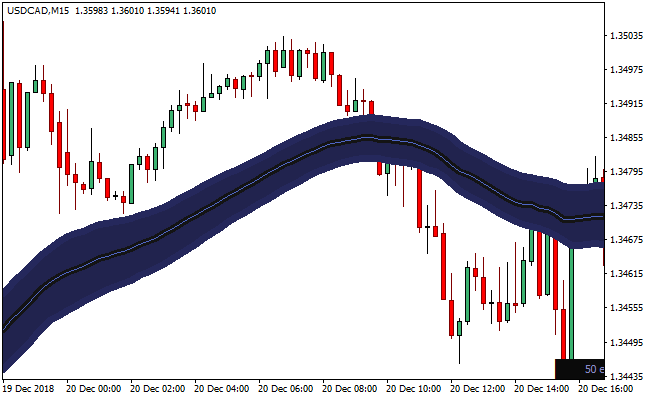
At its core, the indicator reflects the behavior of a 50-period EMA, which appears as the thin middle line within the band.
This construction allows the indicator to react smoothly to price while maintaining a reliable trend context.
When applied to a chart, the Trend Suite indicator forms a band around the price rather than a single line.
This band structure provides additional insight into how price behaves during trending phases, pullbacks, and continuation moves.
Instead of focusing only on direction, the indicator highlights everything that happens within the trend.
Because of this expanded view, the Trend Suite indicator can reveal more trade opportunities than traditional moving averages.
While it offers advanced possibilities, traders new to the tool are encouraged to focus on its basic trend-following signals.
Free Download
Download the “trend-suite.ex4” MT4 indicator
Key Features
- Built from simple and exponential moving averages.
- The middle line aligns closely with a 50-period EMA.
- Displayed as a dynamic band around the price.
- Tracks trend direction and internal price behavior.
- Provides more signals than single-line moving averages.
Indicator Chart
The chart below shows the Trend Suite indicator applied directly to the price chart.
The moving average band surrounds price action, highlighting trend direction and pullback zones.
Price interaction with the band helps identify continuation and exit points.
Guide to Trade with Trend Suite Indicator
Buy Rules
- Wait for the price to open above the Trend Suite band.
- Confirm the candle also closes above the band.
- Ensure the band is sloping upward.
- Enter a buy trade after confirmation.
Sell Rules
- Wait for the price to open below the Trend Suite band.
- Confirm the candle also closes below the band.
- Ensure the band is sloping downward.
- Enter a sell trade after confirmation.
Stop Loss
- Place the stop just inside the Trend Suite band.
- Allow room for normal pullbacks within the trend.
- Avoid placing stops directly at recent candle extremes.
- Adjust the stop as the price moves away from the band.
Take Profit
- Target recent swing highs or lows in the trend direction.
- Hold the position while the price remains outside the band.
- Scale out during extended price moves.
- Exit fully when the price closes back inside the band.
MT4 Trend Suite + Alfa Sniper Trend Scalping Strategy
This scalping strategy combines the Trend Suite MT4 Forex Indicator with the Alfa Sniper Trend MT4 Forex Indicator.
The Trend Suite gives a broad directional filter: when price is above the indicator’s blue band, the bias is bullish; when price is below the band, bearish.
The Alfa Sniper Trend adds precise entry signals via blue arrows for buys and red arrows for sells.
By combining both, you only trade when the market direction and entry signal align.
This method works best on low- to medium-timeframes like M1 and M5 and suits scalpers who like fast trades on high-liquidity pairs.
Buy Entry Rules
- Price must be above the blue band of Trend Suite, indicating bullish bias.
- A blue arrow must appear on Alfa Sniper Trend.
- Enter long at the open of the next candle after the blue arrow forms while price remains above the blue band.
- Place a stop loss a few pips below the recent minor swing low or just below the lower edge of the blue band.
- Set take profit at 6–12 pips, or exit when price closes inside or below the blue band, or when a red arrow appears.
Sell Entry Rules
- Price must be below the blue band of Trend Suite, indicating bearish bias.
- A red arrow must appear on Alfa Sniper Trend.
- Enter short at the open of the next candle after the red arrow appears while the price remains below the blue band.
- Place a stop loss a few pips above the recent minor swing high or just above the upper edge of the blue band.
- Set take profit at 6–12 pips, or exit when price closes inside or above the blue band, or when a blue arrow appears.
Advantages
- Combines trend direction filter with entry signals, reducing random trades in the wrong direction.
- Fast scalping style with clear entry and exit rules.
- Works well on major, liquid pairs with tight spreads.
- Simple enough for discretionary scalpers while still structured.
- Small pip targets mean less exposure and quicker turnaround for many setups over a session.
Drawbacks
- Frequent trades require full attention and quick execution.
- During low-volatility periods or sideways markets, the strategy may generate many false signals or no suitable trades.
- Small profit targets mean that a string of small losses or stop-outs can hurt overall performance when risk management is weak.
- Spread and slippage can significantly reduce profitability on low-volatility or high spread pairs.
- Using an aggressive timeframe (M1) increases the risk of noise and false arrows even when trend bias is correct.
Case Study 1
On EURUSD M1 during the London session, the price remained above the Trend Suite blue band.
A blue arrow appeared on Alfa Sniper Trend after a small retracement.
The trader entered long at the next candle. Stop loss was placed 5 pips below the recent swing low.
Within 10 minutes price advanced and hit an 8-pip take profit.
The blue band remained supportive throughout, and no conflicting arrow appeared during the move.
The quick momentum and alignment with the trend gave a clean scalp.
Case Study 2
On USDJPY M5 during the New York session, the price was clearly below the blue band of Trend Suite, indicating bearish bias.
A red arrow formed on Alfa Sniper Trend while the trend remained bearish.
The trader entered short with a stop loss 7 pips above the last minor swing high.
Price moved downward steadily, and after about 15 minutes, the trade reached a 12-pip profit target.
Price stayed under the blue band, and no bullish arrow appeared during the move.
The scalp worked well thanks to good trend alignment and a clear entry signal.
Case Study 3
On GBPUSD M1 early in the London session, the price dipped slightly below the blue band but quickly retraced back above, keeping bullish bias.
A blue arrow appeared as the price bounced from the band support.
Entering long at the next candle, with a 6-pip stop loss, the price surged 10 pips within 8 minutes and hit the take profit.
The quick band bounce plus confirmation arrow gave a high-probability scalp setup.
Strategy Tips
- Focus on major currency pairs with tight spreads such as EURUSD, GBPUSD and USDJPY for cleaner scalping setups.
- Trade during the most active sessions, like London and the London and New York overlap, to capture stronger directional moves.
- Keep your position size consistent to maintain solid risk management across many short trades.
- Check the spread before entering any trade because a sudden increase can reduce or eliminate small scalping profits.
- Prefer setups where the price reacts to the Trend Suite band before the arrow forms because these usually offer stronger confirmation.
Download Now
Download the “trend-suite.ex4” Metatrader 4 indicator
FAQ
What does the Trend Suite band represent?
The band reflects dynamic trend boundaries based on moving average behavior.
It shows how price expands and contracts during trending conditions.
Is the Trend Suite indicator based on a 50 EMA?
Yes. The thin middle line closely mirrors a 50-period exponential moving average.
The surrounding band adds additional context around that core value.
Can the Trend Suite indicator be used on lower timeframes?
Yes. It works across all timeframes, though lower timeframes may produce more frequent signals.
Summary
The Trend Suite MT4 indicator delivers a broader view of trend behavior by using a moving average band instead of a single line.
This approach helps traders follow direction while understanding pullbacks and continuation phases within the trend.
Its EMA-based logic, clean visual presentation, and ability to highlight internal trend activity make it a powerful alternative to traditional moving averages for traders seeking more precise timing.