
About the Ultimate Pro Scalper Indicator
The Ultimate Pro Scalper Indicator is a short-term trading tool developed for traders who focus on rapid market movements.
It is designed to perform best on lower timeframes, particularly those below the 1-hour chart, where price reacts quickly to liquidity.
The indicator generates concise buy and sell signals using colored dots placed directly on the price chart.
These signals are intended to capture quick momentum bursts rather than extended trends.
To increase effectiveness, the indicator should be used during active trading sessions where volume and volatility are present.
When applied with proper session timing and discipline, the Ultimate Pro Scalper can help traders capitalize on short-lived opportunities.
Free Download
Download the “ultimate-pro-scalper.ex4” MT4 indicator
Key Features
- Designed specifically for scalping strategies.
- Optimized for timeframes below the 1-hour chart.
- Displays clear buy and sell dots on the price chart.
- Performs best during high-liquidity sessions.
- Includes alert options for timely trade execution.
Indicator Chart
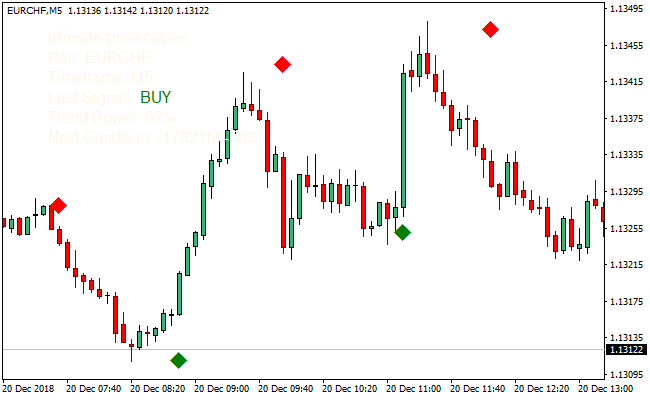
The chart shows the Ultimate Pro Scalper Indicator plotted directly on the price action.
Green dots below the candles signal buying pressure.
Red dots above the candles indicate potential selling opportunities during active market phases.
Guide to Trade with the Ultimate Pro Scalper Indicator
Buy Rules
- Confirm the market is active with sufficient volatility.
- Focus on London or New York trading sessions.
- Wait for a green signal dot to appear below the candle.
- Enter the buy trade immediately after the signal prints.
Sell Rules
- Ensure the market is showing consistent price movement.
- Trade during high-volume session hours only.
- Wait for a red signal dot to appear above the candle.
- Enter the sell trade at the close of the signal candle.
Stop Loss Rules
- Place the stop loss just beyond the most recent micro swing.
- Use a tight fixed-pip stop suitable for scalping conditions.
- Exit the trade if price stalls without momentum.
Take Profit Rules
- Target a small fixed number of pips per trade.
- Close the position near short-term intraday levels.
- Exit manually when momentum begins to slow.
Ultimate Pro Scalper Indicator + Extreme Trend Explosion Forex Scalping Strategy for MT4
This strategy combines the Ultimate Pro Scalper MT4 Indicator with the Extreme Trend Explosion MT4 Indicator.
The Ultimate Pro Scalper displays a green dot for a buy opportunity and a red dot for a sell opportunity.
The Extreme Trend Explosion uses a histogram to indicate trend strength: green bars for bullish momentum and red bars for bearish momentum.
Using both indicators together allows traders to identify trend-aligned scalping entries with clear confirmation.
This strategy is ideal for M1 and M5 charts, offering fast intraday opportunities for traders who want precise entries in the direction of the prevailing trend.
Buy Entry Rules
- The Extreme Trend Explosion histogram must be green, indicating a strong upward trend.
- The Ultimate Pro Scalper must display a green dot, indicating a buy opportunity.
- Enter a long trade at the close of the candle where the green dot appears, as long as the histogram remains green.
- Set a stop loss a few pips below the most recent swing low.
- Close the trade when either the histogram turns red or a red dot appears, indicating a weakening trend.
Sell Entry Rules
- The histogram from Extreme Trend Explosion must be red, showing a strong downward trend.
- The Ultimate Pro Scalper must display a red dot, indicating a sell opportunity.
- Enter a short trade at the close of the candle with the red dot, while the histogram remains red.
- Set a stop loss a few pips above the most recent swing high.
- Exit the trade when the histogram turns green or a green dot appears, signaling the trend may reverse.
Advantages
- Trend confirmation from the histogram reduces false entries.
- Pro Scalper dot provides exact entry points for faster trades.
- M1 and M5 timeframes provide multiple trading opportunities each session.
- The combination filters out weak moves and focuses on strong trend opportunities.
Drawbacks
- The dot may appear too frequently in choppy conditions, increasing the risk of overtrading.
- Exiting only on histogram changes or dot reversal may give back part of the profits.
- Requires continuous monitoring on M1 and M5 charts for effective execution.
Example Case Study 1
On EUR/USD M1 during the London session, the histogram turned green, showing bullish momentum.
Shortly after, a green Pro Scalper dot appeared, indicating a buy entry.
A long trade was opened at candle close with a stop loss 5 pips below the swing low.
Price moved upward, and the trade was closed when the histogram turned red, capturing about 8 pips of profit.
Example Case Study 2
On GBP/JPY M5 during New York hours, the histogram was red, signaling a bearish trend.
A red Pro Scalper dot appeared, indicating a sell opportunity.
A short trade was entered at candle close with a stop loss 10 pips above the recent high.
Price moved lower, and the trade was closed when a green dot appeared, resulting in a 14-pip gain.
Strategy Tips
- Combine this strategy with higher timeframe trend analysis to filter trades in the direction of the larger trend.
- Monitor economic news releases as they can cause sudden spikes that may trigger false entries.
- Use small lot sizes when testing the strategy to reduce risk while observing how it behaves on different pairs.
- Focus on currency pairs with tight spreads for faster execution and minimal slippage.
- Record and analyze trades to determine which pairs respond best to M1 and M5 scalping setups with this combination.
Download Now
Download the “ultimate-pro-scalper.ex4” Metatrader 4 indicator
FAQ
Which sessions work best with Ultimate Pro Scalper?
The indicator performs best during the London and New York sessions when liquidity and volatility are highest.
Is Ultimate Pro Scalper suitable for higher timeframes?
It can be used, but signals are optimized for lower timeframes where quick price reactions occur.
Should volatility be confirmed before trading?
Yes, confirming volatility with tools such as Bollinger Bands can improve trade quality.
Does the indicator provide alerts?
Yes, it supports on-screen alerts and optional email notifications for new signals.
Summary
The Ultimate Pro Scalper Indicator is built for traders who thrive in fast-paced market environments.
Its dot-based signals provide quick visual confirmation for short-term entries.
By focusing on active sessions and controlled risk, traders can use it to exploit brief momentum moves.
With disciplined execution and proper timing, Ultimate Pro Scalper can become a valuable addition to a scalping-focused trading setup.





