About the Universal Pivot Point Indicator
The Universal Pivot Point indicator for MT4 is a widely used tool that helps traders identify key support and resistance levels on the chart.
It calculates the main pivot point and additional levels (S1, S2, S3 for support and R1, R2, R3 for resistance) to guide trade entries and exits.
Price action above the pivot point suggests bullish conditions, while price action below indicates bearish conditions.
This makes it easy to spot potential buy and sell opportunities based on where price sits relative to these levels.
The indicator is especially popular with scalpers and day traders who rely on short-term momentum and precise targets.
By providing clear pivot and range levels, it allows traders to plan entries, exits, and risk management more effectively.
All default settings can be adjusted in the inputs tab, enabling traders to customize the calculation method and display according to their trading style.
Free Download
Download the “universal-pivot-indicator.mq4” MT4 indicator
Key Features
- Displays the main pivot point and three support/resistance levels.
- Helps determine market bias above or below the pivot.
- Suitable for scalping, day trading, and intraday setups.
- Provides clear target levels for trade exits.
- Customizable display and calculation settings.
Indicator Chart
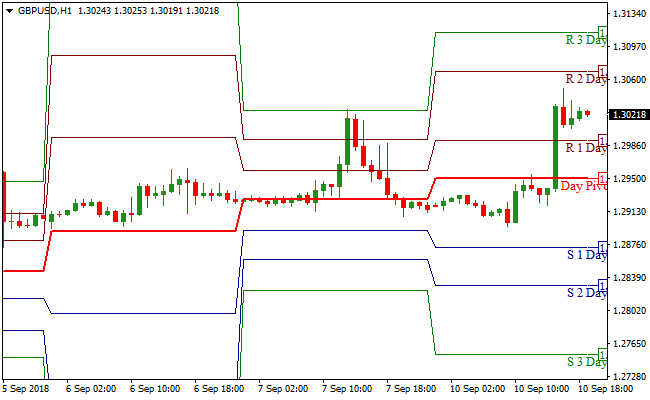
The chart illustrates the Universal Pivot Point indicator mapping key support and resistance levels in real-time.
Pivot and support/resistance levels help visualize potential entry and exit zones.
Traders can see where price may reverse or continue, making it easier to plan trades with discipline.
Guide to Trade with Universal Pivot Point Indicator
Buy Rules
- Ensure price is trading above the main pivot point.
- Look for bullish confirmation using other indicators or price action.
- Open a buy trade when momentum aligns with the pivot bias.
- Hold the trade until price approaches resistance levels (R1, R2, or R3).
Sell Rules
- Confirm price is trading below the pivot point.
- Check for bearish confirmation from price action or trend filters.
- Open a sell trade when conditions favor the pivot bias.
- Hold the trade until price nears support levels (S1, S2, or S3).
Stop Loss
- Place the stop loss just below the pivot for buy trades.
- Place the stop loss just above the pivot for sell trades.
- Adjust stop distance for volatility and timeframe.
- Use tighter stops for scalping and wider stops for intraday trades.
Take Profit
- Target resistance levels R1, R2, or R3 for buy trades.
- Target support levels S1, S2, or S3 for sell trades.
- Consider partial exits at the first level to lock in profits.
- Trail trades toward higher pivot levels if momentum remains strong.
MT4 Strategy: Universal Pivot Point + Zero Lag MACD Day Trading Method
This MT4 day trading strategy combines the Universal Pivot Point Indicator and the Zero Lag MACD Indicator to create a structured intraday trading approach.
The Universal Pivot Point tool defines the main daily levels and shows whether the market is trading above or below the pivot.
Trading above the pivot suggests bullish conditions while trading below it signals a bearish environment.
The Zero Lag MACD then provides precise entry confirmation by moving above the zero line for buy signals and below the zero line for sell signals.
This combination works well on M15, M30, and H1 charts.
These time frames suit day traders who want clean setups without the noise of very small charts.
The strategy focuses on aligning daily structural bias with momentum confirmation, making it suitable for both beginners and experienced day traders.
By following pivot direction and MACD momentum together, traders avoid counter trend entries and focus on high probability continuation moves.
This helps create consistent daily opportunities while keeping risk structured and predictable.
Buy Entry Rules
- Price is trading above the main daily pivot.
- The Zero Lag MACD crosses above the zero line.
- No major resistance level is directly ahead.
- Place a stop loss below the daily pivot or below the nearest swing low.
- Take profit at the next resistance level or at a previous intraday high.
Sell Entry Rules
- Price is trading below the main daily pivot.
- The Zero Lag MACD crosses below the zero line.
- No strong support level is directly ahead.
- Place a stop loss above the pivot or above the nearest swing high.
- Take profit at the next support level or at a previous intraday low.
Advantages
- Pivot levels provide clear structure for day trading.
- Zero Lag MACD reacts faster than the classic MACD, improving timing.
- Easy to identify trend direction with simple above or below pivot logic.
- Works well on many major and cross pairs.
- Ideal for traders who prefer clean, rule based systems.
Drawbacks
- Pivots lose reliability during extremely low volatility days.
- MACD signals can occur slightly late after large spikes.
- Requires discipline to avoid trading directly into strong levels.
Case Study 1: USDCHF M30
During the London session, USDCHF opened above the daily pivot and continued to respect that level.
The Zero Lag MACD moved above the zero line shortly after the session became active.
A buy entry was placed with a stop below the pivot line.
The pair moved steadily upward toward the next resistance area and completed a clean 28 pip move.
The alignment of bullish pivot positioning and upward MACD momentum created a reliable day trading setup.
Case Study 2: AUDNZD H1
AUDNZD traded below the daily pivot throughout the Asian session.
Later, the Zero Lag MACD crossed below the zero line again, confirming sustained bearish pressure.
A sell trade was opened with a stop above the pivot.
The price dropped through the next support zone, producing a 32 pip gain.
The pair respected both the pivot structure and MACD momentum, making this a smooth intraday short.
Strategy Tips
- Always check where price is trading relative to the pivot before looking at MACD signals. This prevents unnecessary counter trend trades.
- Do not trade signals that appear directly into major support or resistance. Give the market some space to move.
- Focus on sessions with strong activity such as London and New York for the best results.
- If the MACD hovers around the zero line without direction, wait for a clear breakout before entering.
- Pivots can act as natural stop loss locations, offering simple and structured risk management.
- Avoid taking trades during major red news releases because momentum spikes can distort MACD readings.
Download Now
Download the “universal-pivot-indicator.mq4” Metatrader 4 indicator
FAQ
What makes the Universal Pivot Point useful?
It provides clear reference levels for entries, exits, and trend bias, helping traders make disciplined decisions in intraday trading.
Can it be used on any currency pair?
Yes, it works well on all pairs and is effective on multiple timeframes, from M1 scalping to H1 intraday trading.
Should I use additional indicators with it?
Yes, combining pivot points with trend filters or momentum indicators improves accuracy and reduces false entries.
Can the levels be customized?
All pivot and support/resistance settings can be adjusted in the inputs tab to suit your preferred calculation method and display style.
Summary
The Universal Pivot Point indicator is a reliable tool for identifying key support and resistance levels.
It clearly shows market bias and provides practical targets for entries and exits.
Its versatility across currency pairs and timeframes, along with customizable settings, makes it ideal for scalpers and day traders.
Using pivot points helps traders plan trades more strategically and manage risk effectively.


