
About the MACD Arbitrage Cloud Indicator
The Winning MACD Arbitrage Cloud Indicator for MetaTrader 4 combines standard MACD analysis with a visual cloud overlay.
It helps traders pinpoint arbitrage-like trade entries by highlighting momentum shifts with clear on-chart signals.
Key Features
- MACD histogram with a colored “blue & green cloud” background for clarity
- Non‑repainting for real-time decision-making
- Works across multiple currency pairs and timeframes
- Popup and sound alerts to catch signals instantly
How It Works
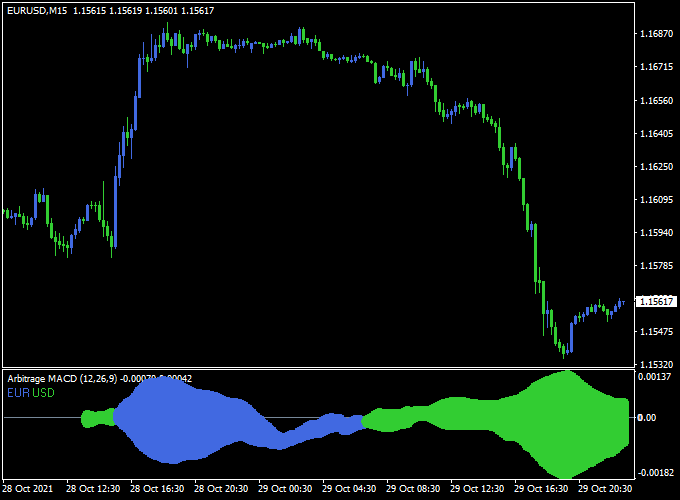
The indicator overlays the MACD histogram on a cloud that visually represents bullish or bearish pressure:
- Bullish Cloud (e.g., blue): look for long entries
- Bearish Cloud (e.g., green): signals short entries
Free Download
Download the “arbitrage-macd.mq4” indicator for MT4
Benefits of Using This Indicator
- Clarifies momentum direction more intuitively with color clouds
- Helps spot early arbitrage-style entries on momentum reversals
- Applicable across forex pairs and timeframes for flexible use
- Reduces subjectivity by automating signal detection and alerts
Indicator Example Chart (EUR/USD M15)
How To Trade Using This Indicator
Entry Point
- Buy: When the histogram turns blue, enter at the close of that candle
- Sell: When the histogram turns green, enter at candle close
Stop Loss
- For longs: place SL just below the recent swing low or below the cloud bottom
- For shorts: place SL just above the recent swing high or above the cloud top
Take Profit
- Option A: fixed risk‑reward (e.g., 1:2 or 1:3)
- Option B: exit when histogram returns toward zero or cloud fades
- Option C: target nearby support/resistance or recent swing points
Download Now
Download the “arbitrage-macd.mq4” indicator for Metatrader 4
MACD Arbitrage Cloud + ARSI Sigma Forex Strategy (MT4)
This strategy blends the trend-tracking power of the Winning MACD Arbitrage Cloud Indicator with the precision entry signals of the ARSI Sigma Forex Signal Indicator.
The result is a trend-following momentum strategy with advanced signal filtering designed for intraday and swing trading on MetaTrader 4.
What Is This Strategy About?
This strategy focuses on entering only during confirmed momentum bursts in the direction of the trend.
The MACD Arbitrage Cloud defines the trend bias and momentum zones, while the ARSI Sigma Indicator provides confirmation entries based on combined RSI and volatility logic.
Traders only enter when both tools agree, reducing whipsaws and increasing trade confidence.
Buy Rules
- Wait for the MACD Arbitrage Cloud to turn blue or for the price to be trading above the cloud with bullish momentum.
- Confirm a buy signal from the ARSI Sigma Forex Signal Indicator.
- Enter a buy position at the open of the next candle after both indicators align.
- Set stop loss just below the MACD cloud or last swing low.
- Target 1:2 risk-reward, or trail stop as long as price remains above the cloud and ARSI doesn’t signal exit.
Sell Rules
- Wait for the MACD Arbitrage Cloud to turn green or for the price to be below the cloud with a bearish bias.
- Look for a sell signal from the ARSI Sigma Indicator.
- Enter a sell trade at the next candle open after confirmation.
- Place a stop loss just above the MACD cloud or last swing high.
- Take profit using a fixed 1:2 ratio or exit when the cloud turns neutral or ARSI shows a reversal.
Advantages
- Double confirmation: Reduces false signals by combining trend (MACD Cloud) and volatility-based entry (ARSI Sigma).
- Visual trend bias: Easy to see whether the market is bullish, bearish, or neutral using the cloud.
- Effective on multiple timeframes: Suitable for M15 to H4 charts.
- Low noise: Fewer but higher-quality trade setups.
Drawbacks
- Misses early reversals: Since the MACD Cloud waits for confirmation, some reversal trades may be missed.
- Less effective in ranging markets: Works best when the market is trending clearly.
- Requires discipline: Traders must wait for both confirmations before executing trades.
Thoughts
The combination of the Winning MACD Arbitrage Cloud and ARSI Sigma Forex Signal Indicator creates a robust and visually intuitive system for trading momentum-based trends.
This setup is best applied during active trading sessions and avoids overtrading by focusing on quality signals only.
Traders looking for structure and clarity in their strategy will appreciate this precise, rule-based approach.
Examples, Back‑Test, Pros & Cons
Backtests on EUR/USD H1 suggest the Winning MACD Arbitrage Cloud can deliver clear signals during momentum shifts if combined with trend filters.
Since it highlights cloud shifts, it’s best during trending markets and less effective in choppy ranges.
- Pros: Intuitive signal display, color‑coded momentum clarity, built-in alerts
- Cons: False or late signals in range-bound markets; best used with trend confirmation
Indicator Specifications
| Property | Details |
|---|---|
| Name | Winning MACD Arbitrage Cloud |
| Platform | MetaTrader 4 (MT4) |
| Timeframes | All (recommended M30, H1, H4) |
| Pairs | Major/minor Forex pairs |
| Signal Type | MACD cloud shift, alerts |
| Inputs |
|
Final Words
The Winning MACD Arbitrage Cloud Indicator offers a fresh visual take on MACD-based trading.
By overlaying a momentum cloud, it aims to simplify entry timing.
For best results, combine it with trend filters and disciplined risk management, and always test on demo environments before going live.


