
About the ZigZag Alert Signal Indicator
The ZigZag Alert Signal MetaTrader 4 indicator is an enhanced version of the classic ZigZag technical indicator.
It is designed to help traders identify swing-based buy and sell opportunities with greater ease and clarity.
By building on the ZigZag logic, the indicator focuses on significant price movements rather than minor fluctuations.
What sets this version apart is its alert and visual signaling system.
Whenever a new trading opportunity appears, the indicator sends an alert and plots an arrow directly on the price chart.
Blue arrows indicate potential buy opportunities, while red arrows signal potential sell setups.
This makes it easier to monitor multiple charts without constant manual observation.
In addition to signal generation, the ZigZag Alert Signal indicator can display key account information directly on the chart.
This includes broker name, account number, trade mode, leverage, balance, and equity.
All of these elements can be enabled or disabled through the indicator settings.
Free Download
Download the “ZigZagSignal.mq4” MT4 indicator
Key Features
- Based on the classic ZigZag swing identification logic.
- Buy and sell arrows plotted directly on the price chart.
- Alert notifications for new trade opportunities.
- Filters minor price movements to focus on key swings.
- Optional display of MetaTrader 4 account information.
Indicator Chart
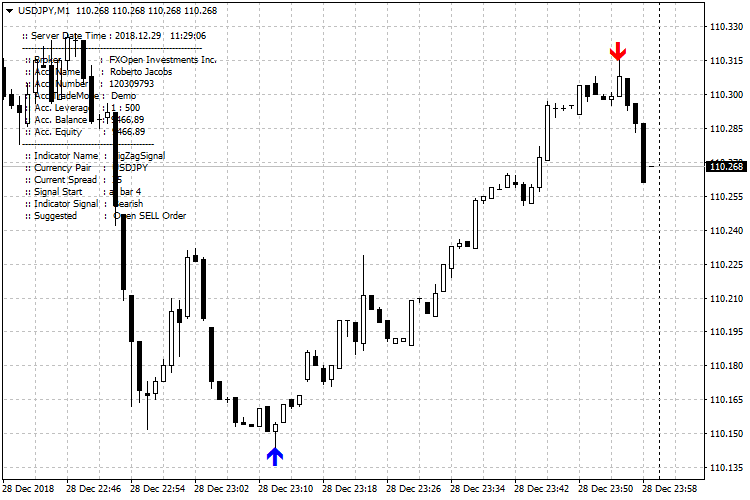
The chart below shows the ZigZag Alert Signal indicator applied to a price chart.
Blue arrows appear at swing lows to highlight potential buy opportunities.
Red arrows appear at swing highs to indicate potential sell setups.
Guide to Trade with ZigZag Alert Signal Indicator
Buy Rules
- Wait for a blue arrow to appear on the price chart.
- Confirm the indicator displays an “open BUY order” message.
- Check that price is reacting near a visible support area.
- Open a buy trade after the signal is confirmed.
Sell Rules
- Wait for a red arrow to appear on the price chart.
- Confirm the indicator displays an “open SELL order” message.
- Check that price is reacting near a visible resistance area.
- Open a sell trade after the signal is confirmed.
Stop Loss
- Place the stop 1 to 3 pips below support for buy trades.
- Place the stop 1 to 3 pips above resistance for sell trades.
- Ensure the stop is beyond the recent swing point.
- Avoid placing stops inside active price swings.
Take Profit
- Target the next visible swing high or low.
- Use opposing ZigZag swings as reference levels.
- Scale out when price approaches prior turning points.
- Close the trade based on your preferred exit method.
MT4 ZigZag Alert Signal + Zero-Lag MA Forex Strategy
This strategy combines the ZigZag Alert Signal MT4 Forex Indicator with the Zero-Lag Moving Average (MA) MT4 Forex Indicator.
The ZigZag Alert Signal gives clear arrow signals: blue arrows for buy and red arrows for sell.
The Zero-Lag MA provides a smoother and more responsive trend filter: when the price is above the MA, the trend is bullish; when below, bearish.
By combining them, the strategy filters entries to those aligned with the overall trend and timed by reversal/continuation arrows.
This setup can work on M5 and M15 charts and suits traders who prefer simple yet effective signals with defined entry and exit rules.
Buy Entry Rules
- Price must be above the Zero-Lag MA, indicating a bullish trend.
- A blue arrow must appear from the ZigZag Alert Signal.
- Enter long at the open of the next candle after the blue arrow appears while price remains above the MA.
- Place a stop loss a few pips below the most recent swing low or below a recent support area.
- Set take profit at a 1:2 risk-to-reward ratio, or exit if price closes below the MA or if a red arrow appears.
Sell Entry Rules
- Price must be below the Zero-Lag MA, indicating a bearish trend.
- A red arrow must appear from the ZigZag Alert Signal.
- Enter short at the open of the next candle after the red arrow appears while the price remains below the MA.
- Place a stop loss a few pips above the most recent swing high or above a recent resistance area.
- Set take profit at a 1:2 risk-to-reward ratio, or exit if price closes above the MA or if a blue arrow appears.
Advantages
- Trend filter from Zero-Lag MA helps avoid trades against the overall market direction.
- Arrows from ZigZag Alert Signal give timely entries, which often occur near short-term reversals or momentum changes.
- Simplified rules make it easy to follow even for beginners.
- Well-defined stop losses and take profits improve risk management and trade consistency.
- Works across multiple currency pairs when markets are trending.
Drawbacks
- In sideways or choppy markets, the arrows may trigger frequently while the price flips around the MA, causing many false signals.
- Using fixed risk-to-reward may limit profits in strong trends or cause premature exits.
- On lower timeframes (M5), whipsaw can hit stop loss quickly if the price spikes without clear trend confirmation.
- The strategy may miss bigger moves because it targets moderate gains with conservative exits.
Case Study 1
On EURUSD M5 during the London session, the price was trading above the Zero-Lag MA, indicating bullish bias.
A blue arrow appeared on the ZigZag Alert Signal after a brief pullback.
The trader entered long at the next candle with a stop loss 8 pips below the recent swing low.
Price then climbed within 15 minutes and hit a 16‑pip take profit (risk of 8 pips, reward 16 pips).
The MA remained below the price, and no red arrow appeared during the move.
The setup followed the trend direction and produced a clean scalp.
Case Study 2
On USDJPY M15 during the New York session, the price was clearly below the Zero-Lag MA, indicating a bearish trend.
A red arrow formed signaling a sell.
The trader entered short at the next candle, placing a stop loss 12 pips above the recent swing high.
Over the next 30 minutes price fell steadily and reached a 24‑pip take profit (with 1:2 risk-reward).
The MA stayed above the price, and no blue arrow appeared during the trade.
The bearish momentum aligned with the trend filter and gave a strong intraday move.
Strategy Tips
- Trade major and liquid currency pairs like EURUSD, USDJPY, GBPUSD, or EURJPY for tighter spreads and more reliable signals.
- Focus on active market hours such as the London session or the London and New York overlap to take advantage of stronger price movements.
- Avoid trading when markets are flat or consolidating since signals during these periods often lead to whipsaws.
- Maintain strict risk management by using small position sizes and limiting the risk to a small percentage of your account per trade.
- Skip trades if the price is too close to the MA or near strong support or resistance areas that could distort normal movement.
- Backtest the strategy across different currency pairs and sessions to determine which setups provide the best win rates.
Download Now
Download the “ZigZagSignal.mq4” Metatrader 4 indicator
FAQ
What type of signals does the ZigZag Alert Signal provide?
The indicator provides swing-based buy and sell signals.
These signals are derived from significant price movements rather than minor fluctuations.
Does the ZigZag Alert Signal repaint?
Like the standard ZigZag indicator, swing points may adjust while price is forming.
Signals should be evaluated after the swing is clearly established.
Can alerts be turned off?
Yes. Alert notifications can be enabled or disabled from the indicator input settings.
What is the purpose of the account information display?
The account information overlay provides quick access to key trading details.
It is optional and can be hidden if not needed.
Summary
The ZigZag Alert Signal MT4 indicator offers a simplified way to identify swing trading opportunities.
By combining ZigZag logic with arrow signals and alerts, it reduces the effort required to track market turning points.
Its visual clarity, alert functionality, and optional account data display make it a practical tool for traders who focus on swing-based entries and structured market movements.
When used with confirmation techniques, it can support more confident trading decisions.





