

About the 4 MAs Trend Indicator
The 4 MAs Trend Indicator for MT4 is a momentum-based tool that simplifies trend analysis by tracking the crossover of four distinct moving averages.
It displays trend health through color-coded histogram bars in a separate window.
Its essential function is to identify the consensus between short-term and long-term price velocity.
By requiring four averages to align, it effectively filters out market noise and provides a definitive bias for any currency pair.
This makes it an invaluable asset for traders who want to avoid choppy price action and focus on sustained market moves.
Free Download
Download the “4mas-trend-indicator.mq4” MT4 indicator
Key Features
- The indicator utilizes a four-period crossover logic to confirm trend strength.
- It features a three-color histogram system for instant market bias identification.
- The tool includes a dedicated “flat market” filter to prevent trading during low volatility.
- The signal bars are non-repainting, providing reliable entry and exit triggers.
Indicator Chart
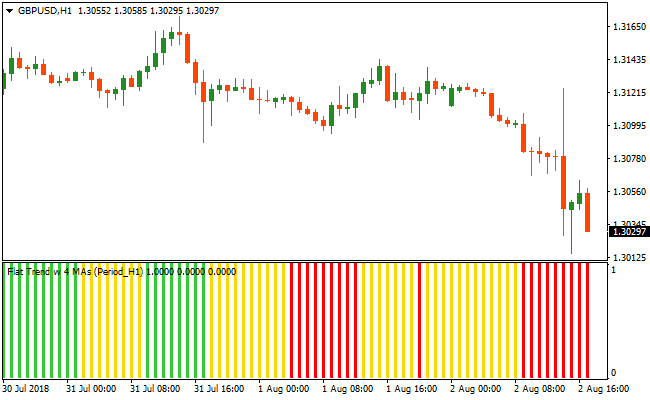
The chart displays the 4 MAs Trend Indicator positioned below the price action.
You can see the first green bar marking the start of a bullish phase, while red bars indicate a transition into a bearish trend.
The yellow bars clearly highlight periods of consolidation where the trend is neutral.
Guide to Trade with 4 MAs Trend Indicator
Buy Rules
- Monitor the indicator window for a shift from yellow or red to green.
- Open a buy trade at the close of the first green histogram bar.
- Ensure the green bars remain consistent to confirm the upward momentum.
Sell Rules
- Monitor the indicator window for a shift from yellow or green to red.
- Open a sell trade at the close of the first red histogram bar.
- Confirm that price action aligns with the bearish signal before entering.
Stop Loss
- For buy trades, place the stop loss 2-3 pips below the most recent swing low.
- For sell trades, place the stop loss 2-3 pips above the most recent swing high.
- Use the most recent yellow bar zone as a reference for tight stop placement.
Take Profit
- Exit the trade immediately when the indicator prints an opposite color bar.
- Aim for a fixed risk-to-reward ratio based on the volatility of the specific timeframe.
4 MAs Trend and Cougar MT4 Forex Strategy
This MT4 forex strategy combines the trend clarity of the 4 MAs Trend Metatrader 4 Forex Indicator with the trade entry signals of the Cougar Forex Indicator MT4.
The 4 MAs Trend indicator uses color‑coded bars to show market bias: green bars indicate bullish conditions, red bars show bearish conditions, and yellow bars suggest neutral, sideways conditions.
The Cougar indicator adds blue arrows for buy entries and red arrows for sell entries.
This strategy helps traders enter when the trend and entry signals align.
It works best on M15 and H1 timeframes where trends are more reliable and less noisy.
The rules are designed to filter out random signals in choppy markets by only taking entries when both trend direction and timing indicators agree.
Buy Entry Rules
- The 4 MAs Trend indicator must display green bars, indicating bullish momentum.
- The Cougar Forex Indicator must show a blue arrow, signaling a buy entry.
- Enter a buy trade at the close of the candle where the blue arrow appears while the 4 MAs Trend bars remain green.
- Place the stop loss a few pips below the most recent swing low or below nearby support.
- Exit the trade when the 4 MAs Trend bars turn red or a red arrow appears from the Cougar indicator.
Sell Entry Rules
- The 4 MAs Trend indicator must display red bars, indicating bearish momentum.
- The Cougar Forex Indicator must show a red arrow, signaling a sell entry.
- Enter a sell trade at the close of the candle where the red arrow appears while the 4 MAs Trend bars remain red.
- Place the stop loss a few pips above the most recent swing high or above nearby resistance.
- Exit the trade when the 4 MAs Trend bars turn green or a blue arrow appears from the Cougar indicator.
Advantages
- Combines trend direction with precise entry arrows to improve trade quality.
- Simple visual cues make it easy to identify tradable setups quickly.
- Works well on common timeframes like M15 and H1, balancing signal quality with time efficiency.
- Reduces emotional trading by relying on clear indicator alignment rules.
- Helps stay in moves longer by exiting only when trend changes or opposite signals appear.
Drawbacks
- Neutral or sideways markets with frequent yellow bars can delay or reduce trade signals.
- Signals may lag during rapid trend reversals.
Case Study 1 – EURGBP M15
On the EURGBP M15 chart, the 4 MAs Trend indicator displayed persistent green bars during an up move.
Soon after, the Cougar Forex Indicator printed a blue arrow.
A buy trade was entered at the close of the signal candle with the stop loss placed a few pips below recent support.
Price continued upward for several candles while the trend remained bullish.
The trade was closed when the 4 MAs Trend bars turned red, capturing 22 pips as the market shifted direction.
Case Study 2 – AUDJPY H1
On AUDJPY in the H1 timeframe, red 4 MAs Trend bars appeared as bearish momentum strengthened.
Shortly thereafter, the Cougar indicator displayed a red arrow.
A sell trade was entered at the close of the signal candle, with the stop loss placed just above the recent resistance zone.
Price continued lower as bearish bars remained consistent.
The trade was exited when a blue arrow appeared from the Cougar indicator, capturing 48 pips in profit as the market began a corrective bounce.
Strategy Tips
- Avoid trading when the 4 MAs Trend indicator shows yellow bars, as this often indicates indecision or weak direction.
- Use higher timeframe trend confirmation, such as checking H4 first, before taking setups on M15 to improve overall probability.
- Place stop losses just beyond recent price highs or lows to account for normal volatility rather than arbitrary pip distances.
- Consider using pending orders when the trend is strong to catch the move early.
- Monitor major economic news releases to avoid erratic price spikes that can trigger stops prematurely.
Download Now
Download the “4mas-trend-indicator.mq4” Metatrader 4 indicator
FAQ
What do the yellow bars represent in the histogram?
Yellow bars indicate a flat or ranging market where the four moving averages are not in alignment.
Trading should be avoided during these phases as price lacks a clear directional bias.
How does using four moving averages improve signal accuracy?
Using four averages requires a stronger consensus of price movement compared to a standard two-MA crossover.
This reduces the number of false signals and ensures you only enter when a trend has significant backing.
Can I use the 4 MAs Trend Indicator for scalping M1 charts?
Yes, it is highly effective for scalping.
In fast-moving environments, the first color change provides an early entry trigger, though it is best to trade in the direction of a higher timeframe.
Summary
The 4 MAs Trend Indicator is a powerful trend-following solution that helps traders maintain discipline by clearly defining market states.
Its primary benefit is the inclusion of a neutral zone, which protects traders from the dangers of a sideways market.
By relying on the synchronization of multiple averages, it offers a more robust entry signal than most basic oscillators.
Integrating this tool into your strategy allows for cleaner charts and a more objective approach to capturing profitable trends across any timeframe.





