About the ICT Order Block Indicator
The ICT Order Block indicator for MetaTrader 4 is a price action indicator that identifies potential institutional buying and selling zones on the chart.
Based on the Inner Circle Trader (ICT) trading methodology, the indicator highlights bullish and bearish order blocks that often act as future support or resistance levels.
The indicator analyzes market structure and strong impulsive price movements to identify areas where large market participants may have entered the market.
These zones help traders anticipate potential reversals, pullbacks, and continuation opportunities before price reaches them.
The ICT Order Block Indicator performs best when combined with market structure analysis, liquidity concepts, and higher-timeframe trend confirmation.
Free Download
Download the “ICT Order Block Indicator.ex4” for MT4
Key Features
- Automatically identifies bullish and bearish order blocks
- Highlights institutional support and resistance zones
- Based on ICT market structure principles
- Suitable for all currency pairs and time frames
- Customizable order block display and filtering options
Indicator Chart
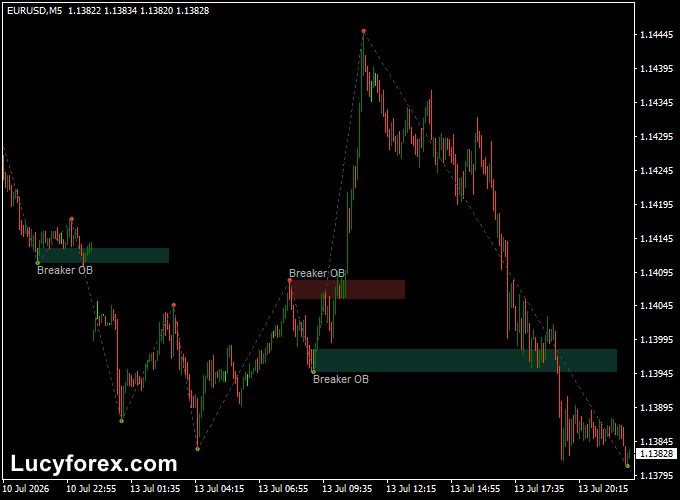
The ICT Order Block Indicator displays colored order block zones directly on the main MT4 chart.
Bullish order blocks appear below price after strong upward moves, while bearish order blocks are plotted above price following impulsive declines.
Many traders monitor these zones for rejection candles, market structure breaks, or liquidity sweeps before entering a position.
Guide to Trade with ICT Order Block Indicator
Buy Rules
- Identify the overall uptrend on a higher time frame.
- Wait for price to retrace into a bullish order block.
- Look for a bullish rejection or engulfing candle.
- Enter a buy trade after bullish confirmation.
Sell Rules
- Confirm a downtrend on the higher time frame.
- Wait for price to revisit a bearish order block.
- Watch for bearish rejection or reversal price action.
- Open a sell trade once confirmation appears.
Stop Loss
- Place the stop beyond the opposite side of the order block.
- Allow additional room during highly volatile market conditions.
- Avoid placing stops inside the highlighted zone.
Take Profit
- Target the next significant support or resistance level.
- Maintain a minimum 1:2 risk-to-reward ratio whenever possible.
- Trail the stop if the trend remains strong.
ICT Order Block + Supertrend MTF Forex Signal MT4 Strategy
This strategy combines the ICT Order Block Indicator with the Supertrend MTF Forex Signal Indicator to trade high-probability trend continuation setups.
The ICT Order Block Indicator highlights bullish and bearish institutional trading zones where price is likely to react.
The Supertrend MTF Forex Signal Indicator acts as the trend filter.
A green Supertrend line indicates a bullish trend, while a red Supertrend line signals bearish market conditions.
By entering only when price revisits an order block that aligns with the Supertrend direction, traders can focus on higher-quality setups while avoiding many counter-trend trades.
The strategy is suitable for the 15-minute, 1-hour, and 4-hour charts and performs well on major Forex currency pairs.
Buy Entry Rules
- Wait until the Supertrend MTF indicator displays a green trend line.
- Allow price to retrace into a bullish order block.
- Look for bullish confirmation such as a bullish engulfing candle or strong rejection candle.
- Open a buy position after the confirmation candle closes.
- Place the stop loss several pips below the bullish order block.
- Take profit at the next major resistance level or use a minimum 1:2 risk-to-reward ratio.
Sell Entry Rules
- Wait until the Supertrend MTF indicator displays a red trend line.
- Allow price to retrace into a bearish order block.
- Wait for bearish confirmation such as a bearish engulfing or rejection candle.
- Enter a sell trade after the confirmation candle closes.
- Place the stop loss several pips above the bearish order block.
- Target the next important support level or use at least a 1:2 risk-to-reward ratio.
Advantages
- Combines institutional order flow with multi-timeframe trend confirmation.
- Filters out many low-probability counter-trend trades.
- Provides clearly defined entry, stop-loss, and profit target locations.
- Suitable for both day trading and swing trading.
- Works across all major currency pairs and multiple timeframes.
- Simple visual trend confirmation makes decision-making easier.
- Can be combined with support and resistance analysis for additional confirmation.
Drawbacks
- Some strong moves may be missed while waiting for price to revisit an order block.
- False reactions can occur during sideways or highly volatile markets.
Case Study 1
On the USD/CAD 1-hour chart, the Supertrend MTF indicator displayed a green trend line, confirming an overall bullish market.
Price later retraced into a recently formed bullish order block, where a bullish rejection candle appeared.
After the confirmation candle closed, a buy trade was opened with the stop loss placed below the order block.
The market respected the institutional zone and continued moving higher until the next resistance level.
Case Study 2
On the EUR/USD 30-minute chart, the Supertrend MTF indicator remained red, indicating a bearish trend.
Price pulled back into a bearish order block before forming a bearish engulfing candle.
A sell position was opened after the confirmation candle, with the stop loss placed above the order block.
Selling pressure returned quickly, allowing the trade to follow the prevailing trend toward the next support area.
Strategy Tips
- Focus on order blocks that form after strong impulsive price movements.
- Trade only when the Supertrend line agrees with the higher-timeframe market direction.
- Wait for price action confirmation before entering every trade.
- Avoid opening new positions immediately before major economic news releases.
- Trail the stop loss during strong trends to maximize profitable trades.
- Backtest the strategy on different currency pairs to determine which markets produce the most reliable results.
Download Now
Download the “ICT Order Block Indicator.ex4” for MetaTrader 4
FAQ
What is an ICT Order Block?
An ICT Order Block is a price zone that often represents institutional buying or selling activity before a strong market move.
Can the ICT Order Block Indicator be used alone?
It can identify potential trading zones, but combining it with market structure, liquidity concepts, or confirmation candles generally improves trade selection.
What are the best settings for the ICT Order Block Indicator?
Most traders begin with the default settings, as they are designed to detect high-quality order blocks automatically.
Forex scalpers using the M1 and M5 charts may reduce the lookback period to focus on recent price action, while swing traders often increase it to display stronger institutional zones on higher time frames.
Which time frame works best with the ICT Order Block Indicator?
The indicator works on all MT4 time frames, but many traders prefer the 1-hour and 4-hour charts because they produce more reliable order blocks.
Lower time frames can provide additional trading opportunities, although they may also generate more false signals during choppy market conditions.
Summary
The ICT Order Block Indicator for MT4 helps traders locate potential institutional support and resistance zones using price action rather than lagging indicators.
By highlighting important order blocks, it allows traders to prepare for pullbacks, reversals, and trend continuation setups with greater confidence.
The indicator works across all time frames and currency pairs while offering flexible customization for different trading styles.
When combined with market structure analysis and the confirmation strategy presented above, it becomes a valuable addition to a disciplined Forex trading plan.