
About the Trend Arrows Indicator
The Trend Arrows Indicator for MT5 is a non-repainting trend tool designed to provide direct buy and sell signals without confusion.
It delivers clear directional guidance using colored trend lines and arrow dots plotted directly on the price chart.
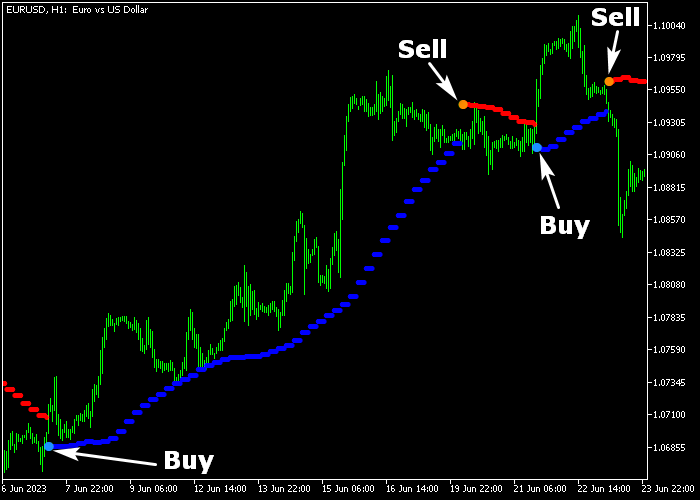
A blue colored line signals a bullish market trend, while a red colored line indicates bearish conditions.
When an arrow dot appears, it confirms a shift in direction and provides a trade signal.
This indicator does not generate intermediary or mixed signals.
It alternates cleanly between buy and sell conditions, making decision-making straightforward.
Traders can adjust inputs such as arrow period, full period, and colors to match their strategy.
For lower timeframe traders using the 1-minute and 5-minute charts, it performs best during the London and New York sessions, especially on low spread currency pairs.
Free Download
trend_arrows.mq5 Indicator (MT5)
Key Features
- Non-repainting buy and sell signals.
- Blue line for bullish trend indication.
- Red line for bearish trend indication.
- Arrow dots confirm trade entries.
- Customizable arrows period and full period.
- Adjustable color settings.
Indicator Chart
The Trend Arrows Indicator appears on the main price area with a blue or red trend line and corresponding arrow dots marking entry signals.
Blue arrow dots confirm bullish reversals or continuations. Orange arrow dots confirm bearish reversals or trend shifts.
Each arrow marks a decisive change in direction.
Guide to Trade with Trend Arrows Indicator
Buy Rules
- Wait for a blue super trend arrow dot to appear on the chart.
- Confirm that the trend line is blue.
- Enter a buy trade at the open of the next candle.
- Focus on active trading sessions for stronger momentum.
Sell Rules
- Wait for an orange super trend arrow dot to appear on the chart.
- Confirm that the trend line is red.
- Enter a sell trade at the open of the next candle.
- Prefer signals that form during high liquidity sessions.
Stop Loss
- For buy trades, position the stop below the blue indicator line.
- For sell trades, position the stop above the red indicator line.
Take Profit
- Close the buy trade when an opposite orange arrow dot appears.
- Close the sell trade when an opposite blue arrow dot appears.
- Alternatively, trail the stop as long as the trend line color remains unchanged.
- Advanced traders may scale out partial profits at key price levels.
Trend Arrows Indicator with Super Trend Forex Strategy for MT5
This day trading strategy combines the Trend Arrows Indicator with the Super Trend HTF Indicator to capture directional moves during the trading day.
It works best on the major currency pairs and on Gold, where trends are more reliable and momentum is clearer.
The Trend Arrows indicator generates blue arrows for buy signals and orange arrows for sell signals.
The Super Trend HTF indicator confirms the overall trend direction with its colored line: green for bullish trends and red for bearish trends.
Using both together allows traders to enter trades in the direction of the prevailing trend while avoiding false signals.
This strategy works best on H1 charts and is ideal for intraday traders looking to catch strong moves without holding trades overnight.
Buy Entry Rules
- Wait for the Super Trend HTF line to be green, signaling a bullish trend.
- Confirm a blue arrow appears on the Trend Arrows indicator.
- Enter a buy trade at the close of the signal candle.
- Place the stop loss below the most recent swing low.
- Take profit near recent resistance levels or close the trade when the Trend Arrows indicator prints an orange arrow.
Sell Entry Rules
- Wait for the Super Trend HTF line to be red, signaling a bearish trend.
- Confirm an orange arrow appears on the Trend Arrows indicator.
- Enter a sell trade at the close of the signal candle.
- Place the stop loss above the most recent swing high.
- Take profit near recent support levels or close the trade when the Trend Arrows indicator prints a blue arrow.
Case Study 1 Buy Trade (EURUSD, H1)
During the London session on EURUSD using the H1 timeframe, the Super Trend HTF line was green, indicating a bullish trend.
A blue arrow appeared on the Trend Arrows indicator, confirming the buy signal.
A buy trade was opened at the close of the signal candle. The stop loss was placed below the recent swing low.
Price moved steadily upward over the next few hours.
After several candles, the Trend Arrows indicator printed an orange arrow, which prompted the trade exit near a resistance zone.
Case Study 2 Sell Trade (XAUUSD, H1)
During the New York session on Gold (XAUUSD) using the H1 timeframe, the Super Trend HTF line was red, signaling a bearish trend.
An orange arrow appeared on the Trend Arrows indicator, confirming the sell signal.
A sell trade was executed at the candle close. The stop loss was placed above the recent swing high.
Price declined steadily, and the short trade was closed for 97 pips profit when a blue arrow appeared, indicating a potential bullish short-term reversal.
Download Now
trend_arrows.mq5 Indicator (MT5)
FAQ
Does the Trend Arrows Indicator repaint signals?
No, once an arrow dot appears and the candle closes, the signal remains fixed.
Which timeframes are best for this indicator?
It works on all timeframes, but many traders prefer the 1-minute and 5-minute charts during the London and New York sessions.
Can I customize the signal sensitivity?
Yes, you can adjust the arrow period and full period settings to make the signals faster or smoother.
Is it suitable for beginners?
Yes, the direct arrow signals and clear color coding make it easy to interpret.
Summary
The Trend Arrows Indicator provides non-repainting buy and sell signals with clear trend direction. Its arrow-based system simplifies trade execution.
With adjustable settings and strong performance during active sessions, it supports both scalpers and intraday traders who prefer decisive trend confirmation.





