About the Liquidity Flow Matrix Indicator
The Liquidity Flow Matrix indicator for MT5 is a price action tool that identifies liquidity levels, stop sweeps, and key market zones directly on the chart.
The indicator marks potential buy-stop and sell-stop areas around price swings, helping traders monitor where liquidity may be concentrated.
It also displays liquidity events labelled as swept or purged, providing additional information about how price interacts with these levels.
The chart includes Supply and Demand Order Blocks, Fair Value Gap (FVG) zones, and Cumulative Volume Delta (CVD) readings.
These elements allow traders to examine price structure, potential reaction areas, and volume-related information together.
This makes the tool useful for traders who follow liquidity-based trading, market structure, and institutional-style price action strategies.
Free Download
Download the Liquidity Flow Matrix Indicator for MT5
Key Features
- Identifies potential buy-stop and sell-stop liquidity levels
- Displays swept and purged liquidity events
- Highlights Supply and Demand Order Blocks
- Shows Cumulative Volume Delta (CVD) information
- Displays active Fair Value Gap zones
- Includes adjustable liquidity detection and chart display settings
- Suitable for liquidity-based price action analysis on MT5
Indicator Chart
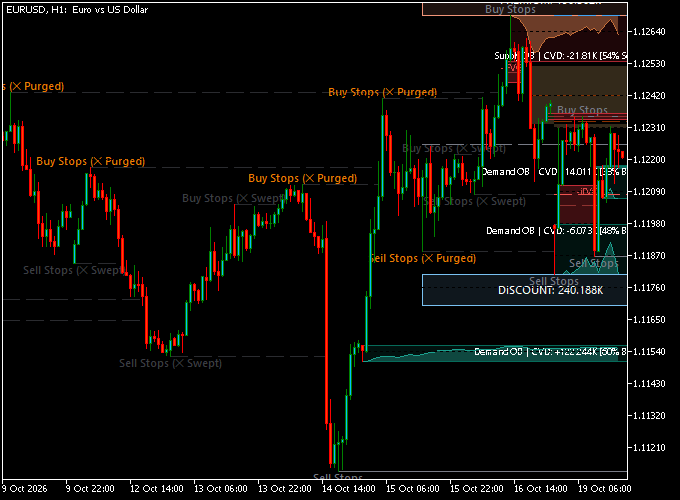
The Liquidity Flow Matrix Indicator displays several types of market information in one chart window.
Buy-stop levels are generally associated with areas above previous highs, while sell-stop levels are commonly found below previous lows.
These areas can attract price movement when stop orders are concentrated around significant swing points.
The indicator marks liquidity levels and identifies events labelled as swept or purged.
Traders can observe these annotations to study how price behaves after moving through previously identified levels.
Supply and Demand Order Blocks provide additional areas to monitor for potential buying or selling pressure.
The displayed CVD readings offer further context for examining activity around these zones.
The chart also includes a Discount area and active liquidity-related zones.
By combining these elements, traders can analyse price movements in relation to potential liquidity targets and areas of interest.
Guide to Trade with the Liquidity Flow Matrix Indicator
The indicator can be used to identify areas where traders may want to examine price action more closely.
The following rules provide a general framework for studying liquidity-based setups. They are not automated entry signals.
Buy Rules
- Identify a potential sell-stop liquidity level below a previous swing low.
- Observe whether price moves through the level and the indicator marks a liquidity sweep or related event.
- Check whether price approaches or reacts from a Demand Order Block or bullish Fair Value Gap.
- Look for bullish price action or a clear rejection of lower prices.
- Consider a buy position only when the market structure and price action support the setup.
Sell Rules
- Identify a potential buy-stop liquidity level above a previous swing high.
- Watch whether price moves through the level and the indicator marks a liquidity event.
- Check whether price approaches or reacts from a Supply Order Block or bearish Fair Value Gap.
- Look for bearish price action or rejection from the marked area.
- Consider a sell position when the surrounding market structure supports the bearish setup.
Stop Loss
- For buy trades, consider placing the stop loss below the relevant swing low or demand area.
- For sell trades, consider placing the stop loss above the relevant swing high or supply area.
- Allow sufficient room for normal price fluctuations while keeping the potential loss within your risk limits.
Take Profit
- Use the next relevant buy-stop or sell-stop liquidity area as a potential target.
- Consider previous swing highs and lows when planning exits.
- Monitor opposing Supply or Demand Order Blocks as possible reaction areas.
- Define a risk-to-reward target before entering the trade and adjust it to the market conditions.
FAQ
What does the Liquidity Flow Matrix Indicator show?
The indicator displays potential buy-stop and sell-stop liquidity levels, swept and purged liquidity events, Supply and Demand Order Blocks, CVD readings, and active Fair Value Gap zones.
What is a liquidity sweep?
A liquidity sweep occurs when price moves through a level where stop orders may be concentrated, often around a previous swing high or low.
Traders observe the subsequent price action to assess whether the market may continue in the same direction or reverse.
What are Supply and Demand Order Blocks?
Supply and Demand Order Blocks are chart areas that traders monitor for potential selling or buying interest.
Price reactions around these zones can provide additional context when studying market structure.
What is the purpose of the Swing Pivot Lookback setting?
This setting controls the lookback used for identifying swing pivot points. These points are relevant to the identification of potential liquidity levels.
Can the indicator be used for scalping?
The indicator can be used to analyse liquidity and price structure on different chart timeframes.
Shorter timeframes may suit scalping, while higher timeframes can help traders assess broader market conditions.
The suitability depends on the trading method and the indicator’s configuration.
Download Now
Download the Liquidity Flow Matrix Indicator for MT5
Indicator Settings
The Liquidity Flow Matrix Indicator for MT5 includes several settings that control liquidity detection and the appearance of information on the chart.
- Swing Liquidity Engine: Controls the indicator’s swing liquidity detection functionality. Its available options determine how the engine is configured.
- Swing Pivot Lookback: Adjusts the lookback used when identifying swing pivot points. Swing pivots help determine the price levels used for liquidity analysis.
- Max Active Levels: Sets the maximum number of active liquidity levels displayed by the indicator. This option helps control how many levels remain visible on the chart.
- Show Active FVG Zones: Controls whether active Fair Value Gap zones are displayed. These zones can be monitored for potential price retracements and reactions.
- Colors: Allows the indicator’s visual elements to be customized to suit individual chart preferences.
Putting Liquidity Analysis into Practice
The Liquidity Flow Matrix Indicator for MT5 brings liquidity levels, stop sweeps, Supply and Demand Order Blocks, Fair Value Gap zones, and CVD readings together in one chart-based tool.
This gives traders several ways to examine market structure and monitor areas of interest.
By marking swing-related liquidity levels and highlighting liquidity events, the indicator helps traders study how price behaves around previous highs and lows.
The adjustable settings also allow users to customise swing pivot detection, the number of active liquidity levels, FVG zone visibility, and chart colours.
For traders who rely on liquidity-based strategies, the Liquidity Flow Matrix Indicator provides a convenient way to analyse price action and locate areas for further investigation when planning potential trades.