

About the Kalman Filter Indicator
The Kalman Filter Indicator for MT5 is a trend-following tool based on the Kalman trading method.
It plots a colored signal line directly on the chart, showing whether the market is in a bullish or bearish trend.
The indicator is always active, helping traders follow market direction continuously.
Green lines indicate upward momentum and a buy signal, while red lines indicate downward momentum and a sell signal.
This tool is straightforward to use, making it suitable for both beginners and experienced traders who want to capture trends without complex setups.
The Kalman Filter performs best on low-spread forex pairs during volatile trading sessions, making it particularly effective for scalping and intraday strategies.
By following the signal line, traders can enter trades aligned with the prevailing trend and reduce the guesswork involved in timing entries.
Free Download
Kalman filter (generalized).mq5 Indicator (MT5)
Key Features
- Displays a trend-following signal line directly on the chart.
- Always active, showing current market direction in real time.
- Best on low-spread currency pairs during high volatility sessions.
- Customizable period and smoothing ratio to fine-tune sensitivity.
- Adjustable line style and price type for visual preference.
- Helps traders enter trades aligned with prevailing market trends.
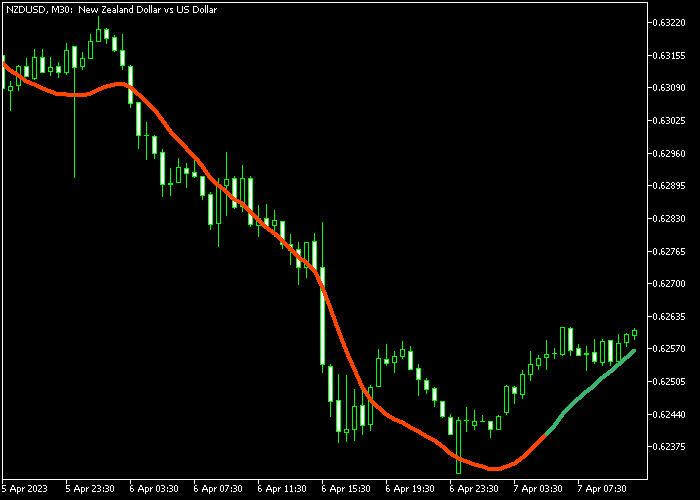
Indicator Chart
The Kalman Filter Indicator plots a single colored signal line on the chart.
Green lines indicate a bullish trend, while red lines indicate a bearish trend.
Traders watch the line to follow market momentum and enter trades in the direction of the prevailing trend.
Guide to Trade with Kalman Filter Indicator
Buy Rules
- Wait for the Kalman signal line to turn green, indicating an upward trend.
- Open a buy trade when the green line is confirmed.
Sell Rules
- Wait for the Kalman signal line to turn red, indicating a downward trend.
- Open a sell trade when the red line is confirmed.
Stop Loss
- Buy trades: stop loss below the most recent swing support.
- Sell trades: stop loss above the most recent swing resistance.
- Trailing stops can be used to protect profits as the trend continues.
Take Profit
- Set a fixed take profit target according to your trading plan.
- Close buy trades when the signal line turns red.
- Close sell trades when the signal line turns green.
- Partial profits may be taken during strong trend extensions.
Kalman Filter MT5 + MACD Candles Scalping Strategy
This strategy combines the Kalman Filter indicator with the MACD Candles indicator to create a fast and reliable scalping approach for short term trading.
It focuses on the M1 and M5 timeframes where quick price movements offer frequent opportunities.
The Kalman Filter identifies the underlying trend direction, while MACD Candles highlight momentum shifts through clear color changes.
This combination helps reduce false signals and improves timing.
The method works best on major currency pairs like EURUSD, GBPUSD, and USDJPY due to tighter spreads and smoother price action.
It fits traders who prefer active trading and small consistent gains between 10 and 25 pips.
Buy Entry Rules
- Wait for the Kalman Filter line to turn green indicating a bullish trend.
- Confirm that MACD Candles print a green candle showing upward momentum.
- Enter a buy trade at the opening of the next candle.
- Place stop loss 1 to 3 pips below the recent swing low or below the Kalman line.
- Take profit at 10 to 25 pips or close the trade when MACD Candles turn red.
Sell Entry Rules
- Wait for the Kalman Filter line to turn red indicating a bearish trend.
- Confirm that MACD Candles print a red candle showing downward momentum.
- Enter a sell trade at the opening of the next candle.
- Place stop loss 1 to 3 pips above the recent swing high or above the Kalman line.
- Take profit at 10 to 25 pips or close the trade when MACD Candles turn green.
Case Study 1
On the EURUSD M5 timeframe, the Kalman Filter line turned green after a short consolidation phase.
Price started moving upward with clear strength and the green line confirmed bullish conditions.
MACD Candles followed with consecutive green candles supporting the move.
A buy trade was entered after the confirmation candle closed. The stop loss was placed below the recent swing low.
Price moved steadily higher and reached a 20 pip profit target.
The trade was closed while the trend and momentum remained aligned.
Case Study 2
On the GBPUSD M1 timeframe, a fast setup appeared. The first green MACD Candle formed just as the Kalman Filter turned bullish.
This created a clear buy entry signal. The short trade quickly reached 12 pips profit.
The position was closed when the first red MACD Candle appeared, signaling fading momentum.
Shortly after, the first red MACD Candle appeared again while the Kalman Filter turned bearish.
A sell trade was executed immediately.
Price dropped quickly and delivered about 10 pips before momentum weakened. The short trade was closed as the move slowed.
Download Now
Kalman filter (generalized).mq5 Indicator (MT5)
FAQ
Which trading style suits this indicator?
It works for scalping, day trading, and swing trading, especially on low-spread pairs during volatile sessions.
Can the indicator settings be customized?
Yes, traders can adjust the period, smoothing ratio, price type, and line style to fit different timeframes and market conditions.
Is it beginner-friendly?
Yes, the simple green/red signal line makes it easy to follow trends and enter trades without complex analysis.
Summary
The Kalman Filter Indicator simplifies trend-following by showing a single signal line that turns green for bullish trends and red for bearish trends.
Traders can follow the line to enter trades aligned with market momentum.
With customizable settings and clear trend signals, it suits beginners and experienced traders alike.
Stop loss and take profit can be combined with signal changes for a flexible trading approach.
This tool performs best on low-spread forex pairs during volatile sessions, helping traders capture trend movements efficiently and make timely decisions with minimal guesswork.





