
About the Take Profit indicator
The Take Profit indicator for MT4 is designed to assist traders by visually displaying suggested take profit and stop-loss levels directly on the chart.
It provides four take profit levels for both buy and sell trades, helping traders plan exits more effectively.
The indicator does not generate entry signals.
Instead, it works in conjunction with your existing forex system or strategy to guide trade management.
Suggested stop-loss levels are also displayed to help protect trades and manage risk efficiently.
By providing multiple target levels, the Take Profit indicator allows traders to scale out positions or follow a step-by-step profit-taking approach.
Free Download
Download the “target-points.ex4” MT4 indicator
Key features
- Displays four take profit levels (TP1–TP4) for buy and sell trades.
- Plots the suggested stop-loss level for each trade.
- Works alongside any existing trading strategy or system.
- Helps plan exits and scale profits efficiently.
Indicator chart
The image below shows the Take Profit indicator displayed in a separate window below the main price chart. TP and SL lines are clearly plotted for easy trade management.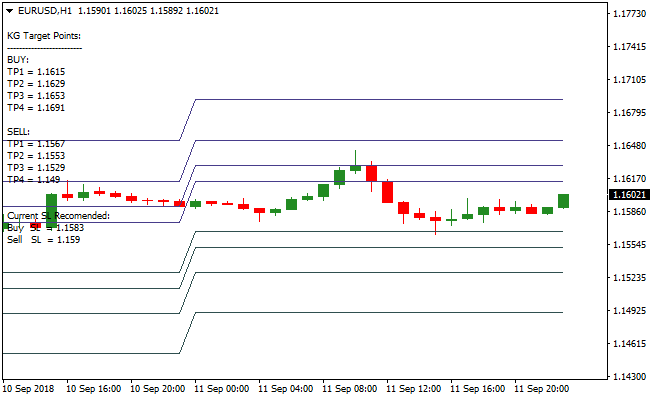
Guide to trade with the Take Profit indicator
Buy rules
- Use your own system or strategy to identify a buy entry.
- Reference the TP lines (TP1–TP4) to plan your profit targets.
- Adjust position size according to your risk management preferences.
- Monitor the SL line to protect the trade in case of adverse movement.
Sell rules
- Use your own system or strategy to identify a sell entry.
- Reference the TP lines (TP1–TP4) to plan your profit targets.
- Adjust position size according to your risk management preferences.
- Monitor the SL line to protect the trade in case of adverse movement.
Stop loss
- Use the suggested SL line plotted by the indicator for both buy and sell trades.
- Move the stop-loss only if your strategy or market conditions require.
- Keep stops consistent with the scale of TP levels to maintain a balanced risk-reward ratio.
- Exit the trade if price reaches the SL before hitting any TP levels.
Take profit
- Use the TP1–TP4 levels as step-by-step targets for partial or full exits.
- Close portions of your trade at each level or all at a preferred target.
- Adjust TP levels if market conditions or volatility change significantly.
- Optionally, use a trailing stop after reaching the first TP level to lock in profits.
Take Profit and Zero Lag MA Forex Scalping Strategy for MT4
This MT4 strategy combines the Take Profit Metatrader 4 Forex Indicator with the Zero Lag Moving Average Indicator.
The Take Profit indicator provides four suggested TP levels and stop-loss levels for both buy and sell trades, giving clear exit points.
The Zero Lag MA confirms trend direction for entries, with the price above the MA indicating a buy trend and below the MA indicating a sell trend.
This strategy works best on lower time frames such as M1, M5, and M15.
It is ideal for scalpers who want quick trades with defined risk and multiple take profit targets for flexibility.
Buy Entry Rules
- Enter a buy trade when the price is above the Zero Lag MA, generating a buy signal.
- Set stop loss at the level suggested by the Take Profit indicator.
- Take profit sequentially at TP1, TP2, TP3, and TP4 or exit if the price falls below the Zero Lag MA.
Sell Entry Rules
- Enter a sell trade when the price is below the Zero Lag MA, generating a sell signal.
- Set stop loss at the level suggested by the Take Profit indicator.
- Take profit sequentially at TP1, TP2, TP3, and TP4 or exit if the price rises above the Zero Lag MA.
Advantages
- Clear trend-based entry signals using the Zero Lag MA.
- Structured take profit levels provide defined exit points for partial or full profits.
- Works on multiple pairs, including EURUSD, GBPUSD, and AUDUSD.
- Lower time frame scalping opportunities are enhanced with trend alignment.
- Partial exits at TP levels allow locking in gains while riding momentum.
Drawbacks
- Requires active monitoring on lower time frames.
- Fast reversals can hit stop losses quickly..
- High-impact news can cause slippage and unexpected price movements.
Case Study 1
On EURUSD M5, the price was above the Zero Lag MA at 1.1510, generating a buy signal.
A buy trade was entered at 1.1510.
The Take Profit indicator suggested TP1 at 1.1517, TP2 at 1.1523, TP3 at 1.1530, and TP4 at 1.1535.
Price moved upward steadily, hitting TP1 (+7 pips), TP2 (+13 pips), and TP3 (+20 pips) before a minor retracement.
Partial profits were taken at each level, maximizing gains while minimizing risk.
Case Study 2
On GBPUSD M5, the price dropped below the Zero Lag MA at 1.2802, generating a sell signal.
A sell trade was entered at 1.2802.
The Take Profit indicator suggested TP1 at 1.2795, TP2 at 1.2788, TP3 at 1.2780, and TP4 at 1.2772.
Price moved downward quickly, reaching TP1 (+7 pips), TP2 (+14 pips), and TP3 (+22 pips) before slowing.
The trade captured significant pips in a short period, showing the effectiveness of using the Zero Lag MA as a scalping entry signal.
Strategy Tips
- Only enter trades in the direction of the Zero Lag MA: buy when above the MA, sell when below the MA.
- Use the Take Profit indicator to plan multiple exits and secure incremental gains.
- Focus on pairs with low spreads and active volatility during major sessions.
- Keep stop losses at levels suggested by the Take Profit indicator for effective risk management.
- Practice on demo accounts to master timing, TP management, and quick scalping entries.
- Consider partial exits at each TP level to lock in profits while letting trades run with momentum.
Download Now
Download the “target-points.ex4” Metatrader 4 indicator
FAQ
Does the indicator provide entry signals?
No. The Take Profit indicator only displays suggested TP and SL levels. Use it with your own entry strategy.
Are the TP levels fixed?
The levels are suggested and can be adjusted based on your risk preferences and market conditions.
Summary
The Take Profit indicator for MT4 helps traders manage trades efficiently by plotting four take profit levels and a suggested stop-loss directly on the chart.
It simplifies planning exits and scaling positions for any trade setup.
It supports disciplined trade management and allows traders to optimize profit-taking without cluttering the chart or relying on guesswork.





