
About the Pip Trend Indicator
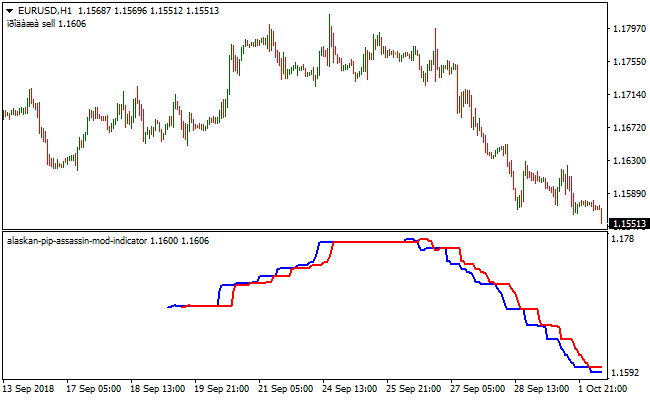
The Pip Trend indicator for MT4 is a simple crossover system consisting of a blue and red signal line.
It identifies bullish and bearish trends based on line crossovers.
Blue crossing above red signals a bullish trend, while red crossing above blue signals a bearish trend.
The current signal is displayed in the upper left corner of the MT4 chart, making it easy to follow the market direction.
The indicator can be used as a standalone tool by setting the SSP value to 50 or higher to reduce false signals, or combined with other technical indicators for confirmation.
The settings are adjustable to suit different trading approaches.
Pip Trend works on any currency pair and can be applied to multiple timeframes.
Free Download
Download the “alaskan-pip-assassin-mod-indicator.mq4” MT4 indicator
Key Features
- Displays clear buy and sell signals via blue and red lines.
- Shows the current trading signal on the chart.
- Adjustable SSP value to filter false crossovers.
- Can be combined with other indicators or used standalone.
Indicator Chart
The chart shows blue and red signal lines with crossovers generating buy or sell signals.
The current signal is displayed in the top-left corner.
Blue line above red indicates a bullish trend, red line above blue indicates a bearish trend.

Guide to Trade with Pip Trend Indicator
Buy Rules
- Open a buy trade when the blue line crosses above the red line from below.
- Confirm trend alignment if using additional indicators.
- Focus on upward momentum and avoid trades against strong bearish trends.
- Ignore buy signals if the crossover occurs during a flat market without trend confirmation.
Sell Rules
- Open a sell trade when the red line crosses above the blue line from below.
- Confirm trend alignment if using additional indicators.
- Focus on downward momentum and avoid trades against strong bullish trends.
- Ignore sell signals if the crossover occurs during a flat market without trend confirmation.
Stop Loss
- For buy trades, place the stop below the recent minor support level.
- For sell trades, place the stop above the recent minor resistance level.
- Set the stop to match your preferred risk level.
Take Profit
- Close buy trades when the red line crosses above the blue line.
- Close sell trades when the blue line crosses above the red line.
- Optionally, use a fixed profit target for each trade.
Pip Trend Indicator and Forex Trend Filter MT4 Strategy
This MT4 strategy utilises the Pip Trend Indicator and the Trend Filter Indicator in conjunction to confirm market direction.
Both tools complement each other, helping traders confirm the trend direction before entering a trade.
The Pip Trend indicator reacts to short-term price shifts while the Trend Filter checks the broader market direction.
Using them together improves accuracy and helps avoid false entries.
This strategy works on all major forex pairs and performs well on the M15, M30 and H1 time frames.
It fits day traders, swing traders and anyone who prefers clear visual signals without complex analysis.
Buy Entry Rules
- Buy when the blue Pip Trend signal line crosses above the red signal line from below.
- Confirm the entry when the Trend Filter starts drawing green histogram bars.
- Place the stop loss a few pips below the recent swing low.
- Take profit at the next resistance level or when the histogram changes from green to red.
Sell Entry Rules
- Sell when the red Pip Trend signal line crosses above the blue signal line from below.
- Confirm the entry when the Trend Filter starts drawing red histogram bars.
- Place the stop loss a few pips above the recent swing high.
- Take profit at the next support level or when the histogram changes from red to green.
Advantages
- Helps filter out weak signals by requiring both indicators to agree.
- Easy to understand and suitable for traders who prefer simple chart setups.
- Performs well during stable trending conditions.
- Reduces hesitation because entries come from two clear confirmations.
- Can be used for intraday, swing or longer-term trading.
- Provides clean exit points when the histogram changes color.
Drawbacks
- Can miss early reversals during very fast market swings.
- May produce mixed signals in low volatility periods.
- Less effective on pairs with unstable or irregular price movement.
Example Case Study 1
On EURUSD M30, the market was trading sideways for several hours.
A new upward move started when the blue Pip Trend line crossed above the red line.
A few minutes later, the Trend Filter changed from neutral to green, confirming bullish strength.
A buy trade was taken with a stop loss below the latest swing low.
The pair moved steadily higher and delivered a clean trend.
The take profit was reached near the next resistance area for 62 pips.
The histogram turned red shortly after, signaling an exit at the perfect moment.
Example Case Study 2
On GBPUSD H1, the pair rejected a strong resistance zone and started to drift lower.
The red Pip Trend line crossed above the blue one and the Trend Filter quickly switched to red.
A sell trade was opened with the stop loss placed above the resistance spike.
Price continued declining throughout the session and the trade gained 87 pips before the histogram flashed green.
Closing the position at that point locked in the profit and avoided the following pullback.
Strategy Tips
- Always check higher time frame trends to avoid trading against the main market direction.
- Avoid entering trades during major economic news releases or low liquidity periods.
- Use a trailing stop once the trade moves into profit to protect gains while allowing room for continuation.
- When both indicators change direction at the same time, it often signals the start of a strong trend.
- Combine this setup with support and resistance zones for better precision in entries and exits.
- Skip trades if the two indicators give conflicting signals or if the Trend Filter histogram is flat.
- Test the strategy on different pairs and time frames before applying it live to understand its rhythm.
Download Now
Download the “alaskan-pip-assassin-mod-indicator.mq4” Metatrader 4 indicator
FAQ
What does the SSP value do?
The SSP value filters false signals. Setting it to 50 or higher reduces unnecessary crossovers and improves accuracy.
Can Pip Trend be used with other indicators?
Yes, it can be combined with trend-following indicators or oscillators to confirm signals and improve trade quality.
Is it suitable for all trading styles?
It works for scalping, day trading, and swing trading. Adjust the timeframe and SSP settings to fit your approach.
Summary
The Pip Trend indicator for MT4 gives Forex traders a clear view of bullish and bearish crossover signals.
Blue and red lines make trend direction easy to follow at a glance.
This tool is ideal for monitoring trend changes without opening multiple charts.
By combining line crossovers with optional confirmation from other indicators, users can spot high-probability trade setups and manage entries and exits efficiently.





