
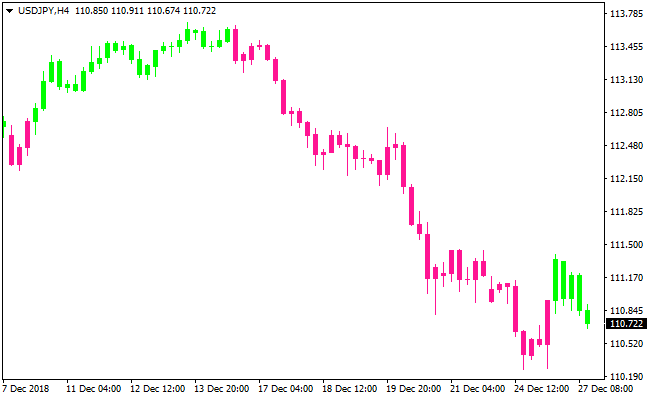
About the Trend Candlesticks Indicator
The Trend Candlesticks indicator is a visual trading tool designed to highlight short-term trend direction directly on the price chart.
It replaces standard candles with colored trend candlesticks that help traders spot buy and sell opportunities at a glance.
The indicator colors candlesticks based on market direction.
Green candlesticks signal bullish conditions, while pink candlesticks signal bearish conditions.
This makes it especially useful for scalping and day trading, where fast decision-making is essential.
For improved accuracy, the Trend Candlesticks indicator is best used alongside a longer-period trend filter such as a moving average.
By trading only in the direction of the broader trend, traders can reduce false entries and stay aligned with dominant market momentum.
Free Download
Download the “trend-candlesticks.ex4” MT4 indicator
Key Features
- Colored trend candlesticks displayed directly on the chart.
- Green candles indicate bullish market conditions.
- Pink candles indicate bearish market conditions.
- Ideal for scalping and intraday trading.
- Works well with moving average trend filters.
- Easy-to-read visual signals for fast execution.
Indicator Chart
The Trend Candlesticks indicator chart replaces standard price candles with colored trend candles.
Green candles highlight bullish pressure, while pink candles reflect bearish momentum.

Guide to Trade with Trend Candlesticks Indicator
Buy Rules
- Confirm price is positioned above a longer-term moving average.
- Wait for a green trend candlestick to appear.
- Ensure the broader trend is bullish.
- Open a buy trade at the close of the signal candle.
Sell Rules
- Confirm price is positioned below a longer-term moving average.
- Wait for a pink trend candlestick to appear.
- Ensure the broader trend is bearish.
- Open a sell trade at the close of the signal candle.
Stop Loss
- Place the stop below support for buys and above resistance for sells.
- Use the recent candle range to define stop distance.
- Allow room for normal pullbacks within the trend.
- Tighten the stop once price accelerates in your favor.
Take Profit
- Target intraday support or resistance zones.
- Trail profits while trend candles remain aligned.
- Secure partial gains during strong momentum moves.
- Exit if candle color changes against the position.
Trend Candlesticks + Best Forex Scalping Indicator Scalping Strategy for MT4
This scalping strategy combines the Trend Candlesticks MT4 Forex Indicator with the Best Forex Scalping Indicator for MT4.
The Trend Candlesticks indicator colors candles: green when the trend is bullish and pink when bearish.
The Best Forex Scalping Indicator adds entry signals via blue arrows for buy and red arrows for sell.
By using the candlestick trend filter together with scalping signal arrows, we aim to enter trades that go with short-term momentum and broader trend direction.
This setup is primarily designed for M1 and M5 charts, aiming for quick scalps on liquid pairs.
Buy Entry Rules
- The current candle must be green, showing a bullish trend via Trend Candlesticks.
- A blue arrow must appear from the Best Forex Scalping Indicator.
- Enter long at the open of the next candle after the arrow appears and while candles stay green.
- Place a stop loss a few pips below the recent minor swing low or below the low of the signal candle.
- Set take profit at 1.5 to 2 times the stop-loss distance, or exit early if the next candle turns pink (trend flip) or a red arrow appears.
Sell Entry Rules
- The current candle must be pink (bearish trend according to Trend Candlesticks).
- A red arrow from the Best Forex Scalping Indicator must appear.
- Enter short at the open of the next candle after the arrow appears and candles remain pink.
- Place a stop loss a few pips above the recent minor swing high or above the high of the signal candle.
- Set take profit at 1.5 to 2 times the stop-loss distance, or exit if the next candle turns green or a blue arrow appears.
Advantages
- The combo filters out counter‑trend scalping attempts by requiring trend confirmation before entry.
- Signals (arrows + candle color) are visually clear, which helps fast decision‑making on M1/M5 charts.
- Defined entry/exit, stop-loss, and take-profit rules improve discipline and risk control.
- Because the trend filter uses candle color, the strategy adapts quickly to changing market conditions rather than static thresholds.
Drawbacks
- On M1 and M5 charts, price noise can cause false arrows or candle‑color flips, leading to bad entries.
- Rapid market moves or spikes can hit stop-losses before price moves in your favor, especially on volatile sessions.
- Strategy might underperform or give many false signals in sideways or low‑volatility markets.
Case Study 1
On EURUSD M1 during a London session, the candles turned green, and the Best Forex Scalping Indicator printed a blue arrow after a small pullback.
The trader entered long at the next candle, placing a stop‑loss 5 pips below the recent swing low and a take‑profit 10 pips above.
Within 7 minutes, the price rallied steadily and hit the take profit.
The candle coloration stayed green, and no red arrow appeared during the move.
The setup offered a clean scalp under good trend alignment and momentum.
Case Study 2
On USDJPY M5 during the New York session, the candles turned pink, indicating a bearish short‑term trend.
A red arrow appeared signaling sell.
The trader entered short at the next candle with a stop‑loss 6 pips above the recent swing high and a take‑profit 12 pips below.
Over the next 12 minutes price dropped, reaching the take‑profit target.
The candles remained pink, and no blue arrow appeared, confirming sustained downward momentum.
Strategy Tips
- Avoid trading during quiet sessions or periods of low volatility when the price tends to drift and produce false signals.
- Use a clean chart layout with only the two indicators to avoid confusion and maintain speed and clarity for scalping.
- Backtest the strategy on demo accounts and multiple pairs to understand win rate, drawdowns, and which conditions work best before trading live.
- Set a daily loss limit to prevent overtrading and making emotional decisions, especially when several trades are taken in quick succession.
Download Now
Download the “trend-candlesticks.ex4” Metatrader 4 indicator
FAQ
Is the Trend Candlesticks indicator suitable for beginners?
Yes. The color-based signals are easy to interpret and help new traders follow trend direction without complex analysis.
Which moving averages work best as a trend filter?
Many traders use a 100-period simple moving average or a 50-period exponential moving average to define the overall trend.
Can this indicator be used on higher timeframes?
Yes. While it excels on lower timeframes, it can also be applied to higher charts for trend confirmation.
Summary
The Trend Candlesticks indicator simplifies trend trading by transforming price candles into clear bullish and bearish signals.
Its visual clarity makes it well suited for fast-paced trading environments.
When combined with a reliable trend filter and disciplined risk management, this indicator can help traders stay aligned with momentum and avoid countertrend trades.





