

About the Trend Signal Indicator
The Trend Signal indicator for MetaTrader 4 is a trend-following tool built to give traders instant feedback on market direction.
It presents trend information in a clean and straightforward way, allowing quick decision-making without overloading the chart.
The indicator uses upward and downward arrows to reflect bullish and bearish market sentiment.
Green arrows signal upward momentum, while red arrows indicate downward pressure.
These arrows appear directly on the activity chart, making it easy to track trend changes in real time.
The Trend Signal indicator works across all timeframes and can be used for both short-term and longer-term trading.
Its default settings perform well in trending conditions, though adjusting the Length parameter can improve accuracy and reduce noise, especially on higher timeframes.
Free Download
Download the “trend-signal.ex4” MT4 indicator
Key Features
- Arrow-based trend signals for quick interpretation.
- Green arrows indicate bullish market conditions.
- Red arrows indicate bearish market conditions.
- Works on all MT4 timeframes.
- Keeps the chart clean and easy to read.
- Useful for major and minor trend analysis.
- Customizable input settings.
Indicator Chart
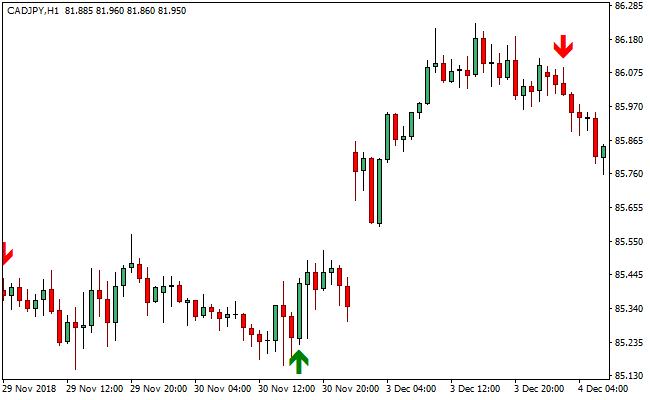
This chart example shows the Trend Signal indicator plotted on the price chart.
The arrows highlight the current trend direction, helping traders identify when momentum shifts from bullish to bearish and vice versa.
Guide to Trade with Trend Signal Indicator
Buy Rules
- Wait for a green upward-pointing arrow to appear below the candles.
- Confirm that recent price action supports higher highs.
- Prefer buy signals that align with the higher-timeframe trend.
- Enter the buy trade at the close of the signal candle.
Sell Rules
- Wait for a red downward-pointing arrow to appear above the price bars.
- Confirm that recent price action supports lower lows.
- Favor sell signals that align with the broader trend.
- Enter the sell trade at the close of the signal candle.
Stop Loss
- For buy trades, place the stop loss below the most recent swing low.
- For sell trades, place the stop loss above the most recent swing high.
- Increase the stop distance slightly when market volatility expands.
Take Profit
- Hold the position while arrows continue to support the active trend.
- Exit part of the trade near key support or resistance levels.
- Close the position when an opposite arrow appears on the chart.
MT4 Trend Signal and Scalping Arrow Forex Strategy
This strategy combines the Trend Signal MT4 Indicator and the Best Forex Scalping Indicator for MT4.
It is designed for traders who want fast and clear entries, especially during active intraday market conditions.
The trend indicator shows the general trend direction using green arrows for buy trends and red arrows for sell trends.
The scalping indicator provides blue arrows for buy signals and red arrows for sell signals.
When combined, they give a simple but effective short-term strategy that works on M1 to M15 charts.
This approach works well because it filters trades with the broader trend and waits for a precise scalping signal before entering.
It improves timing, reduces hesitation, and provides a structured way to scalp without confusion.
The strategy is suitable for both beginners and advanced traders who want a clean rule set for quick entries.
Buy Entry Rules
- The Trend Signal indicator must show a green arrow, confirming a buy trend.
- Wait for the Scalping Indicator to print a blue arrow as the buy signal.
- Enter the trade immediately after the blue arrow closes.
- Place the stop loss below the most recent swing low.
- Set take profit at 1.5 to 2 times the stop loss distance or close at the next opposite signal.
Sell Entry Rules
- The Trend Signal indicator must show a red arrow, confirming a sell trend.
- Wait for the Scalping Indicator to print a red arrow as the sell signal.
- Enter the trade after the candle closes with the red arrow.
- Place the stop loss above the most recent swing high.
- Set take profit at 1.5 to 2 times the stop loss distance or exit at the next opposite arrow.
Advantages
- Simple visual confirmation for both trend direction and entry timing.
- Works on lower time frames for fast results.
- Reduces false entries by combining two independent indicators.
- Suitable for all currency pairs with steady volatility.
- Clear stop loss and take profit placement.
Drawbacks
- May give fewer signals during slow market sessions.
- Not ideal for trading during high-impact news events.
- Requires disciplined trade management due to fast chart movement.
- Trending conditions are required for the best results.
Example Case Study 1
On the EURUSD M5 chart, the Trend Signal indicator printed a green arrow during the London session.
About three candles later, the Scalping Indicator printed a blue arrow, confirming the entry.
The stop loss was placed 8 pips below the swing low.
The pair moved steadily upward, and the take profit was reached at 16 pips.
The move continued even further, but the structured exit already delivered a strong result without stress.
This trade shows how waiting for both confirmations improves consistency.
Example Case Study 2
On GBPJPY M1, a red Trend Signal arrow appeared at the start of a fast downward move.
The Scalping Indicator printed a red arrow shortly after.
A sell entry was taken with a 10 pip stop loss above the nearest high.
Because GBPJPY is more volatile, the take profit was set at 20 pips.
The market continued dropping quickly, and the target was hit within a few minutes.
Strategy Tips
- Focus on active market hours because these signals perform better with momentum.
- Always wait for both indicators to align before entering.
- If the Scalping Indicator gives a signal against the trend, ignore it.
- Avoid trading when the candles are extremely small or the market is flat.
- Consider closing trades early when the price reaches a major support or resistance zone.
Download Now
Download the “trend-signal.ex4” Metatrader 4 indicator
FAQ
What does the Trend Signal indicator show?
It displays bullish and bearish trend direction using upward and downward arrows directly on the chart.
Should I adjust the default settings?
Increasing the Length parameter can help smooth signals and reduce false trend changes.
Does the indicator work best alone?
It can be used by itself, but combining it with ADX, moving averages, or price action can improve results.
Summary
The Trend Signal MT4 indicator offers a clean and efficient way to follow market direction using simple visual trading signals.
Its arrow-based design allows traders to assess trend conditions at a glance.
By adjusting settings and applying additional filters, traders can adapt the indicator to different market environments.
When used with proper risk management, it can be a reliable tool for trend-based trading strategies.





