

About the Neuro Scalper Indicator
The Neuro Scalper Indicator is a specialized technical tool developed for traders who focus on short-term price movements and high-frequency entries.
Unlike traditional oscillators that often lag behind price action, this indicator utilizes a neural-based calculation to identify exhaustion points in the market.
It operates by monitoring price momentum and identifying when a currency pair has reached an overbought or oversold state within a specific timeframe.
The primary benefit of using this tool is its ability to filter out market noise, which is often a major hurdle for scalpers.
By focusing on the 30 and 70 levels, the indicator provides specific zones where price reversals are likely to occur.
The logic behind the tool is centered on capturing quick profit targets, making it ideal for those who prefer to be in and out of trades within a few minutes or hours.
Free Download
Download the “NeuroScalperV1.ex4” MT4 indicator
Key Features
- Neural-based momentum tracking designed specifically for M1, M5, and M15 timeframes.
- Dynamic overbought and oversold levels set at the 70 and 30 marks for precise entry timing.
- Low-lag calculation helps in identifying reversal points earlier than standard oscillators.
- Simplified interface allows for quick decision-making in fast-moving market environments.
- Easy integration with existing scalping systems to act as a secondary confirmation filter.
Indicator Chart
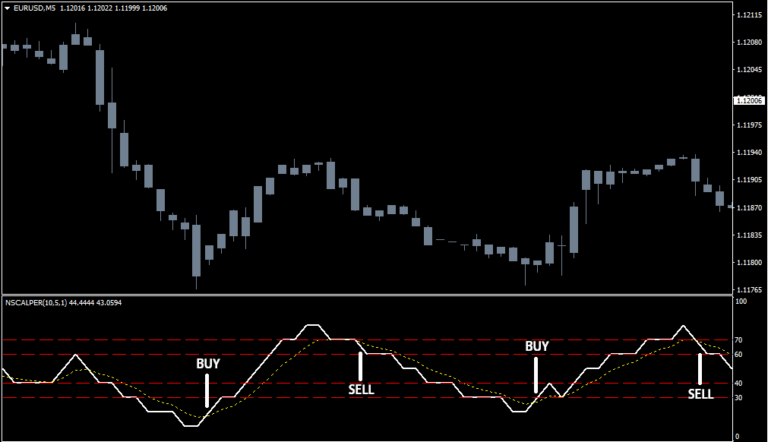
The Neuro Scalper Indicator chart displays a dedicated sub-window where the momentum line fluctuates between defined boundaries.
When the line crosses specific thresholds, it generates actionable buy and sell signals based on current price velocity.
This visual representation allows you to see the exact moment the trend shifts from bearish to bullish or vice versa.
Guide to Trade with Neuro Scalper Indicator
Buy Rules
- Monitor the indicator line as it moves below the 30 level.
- Wait for the Neuro Scalper Indicator to cross back above the 30 level from below.
- Open a buy position immediately upon the candle close of the crossover.
- Target a quick profit of 10 to 15 pips per trade.
Sell Rules
- Monitor the indicator line as it moves above the 70 level.
- Wait for the Neuro Scalper Indicator to fall below the 70 level from above.
- Open a sell position immediately upon the candle close of the crossover.
- Target a quick profit of 10 to 15 pips per trade.
Stop Loss
- Place your protective stop loss a few pips below the most recent swing low for buy entries.
- Set your protective stop loss a few pips above the most recent swing high for sell entries.
- Use a fixed stop loss of 15 to 20 pips if the market volatility is exceptionally high.
- Adjust your exit point to break even once the price has moved halfway toward your profit target.
Take Profit
- Close the trade manually once you reach a profit of 10 to 15 pips.
- Alternatively, exit the trade if the indicator line reaches the opposite extreme level.
- Consistency in taking profits is vital for long-term success with this strategy.
Neuro Scalper Forex Strategy for MT4 Charts
This MT4 scalping strategy combines the Neuro Scalper and the Parabolic SAR indicator.
The Neuro Scalper generates a buy signal when its value rises above 30 from below, and a sell signal when it falls below 70 from above.
The Parabolic SAR provides trend confirmation: green dots below the candlesticks indicate a bullish trend, while red dots above the candlesticks indicate a bearish trend.
This strategy is best used on M1 and M5 charts, making it ideal for scalpers seeking quick trades in line with short-term market momentum.
Buy Entry Rules
- The Neuro Scalper rises above 30 from below, signaling potential upward momentum.
- The Parabolic SAR shows green dots below the candlesticks, confirming a bullish trend.
- Enter a buy trade when both conditions are met.
- Set the stop loss 5–12 pips below the most recent swing low or below the nearest Parabolic SAR dot.
- Set the take profit dynamically: on M1 aim for 10–20 pips, on M5 aim for 20–35 pips, or use a trailing stop to capture longer moves.
Sell Entry Rules
- The Neuro Scalper falls below 70 from above, signaling potential downward momentum.
- The Parabolic SAR shows red dots above the candlesticks, confirming a bearish trend.
- Enter a sell trade when both indicators align.
- Set the stop loss 5–12 pips above the recent swing high or above the nearest Parabolic SAR dot.
- Set the take profit dynamically: on M1 aim for 10–20 pips, on M5 aim for 20–35 pips, or use a trailing stop.
Advantages
- Combines momentum signals with trend confirmation for more precise entries.
- Neuro Scalper threshold crossings and Parabolic SAR dots are easy to read.
- Scalable for M1 and M5 charts, ideal for fast scalping sessions.
- Flexible take profit and stop loss settings allow adaptation to market volatility.
- Works on multiple currency pairs with active intraday moves.
Drawbacks
- Neuro Scalper may lag slightly during rapid price spikes, delaying entry.
- Frequent monitoring is required to catch timely entries and exits.
Case Study 1 — EUR/USD on M1
On the EUR/USD M1 chart, the Neuro Scalper crossed above 30 from below, signaling a buy.
The Parabolic SAR displayed green dots below the candlesticks, confirming the bullish trend.
A buy trade was placed with a stop loss of 8 pips below the recent swing low and a take profit of 15 pips.
Price moved upward and reached the target.
Case Study 2 — GBP/JPY on M5
On the GBP/JPY M5 chart, the Neuro Scalper fell below 70 from above, signaling a sell.
The Parabolic SAR showed red dots above the candlesticks, confirming a bearish trend.
A sell trade was opened with a stop loss 12 pips above the last swing high and a take profit of 30 pips.
Price declined steadily, and the trade closed near the target.
Strategy Tips
- Ensure both the Neuro Scalper signal and Parabolic SAR confirmation before entering a trade.
- Adjust stop loss and take profit according to recent volatility and candle size.
- Check higher timeframes to confirm overall trend direction before scalping lower timeframes.
- Check important support and resistance levels to take profit.
Download Now
Download the “NeuroScalperV1.ex4” Metatrader 4 indicator
FAQ
What are the best timeframes for the Neuro Scalper Indicator?
This tool is optimized for lower timeframes such as the 1-minute, 5-minute, and 15-minute charts.
It excels in these environments because it is tuned to catch small price swings that occur throughout the trading session.
Does the Neuro Scalper Indicator repaint its signals?
The indicator is designed to provide signals based on the close of the candle.
Once a crossover of the 30 or 70 level is confirmed at the close, the signal remains fixed on the chart, allowing for reliable backtesting and execution.
Can I use this indicator for swing trading?
While primarily built for scalping, the logic of the 70 and 30 levels applies to higher timeframes like the H1 or H4.
However, you would need to adjust your take profit and stop loss targets to account for the increased volatility on those charts.
Summary
The Neuro Scalper Indicator provides a streamlined approach to short-term trading by identifying high-probability reversal zones.
Its primary benefit lies in its simplicity, allowing you to react quickly to market changes without being overwhelmed by data.
For traders who struggle with entry timing, this tool offers a mechanical way to enter and exit the market.
To improve results, you might consider pairing it with a long-term trend filter to ensure you are only taking scalping signals that align with the broader market direction.





