

About the Momentum Indicator
The Momentum indicator for MT4 measures the rate of price change over a defined period, providing insight into the strength of market moves.
Quantifying momentum helps traders identify potential trend continuation or reversal points.
Momentum can function as a leading or trend-following tool.
When the indicator forms a bottom and turns up, it suggests buying pressure is increasing.
Conversely, when it forms a top and turns down, selling pressure may be taking over.
Combining Momentum with a longer-term moving average ensures trades align with the overall trend, reducing the risk of countertrend entries and improving trade reliability.
Free Download
Download the “Momentum.mq4” MT4 indicator
Key Features
- Measures the rate of price change to track market momentum.
- Signals potential trend reversals with clear tops and bottoms.
- Works as a leading or trend-following indicator.
- Compatible with any currency pair and timeframe.
Indicator Chart
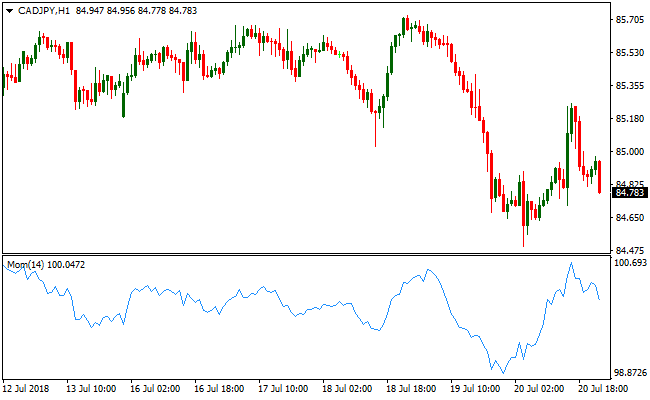
The Momentum indicator appears below the main price area as a single line tracking the rate of price change over time.
The line forms peaks and troughs that indicate potential buy and sell opportunities.
Rising lines suggest bullish pressure, while falling lines indicate bearish pressure.
Guide to Trade with the Momentum Indicator
Buy Rules
- Wait for the indicator to form a bottom and start turning upward.
- Confirm the overall trend is upward with a longer-term moving average.
- Enter a buy trade when bullish momentum strengthens.
- Avoid trades against a dominant downtrend.
Sell Rules
- Wait for the indicator to form a top and start turning downward.
- Confirm the overall trend is downward with a longer-term moving average.
- Enter a sell trade when bearish momentum strengthens.
- Avoid trades against a dominant uptrend.
Stop Loss
- Place the stop below the recent swing low for buy trades.
- Place the stop above the recent swing high for sell trades.
- Exit trades early if momentum reverses sharply against the trade.
Take Profit
- Take partial profits near recent highs or lows to secure gains.
- Exit fully if the indicator forms an opposite signal.
Momentum Indicator and Fisher Forex Scalping Strategy for MT4
This MT4 scalping strategy blends the Momentum indicator with the Fisher Yur4ik Oscillator indicator to spot early trend shifts and capture fast moves.
The Momentum indicator signals potential turns when it forms a bottom and then turns upward for buys, or a top and then turns downward for sells.
The Fisher Yur4ik Oscillator shows trend bias with a green histogram above zero for bullish conditions and a red histogram below zero for bearish conditions.
When both indicators agree on direction and timing, this strategy enters short timeframe trades with higher probability setups.
This strategy is built for scalpers using lower timeframes such as M1, M5, and M15.
Buy Entry Rules
- Confirm the Fisher Yur4ik Oscillator histogram is green and above zero, indicating a bullish trend context.
- Wait for the Momentum indicator to form a bottom and turn back upward, signaling renewed upside pressure.
- Enter a buy trade at the close of the candle where both conditions align.
- Place the stop loss below the most recent swing low or a nearby support area.
- Take profit when the Momentum indicator peaks and turns down or when the Fisher histogram turns red.
Sell Entry Rules
- Confirm the Fisher Yur4ik Oscillator histogram is red and below zero, indicating a bearish trend context.
- Wait for the Momentum indicator to form a top and turn back downward, signaling renewed downside pressure.
- Enter a sell trade at the close of the candle where both conditions align.
- Place the stop loss above the most recent swing high or a nearby resistance area.
- Take profit when the Momentum indicator bottoms and turns up or when the Fisher histogram turns green.
Advantages
- Provides early entry opportunities by combining momentum reversals with trend confirmation.
- Works on multiple lower timeframes, offering flexibility for different trading styles.
- Helps traders avoid entering against the overall trend, increasing trade probability.
- Logical stop loss placement based on price action reduces arbitrary risk levels.
Drawbacks
- Scalping requires constant attention and quick reactions to indicator changes.
- Small pip gains per trade mean consistent execution is needed for profitability.
- Lower timeframe noise can sometimes trigger premature entries or exits.
Example Case Study 1
On the M5 USDJPY chart, the Fisher Yur4ik Oscillator histogram was green above zero, indicating a bullish trend context.
The Momentum indicator formed a bottom and began turning up from oversold levels.
A buy trade was entered on the confirming candle close with the stop loss set below the recent swing low.
Price climbed quickly over the next few bars and the trade was closed when the Momentum peaked and started turning downward.
The trade captured 18 pips on this quick M5 reversal.
Example Case Study 2
On the M1 EURGBP chart, the Fisher Yur4ik Oscillator histogram was red below zero, showing a bearish trend context.
The Momentum indicator reached a top and started turning down from overbought conditions.
A sell trade was entered at the close of the confirming candle, with the stop loss placed above the recent minor resistance.
Price moved lower rapidly, and the trade was closed when the Fisher histogram flipped green, signaling a potential trend shift.
This scalping trade captured 12 pips in fast market action.
Strategy Tips
- Trade during the busiest market sessions such as London and New York for better momentum and tighter spreads.
- Avoid entering trades during quiet market hours with low liquidity to reduce false signals.
- Use limit entries or pending orders near Momentum signal points for better price control.
- Do not force trades when indicators do not clearly align; patience improves win rate.
- Manage risk by keeping position sizes small relative to your account to handle rapid scalping swings.
- Combine entries with minor support and resistance areas to improve accuracy and risk/reward.
Download Now
Download the “Momentum.mq4” Metatrader 4 indicator
FAQ
Can Momentum be used as a standalone indicator?
Yes. Momentum can be used alone to spot trend reversals, but combining it with a trend filter improves trade accuracy.
Which timeframes are most effective for Momentum?
It works on all timeframes. Short-term charts are suited for scalping and intraday trades, while higher timeframes are better for swing or position trading.
How can I combine Momentum with moving averages?
Use a longer-term moving average to confirm the dominant trend. Only take buy signals when the trend is up and sell signals when the trend is down.
Summary
The Momentum indicator provides insight into price movement strength, helping traders anticipate trend reversals or continuation points.
Its peaks and troughs offer actionable entry and exit signals.
When combined with a trend filter, it allows traders to trade in alignment with the dominant trend while managing risk effectively.
Its flexibility across timeframes and pairs makes it a versatile tool for multiple MT4 trading strategies.





