About the Tether Line Forex Signals Indicator
The Tether Line Forex Signals indicator for MT4 is built for traders who prefer straightforward, rule-based signal generation.
It provides continuous buy and sell signals directly on the chart using a single color-changing signal line.
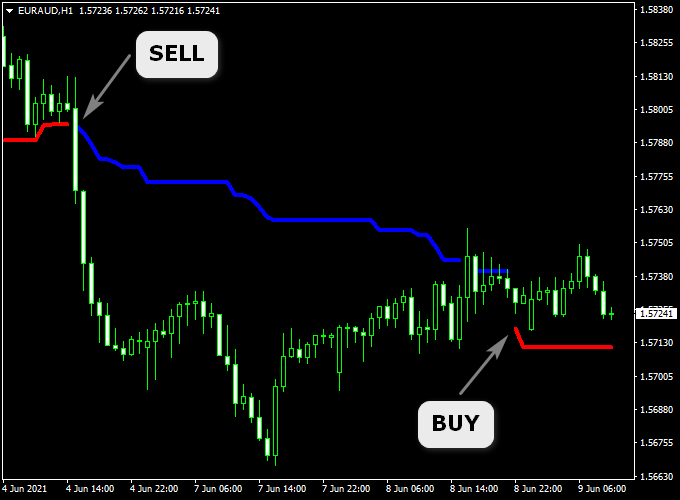
After applying the indicator, a tether line appears on the activity chart and alternates between red and blue.
These color changes reflect shifts in short-term market direction and guide traders on when to stay long or short.
The indicator is always active in the market, meaning it continuously flips between buy and sell conditions.
This makes it suitable for traders who want constant market exposure across different time frames, from fast scalping to longer-term swing trading.
Free Download
Download the “Tether_Line.ex4″ indicator
Key Features
- Single signal line with clear color changes.
- The red line indicates buy-side market conditions.
- The blue line indicates sell-side market conditions.
- Always active with continuous market signals.
- Works on all currency pairs.
- Compatible with all time frames from M1 to weekly.
- Suitable for scalping, day trading, and swing trading.
Indicator Chart
The chart shows the Tether Line Forex Signals indicator plotted directly on the price chart.
As the signal line changes color, traders can quickly identify shifts between buy and sell conditions without additional indicators.
Guide to Trade with Tether Line Forex Signals
Buy Rules
- Wait for the Tether signal line to turn red.
- Confirm stable market conditions on the chosen time frame.
- Open a buy trade immediately after the color change.
Sell Rules
- Wait for the Tether signal line to turn blue.
- Ensure sufficient market activity.
- Open a sell trade once the color shift is confirmed.
Stop Loss
- Place the stop loss beyond the most recent minor swing.
- Adjust the stop distance based on the active time frame.
Take Profit
- Exit the trade when the signal line switches to the opposite color.
- Optionally lock in partial profits during strong momentum moves.
Tether Line + Best Forex Scalping Indicator Strategy for MT4 (M1, M5 & M15)
This strategy combines the Tether Line Forex Signals Indicator for MT4 and the Best Forex Scalping Indicator for MT4.
Using both indicators together offers a dual confirmation setup for rapid scalping entries on short timeframes (M1, M5, M15).
The idea is simple: follow the underlying trend signaled by the Tether Line (red = bullish, blue = bearish) and then act when the scalping indicator gives a matching arrow.
This approach allows traders to enter with the momentum of the move and the trend bias aligned.
It’s intended for traders comfortable with fast decision-making, smaller targets, and disciplined exits.
Buy Entry Rules
- Check that the Tether Line is red, indicating the trend has turned bullish.
- Wait for a blue arrow from the Best Forex Scalping Indicator indicating a buy signal.
- Enter a buy order as soon as the blue arrow appears and a new candle opens.
- Place a stop loss a few pips below the most recent swing low or the recent candle low (for example: M1 = 3-6 pips, M5 = 5-10 pips, M15 = 8-15 pips).
- Set a take profit target: M1: 4-8 pips, M5: 10-20 pips, M15: 20-30 pips, or exit earlier if a red arrow appears (sell signal) or the Tether Line turns blue.
Sell Entry Rules
- Confirm the Tether Line is blue, indicating a bearish trend.
- Wait for a red arrow from the Best Forex Scalping Indicator signaling a sell entry.
- Enter the sell trade at the new candle open, following the red arrow.
- Place stop loss a few pips above the recent swing high or recent candle high (M1: 3-6 pips, M5: 5-10 pips, M15: 8-15 pips).
- Set a take profit: M1: 4-8 pips, M5: 10-20 pips, M15: 20-30 pips, or exit earlier if a blue arrow appears or the Tether Line turns red.
Advantages
- The Tether Line gives a clear trend bias (red/blue), helping avoid counter-trend trades.
- The scalping indicator’s arrow gives quick entry timing, aligning with short-term moves.
- You get a structured system for M1, M5, and M15 charts, suitable for active scalpers.
- Combining trend line and signal arrow helps filter out random noise and weak setups.
- Clear stop loss and take profit rules make trade management simpler.
Drawbacks
- Short timeframes like M1 and M5 have high noise: false arrows or quick reversals can occur.
- If your broker has wide spreads or slow execution, small targets may be eaten by cost or slippage.
- During low volatility or range markets, the trend line may flip often, and the strategy may churn losses.
Example Case Study 1 – USDJPY M5
On the USDJPY pair during the London session, the Tether Line turned red, indicating a bullish trend.
Shortly after, a blue arrow from the scalping indicator appeared at 149.25.
A buy order was placed at 149.26 with a stop loss at 149.16 (10 pips) and a take profit at 149.45 (19 pips).
Price moved quickly and hit the target in about 12 minutes.
The trend line remained red throughout, and no reversal arrow appeared, validating the trade.
Example Case Study 2 – AUDUSD M1
During the Asian to London session transition, the Tether Line switched to blue, indicating a bearish trend on AUDUSD.
Shortly after, the scalping indicator produced a red arrow at 0.6732.
A sell trade was entered at 0.6731 with a stop loss at 0.6737 (6 pips) and a target at 0.6725 (6 pips).
The trade reached the target in under 5 minutes as the price followed the bearish bias, and no opposite arrow appeared.
Strategy Tips
- Prefer trading during high liquidity sessions (London or New York overlap) when moves are sharper and spreads are tighter.
- Use major pairs like EURUSD, USDJPY, GBPUSD, and AUDUSD for tighter spreads and better execution on M1 and M5.
- Before entry, ensure the Tether Line has held its color (red or blue) for at least 2-3 candles to confirm trend bias, avoiding immediate flips.
- If you see a trend line color change (red to blue or blue to red), exit any open trade and wait for the next valid setup.
- Keep a max daily trade count and stop after a set number of losses to preserve capital and avoid overtrading on scalps.
Download Now
Download the “Tether_Line.ex4” Metatrader 4 indicator
FAQ
How does the Tether Line generate signals?
Signals are generated through color changes in the tether line, reflecting shifts in short-term price behavior.
Is the indicator suitable for continuous trading?
Yes. The indicator is always engaged, making it suitable for traders who prefer ongoing market participation.
Does it work better on lower or higher time frames?
Lower time frames provide more frequent signals, while higher time frames tend to produce fewer but steadier setups.
Summary
The Tether Line Forex Signals indicator for MT4 offers a simple approach to trading with continuous buy and sell signals.
Its color-based logic makes decision-making fast and consistent.
The indicator adapts well to different trading styles and time frames.
With proper risk management, it can support disciplined and active trading routines.





