About the BraidFilter Indicator
The BraidFilter Forex Indicator for MT4 is a free oscillator-based trading tool designed to help traders identify market trends with greater precision.
It appears in a separate indicator window and uses three colored lines to analyze price behavior and momentum.
By comparing the relationship between these lines, traders can quickly determine whether the market is trending or preparing for a possible direction change.
BraidFilter is particularly useful for scalpers and day traders who rely on short-term trend confirmation.
The indicator helps reduce market noise and focuses on stronger price movements, making it easier to avoid low-quality trades during choppy conditions.
It can be traded on its own or used as a confirmation tool alongside price action or other technical indicators.
Free Download
Download the “BraidFilter.mq4” MT4 indicator
Key Features
- Displays three colored signal lines in a separate window.
- Helps identify bullish and bearish market trends.
- Provides early trend change indications.
- Suitable for scalping and intraday trading.
- Works on all currency pairs and timeframes.
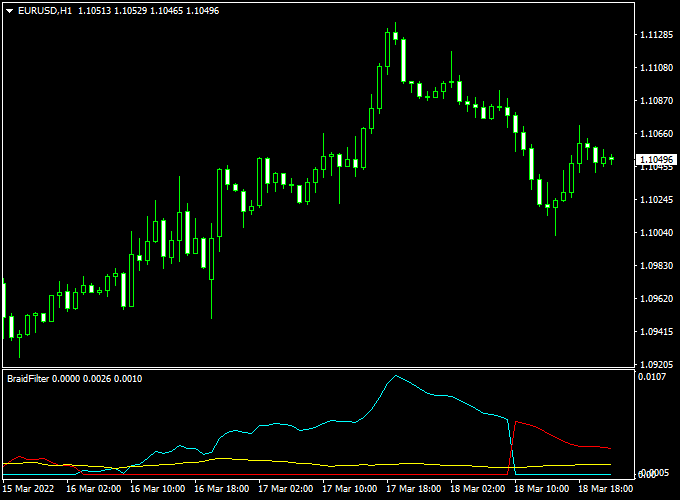
Indicator Chart
This chart example demonstrates how traders can use line separation to confirm trend strength and line crossings to time trade entries and exits.
Crossovers between the blue and red lines highlight potential buy and sell opportunities.

Guide to Trade with the BraidFilter Indicator
Buy Rules
- Wait for the blue BraidFilter line to cross above the red line.
- Confirm the crossover after the candle closes.
- Open a buy trade at the start of the next candle.
Sell Rules
- Wait for the red BraidFilter line to cross above the blue line.
- Confirm the crossover after the candle closes.
- Open a sell trade at the start of the next candle.
Stop Loss
- Place the stop loss below the nearest swing low for buy trades.
- Place the stop loss above the nearest swing high for sell trades.
Take Profit
- Set take profit near the next support or resistance zone.
- Use a fixed risk-to-reward ratio such as 1:2.
- Exit the trade when an opposite BraidFilter signal appears.
BraidFilter + Precise Trend Forex Scalping Strategy for MT4
This MT4 scalping strategy combines the BraidFilter Forex Indicator MT4 and the Precise Forex Market Trend Indicator MT4 to provide clear and timely entries for short-term trades.
The first indicator gives a signal when the blue line of BraidFilter turns back above the red line (buy) or when the red line turns back above the blue line (sell).
The second indicator confirms market direction with green bars for a buy trend and red bars for a sell trend.
Using both gives you a dual-confirmation setup: one crossover entry plus one trend-bar confirmation.
This works well for scalpers on shorter timeframes like 1-minute to 15-minute charts, in liquid pairs, and during active sessions (London / New York).
It’s designed for experienced traders comfortable with quick entries and exits, as well as newer traders looking for structured signals rather than guessing.
Buy Entry Rules
- Wait until the BraidFilter’s blue line crosses back above the red line (signal to buy).
- Confirm that the Precise Trend indicator shows green bars (indicating a buy trend).
- Enter a buy position immediately after both signals align on the same candle or bar.
- Set stop loss 8 to 12 pips below the most recent swing low (for a typical 5-15 minute chart). Adjust according to pair volatility.
- Set take profit target between 15 to 25 pips or exit when the Precise Trend bars turn red
- Or when the BraidFilter blue line crosses back below the red line (early exit signal).
Sell Entry Rules
- Wait until the BraidFilter’s red line crosses *back above* the blue line (signal to sell).
- Confirm that the Precise Trend indicator shows red bars (indicating a sell trend).
- Enter the sell position when both signals occur on the same candle or bar.
- Set stop loss 8 to 12 pips above the most recent swing high.
- Set take profit target between 15 to 25 pips
- Or exit when the Precise Trend bars turn green or when the BraidFilter red line crosses back below the blue line.
Advantages
- Dual-confirmation reduces false entries: crossover + trend color.
- Scalping focused: small profit targets and quick exits match active sessions.
- Works across multiple currency pairs, giving you flexibility to switch when one pair is quiet.
- Clear rules make it easier to back-test, refine, and automate or signal trade decisions.
Drawbacks
- It may produce fewer signals in quiet or range-bound markets where the crossover doesn’t happen.
- Short stop losses mean you must accept that some trades will hit stop quickly—risk management is vital.
Example Case Study 1: AUD/USD, 5-Minute Chart
During the Sydney market open, the AUD/USD pair showed a clear trend shift.
On the 5-minute chart, the BraidFilter blue line crossed above the red line at 0.6720, and at the same time, the Precise Trend indicator turned green.
A buy trade was entered with a 10-pip stop loss (set at 0.6710) and a 20-pip take profit target (0.6740).
Within 35 minutes, the price moved to 0.6741, and the take profit was hit.
The dual confirmation avoided jumping in too early and caught a clean scalping move.
Example Case Study 2: EUR/JPY, 15-Minute Chart
On the EUR/JPY 15-minute chart during the European session, the BraidFilter red line crossed above the blue line at 148.50, and the Precise Trend indicator showed red bars.
A sell trade was opened with a stop loss at 148.65 (15 pips above swing high) and take profit at 148.25 (25 pips).
The pair moved down steadily over the next 40 minutes, and the target was achieved at 148.24.
Strategy Tips
- Keep your chart clean: only the two indicators and price action, remove clutter to focus on signals.
- Use a demo account to test the settings of stop loss / take profit for each currency pair because volatility differs by pair.
- When trading quiet markets, consider widening take profit modestly or reducing trade size.
Download Now
Download the “BraidFilter.mq4” MT4 indicator
FAQ
How does BraidFilter identify trends?
The indicator compares multiple smoothed price calculations and measures their relationship to determine trend direction.
Is BraidFilter better for trending markets?
Yes, it performs best when the market shows sustained directional movement.
Can I use BraidFilter for scalping?
Yes, many traders use it on lower timeframes to capture short-term momentum moves.
Does the indicator generate many false signals?
False signals are reduced when trades are taken in the direction of the prevailing trend.
Summary
The BraidFilter Forex Indicator for MT4 offers traders a practical way to follow market trends using a clean and responsive oscillator.
Its crossover-based signals help with timing entries, while flexible trade management allows adaptation to different trading styles.
With proper risk management and confirmation, BraidFilter can become a valuable component of a disciplined trading approach.





