
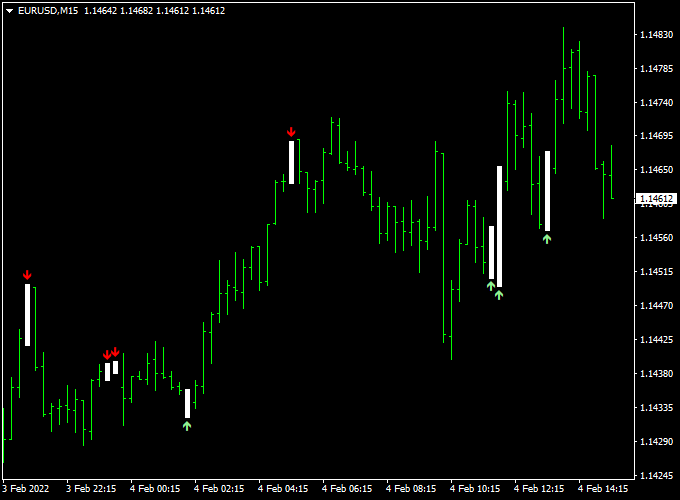
About the Scalper Signal Forex Indicator
The Scalper Signal indicator for MT4 is a practical tool that takes the guesswork out of quick intraday trading.
Instead of manual analysis that can lead to hesitation, this system uses a refined algorithm to alert you exactly when the market is ready to move.
The Scalper Signal indicator for MT4 delivers scalping signals for any currency pair on any time frame, even on the daily chart.
This versatility makes it an excellent choice for both aggressive scalpers and more patient swing traders.
The signals appear on the main MT4 chart window in the form of green and red colored signal arrows.
Because it is highly optimized, the indicator is very reliable, lightweight, and will not slow down your trading platform.
Free Download
Download the “scalper signal.mq4” indicator for MT4
Key Features
- It provides instant visual entry points using green and red arrows directly on the price chart.
- The indicator works across all timeframes, allowing for consistent trading from M1 to Daily charts.
- It features a non-lagging algorithm designed to catch the early stages of a momentum shift.
- The interface remains clean and simple, making it easy to identify key levels without distraction.
- It is optimized for fast performance to ensure signals are delivered the moment a candle closes.
Indicator Chart
The Scalper Signal Forex Indicator chart shows price action with specific entry triggers placed above or below the candles.
A green arrow appears below a candle to indicate a bullish shift, while a red arrow appears above a candle to signal a bearish move.
By looking at where these arrows form relative to support and resistance, a trader can easily filter out the highest probability trades.
Guide to Trade with the Scalper Signal Forex Indicator
To achieve the best results with this tool, follow these specific trading rules.
Buy Rules
- Monitor the chart for a shift in momentum from bearish to bullish.
- Open a buy position when the green arrow gets printed on the chart.
- Wait for the candle to close to ensure the signal is confirmed.
- Check that the price is currently trading above a recent swing low or support zone.
Sell Rules
- Watch for a transition where the market starts to lose buying power.
- Open a sell position when the red arrow gets printed on the chart.
- Verify the signal by waiting for the current candle to finish its period.
- Confirm that the market has enough room to move lower before reaching major support.
Stop Loss
- For buy trades, place the stop loss a few pips below the signal arrow or recent low.
- For sell trades, place the stop loss a few pips above the signal arrow or recent high.
- Always keep your risk levels tight to maintain a professional edge in scalping.
Take Profit
- Aim for 7-40 pips profit per trade, depending on your chosen time frame.
- Alternatively, exit the position when an arrow of the opposite color appears.
- You can also target the next horizontal support or resistance level for a clean exit.
Scalper Signal + Cynthia’s Trend Bars MT4 Scalping Strategy
This MT4 scalping strategy pairs the Scalper Signal Forex Indicator with the Cynthia’s Trend Bars Indicator.
It is designed for fast-paced entries on short timeframes (M1–M15) across several currency pairs (e.g., EUR/USD, GBP/USD, AUD/USD, USD/JPY).
The idea is simple: use clear signal arrows to trigger trades, and trend bars to filter direction and momentum.
This strategy is best suited for active traders comfortable executing multiple trades per session.
The Scalper Signal indicator shows a green arrow for a buy and a red arrow for a sell.
The Cynthia’s Trend Bars indicator colors the bars — green bars indicate a buy trend, purple bars indicate a sell trend.
By combining them, you aim to trade only when both the arrow and the trend bar color align, improving accuracy and reducing random entries.
Buy Entry Rules
- Wait for a green arrow on the Scalper Signal indicator to appear on the chart.
- Ensure the current bars from Cynthia’s Trend Bars are green, showing bullish trend momentum.
- Enter a buy position immediately after confirmation of both signals.
- Set a stop loss a few pips below the most recent swing low (or below the arrow’s candle low).
- Set a take profit target of 10–20 pips (for very short M1/M5 trades) or 20–40 pips (for M15)
- OR exit when Cynthia’s Trend Bars change from green to purple, signaling trend weakening.
Sell Entry Rules
- Wait for a red arrow on the Scalper Signal indicator to appear on the chart.
- Ensure the Cynthia’s Trend Bars are purple, indicating bearish trend momentum.
- Enter a sell position immediately after both signals align.
- Place a stop loss a few pips above the most recent swing high (or above the arrow’s candle high).
- Set a take profit target of 10–20 pips (on M1/M5) or 20–40 pips (on M15)
- OR exit when Cynthia’s bars switch from purple to green, signaling trend reversal or weakening.
Advantages
- Simple and visually clear: arrows and bar colors make signal identification fast.
- Designed for scalping: small stop losses and profit targets allow multiple trades per session.
- Works across several major currency pairs with good liquidity, reducing slippage and cost.
- Filter built in via trend bars helps avoid trading in flat or choppy markets.
- Easy to apply for traders who monitor short timeframes actively.
Drawbacks
- Scalping demands high discipline and fast execution; frequent monitoring is required.
- In very sideways or low-volatility conditions, the arrows may flash often but result in losses or whipsaws.
- The strategy may incur higher transaction costs (spreads/commissions) due to frequent trades, especially on less liquid pairs.
- Mistiming or delayed reaction to the arrow and bar color could result in poor risk-reward or quick stop-outs.
Example Case Study 1: EUR/USD M5 Chart
During the London session, EUR/USD on an M5 chart printed a green arrow from the Scalper Signal indicator at 1.0952. At the same time, Cynthia’s Trend Bars turned green.
A buy trade was entered at 1.0953 with a stop loss at 1.0943 and a take profit target of 1.0970 (17 pips).
The trade closed at the target within 25 minutes. Monitoring the bar colors allowed the trader to stay in till momentum faded.
Example Case Study 2: AUD/USD M1 Chart
In a rapid session for AUD/USD on M1, a red arrow appeared at 0.6738 signaling a sell. Cynthia’s Trend Bars had switched to purple at the same time.
A sell position was opened at 0.6738, stop loss at 0.6743, take profit at 0.6725 (13 pips).
Within 10 minutes, the pair dropped and hit the target. The short timeframe demanded quick monitoring, but the reward was realized swiftly.
Strategy Tips
- Trade mainly during the highest liquidity windows (London and New York overlap) for tighter spreads.
- Choose major currency pairs such as EUR/USD, GBP/USD, USD/JPY, and AUD/USD to reduce spread and slippage.
- If Cynthia’s Trend Bars are mixed or flat (neither clearly green nor purple), skip the trade to avoid sideways noise.
- Keep a tight stop loss relative to your take profit (for example, 1:1 or 1:1.5 risk-reward) and risk only a small percentage of your account per trade.
- Use a demo account first to familiarise yourself with how quickly signals and bars change on shorter timeframes.
Download Now
Download the “scalper signal.mq4” indicator for Metatrader 4
FAQ
Does this indicator repaint its signals?
The Scalper Signal is designed to be a reliable partner, meaning the arrows stay fixed once the candle has officially closed.
This is vital for backtesting and for building trust in the system.
When you see a signal on your historical data, you can be sure that is exactly where it appeared during live market conditions.
What is the best timeframe for this indicator?
While it works on any period, most scalpers prefer the 1-minute, 5-minute, or 15-minute charts.
On these lower timeframes, you can find multiple signals throughout the day.
However, if you prefer a slower pace, using it on the 1-hour or 4-hour charts can help you catch larger trend reversals with less screen time.
Can I use these arrows as an exit signal?
Yes, the Forex Scalper Signal indicator can be used for both trade entry and exit.
Many traders find success by entering on a green arrow and holding the position until a red arrow appears.
This allows you to ride the majority of a trend while having a clear, objective rule for when to take your profits off the table.
Summary
The Scalper Signal for MT4 is an effective momentum tool that assists in determining the appropriate timing for market entries.
By offering a simplified view of trend changes, it helps you stay focused on execution rather than over-analysis.
This tool helps traders maintain a disciplined routine by highlighting levels where the market is statistically likely to move.
Using this indicator allows you to filter high-risk trades and focus on high-conviction signals.





