
About the Matador Forex Profit Indicator
The Matador Forex Profit indicator for MetaTrader 4 is a counter-trend trading tool that delivers buy and sell signals on the main chart.
It is designed to help traders spot short-term reversals while the trend histogram shows overall market momentum.
The indicator displays signals using colored arrows directly on the price chart and shows trend strength in a separate histogram window.
This combination allows traders to enter trades with better timing while keeping an eye on the market’s broader movement.
Its straightforward design means traders can start using it immediately without a complicated setup.
Free Download
Download the “Matador.mq4” indicator for MT4
Key Features
- Counter-trend buy and sell signals directly on the chart.
- Blue and yellow arrows indicate entry points.
- The trend histogram in a separate window shows overall momentum.
- Ready-to-use indicator with minimal setup.
Indicator Chart
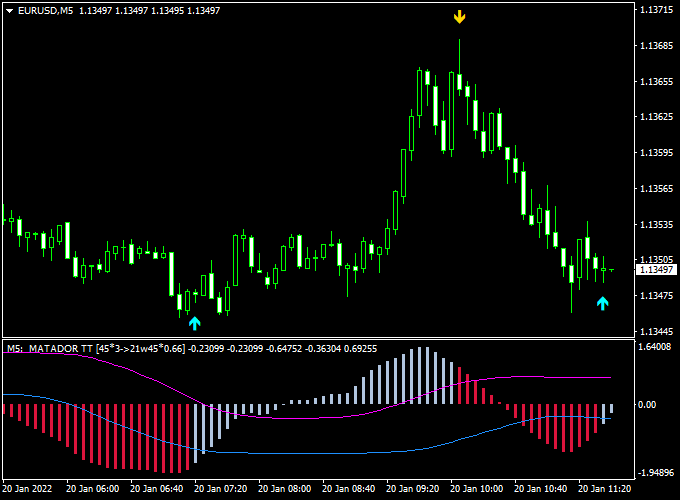
The chart shows the Matador Forex Profit indicator with arrows marking buy and sell opportunities.
The histogram in the lower window indicates market strength, helping traders gauge if a counter-trend trade aligns with momentum or is riskier.
Guide to Trade with Matador Forex Profit Indicator
Buy Rules
- Enter a buy trade when a blue arrow appears on the chart.
- Confirm the histogram is supporting upward movement.
Sell Rules
- Enter a sell trade when a yellow arrow appears on the chart.
- Confirm the histogram shows downward movement.
Stop Loss
- For buy trades, place the stop loss slightly below the last consolidation zone or swing low.
- For sell trades, place the stop loss slightly above the last consolidation zone or swing high.
- Adjust the buffer distance based on recent candle ranges to avoid getting stopped out by normal market noise.
Take Profit
- Set take profit near the next visible pivot or previous high/low instead of a fixed pip target.
- Consider closing part of the position when the histogram shows weakening momentum.
- If the histogram starts reversing while in profit, exit the remaining position early to secure gains.
Practical Trading Tips
- Use the histogram to filter counter-trend trades for better timing.
- Stick to pairs with clear support and resistance levels for safer entries.
- Combine with other indicators to confirm reversals and reduce false signals.
- Focus on one or two pairs at a time to manage risk effectively.
Matador FX Profit and Afirma Forex Trend Day Trading Strategy
The MT4 Matador Forex Profit and Afirma Forex Trend Strategy is designed for day trading and short-term swing trading on M15 and H1 charts.
It combines precise arrow signals from the Matador Forex Profit Indicator with trend confirmation from the Afirma Forex Trend Indicator.
It allows traders to enter trades in the direction of the prevailing trend while avoiding false signals.
This strategy is suitable for active traders looking for clear and reliable entries in major and minor currency pairs.
The Matador Forex Profit Indicator displays blue arrows for buy signals and yellow arrows for sell signals, providing clear entry points.
The Afirma Forex Trend Indicator uses a colored line system to indicate trend direction: blue for bullish trends and red for bearish trends.
Combining these indicators helps traders confirm trend alignment before entering trades, increasing the probability of success.
Buy Entry Rules
- Ensure the Afirma Forex Trend Indicator line is blue, indicating a bullish trend.
- Wait for a blue arrow from the Matador Forex Profit Indicator as a buy signal.
- Enter a long trade at the next candle open after the arrow appears.
- Place a stop loss below the most recent swing low or just below the Afirma blue line.
- Take profit at the next resistance level or if the Afirma line turns red.
Sell Entry Rules
- Confirm that the Afirma Forex Trend Indicator line is red, indicating a bearish trend.
- Wait for a yellow arrow from the Matador Forex Profit Indicator to appear as a sell signal.
- Enter a short trade at the next candle open after the arrow signal.
- Set a stop loss above the most recent swing high or just above the Afirma red line.
- Take profit at the next support level or if the Afirma line turns blue.
Advantages
- Combines clear arrow entry signals with trend confirmation for higher accuracy.
- Easy-to-follow system suitable for day trading and short-term swings.
- Works on multiple currency pairs with clear trend alignment.
- Reduces false entries by confirming signal direction with the trend indicator.
- Visual signals simplify decision-making for intraday traders.
Drawbacks
- Requires attention to both indicators to ensure proper entry.
- Stop losses must be carefully placed to avoid being hit by short-term volatility.
- Not suitable for scalping on very short timeframes like M1.
Case Study 1: EUR/USD M15
During the London session, the Afirma Forex Trend line was blue, signaling a bullish trend.
A blue arrow from the Matador Forex Profit Indicator appeared at 1.0870, confirming a buy opportunity.
A long trade was entered with a stop loss at 1.0860 and a take profit at 1.0890.
The price moved steadily upward, reaching the target within 40 minutes for a +20 pip gain.
Combining the trend line with the arrow signal ensured a high-probability entry.
Case Study 2: GBP/JPY H1
During the New York session, the Afirma line turned red, showing a bearish trend.
A yellow arrow from the Matador indicator appeared at 151.55, indicating a sell signal.
A short trade was opened with a stop loss at 151.75 and a take profit at 150.90.
The price declined steadily, achieving +65 pips.
The alignment of the arrow signal and trend line helped identify a precise short-term trade.
Strategy Tips
- Trade primarily during active sessions like London and New York for better momentum.
- Always confirm the trend line color before taking arrow signals as entries.
- Use M15 or H1 charts for structured intraday setups and reduced noise.
- Manage risk with stop losses placed relative to recent swing highs or lows.
- Partial profit-taking can help protect gains in volatile markets.
Download Now
Download the “Matador.mq4” indicator for Metatrader 4
FAQ
How does Matador identify counter-trend opportunities?
It uses a combination of price action and momentum analysis via the histogram. Signals appear when a short-term reversal is likely against the current trend.
Can I trade multiple pairs with this indicator?
Yes. The indicator works on any currency pair, but it is recommended to focus on the pairs you monitor closely to manage risk.
Does the trend histogram confirm all signals?
The histogram shows momentum strength. While not every signal must align with it, using it as confirmation can reduce false trades.
Is it better for intraday or swing trading?
Matador works for both. Short-term traders benefit from quick entries, while swing traders can use the histogram to time more strategic moves.
Summary
The Matador Forex Profit Indicator MT4 is a practical tool for spotting counter-trend trading opportunities.
Its colored arrows provide clear entry signals, while the histogram helps assess market momentum and risk.
This indicator works on all currency pairs and time frames, making it flexible for both intraday and swing strategies.
Proper stops, defined profit targets, and attention to momentum allow traders to improve trade timing, filter out bad signals, and control multiple positions more effectively.
Matador is lightweight, easy to use, and suitable for beginners as well as experienced traders seeking precise counter-trend entries.





