About the Forex Goiler Signal Indicator
The Forex Goiler Signal Indicator for MT4 is a complete trading system designed to simplify Forex trading.
It provides clear entry points, two take profit levels, and a stop loss for each trade, all displayed directly on the chart.
This makes it easy for traders to plan and manage trades without complicated setups.
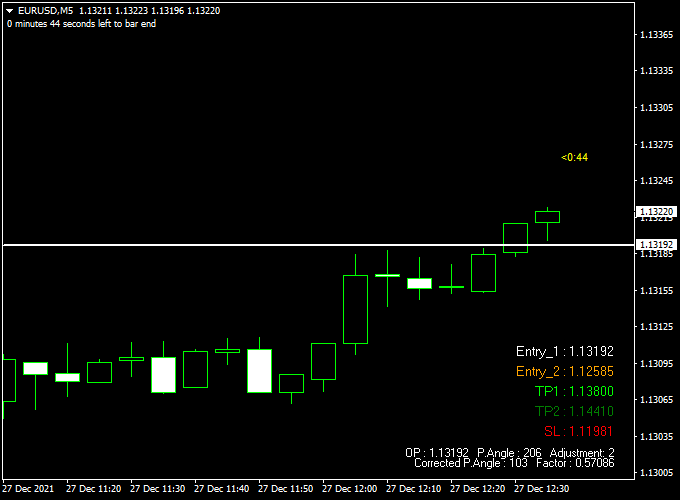
Displayed on the main MT4 chart, the indicator shows Entry 1 and Entry 2 levels, a stop loss, and two take profit targets.
Buy signals appear when the indicator recommends opening a long trade, and sell signals appear when a short trade is suggested.
This system works for both beginners and experienced traders seeking a structured approach to Forex trading.
Free Download
Download the “Forex_goiler.ex4” indicator for MT4
Key Features
- Complete trading system with Entry, Stop Loss, and two Take Profit levels
- Buy and sell signals are displayed directly on the main chart
- Easy-to-read levels for precise trade management
- Suitable for scalping, day trading, and short-term swing trading
- Beginner-friendly setup with no complicated settings
- Visual display of all trade information for quick decision-making
Indicator Chart
The chart below shows the Forex Goiler Signal Indicator applied to an MT4 chart.
It displays buy and sell signals along with Entry 1, Entry 2, stop loss, and two take profit levels.
Traders can follow these signals to enter trades and manage them efficiently.

Guide to Trade with the Forex Goiler Signal Indicator
Buy Rules
- Wait for a buy signal to appear on the chart
- Confirm price action supports the bullish direction
- Open a buy trade at the next candle open
Sell Rules
- Wait for a sell signal to appear on the chart
- Confirm price action supports the bearish direction
- Open a sell trade at the next candle open
Stop Loss
- For buy trades, place the stop just below Entry 1 or the recent swing low
- For sell trades, place the stop just above Entry 1 or the recent swing high
- Adjust the stop distance depending on market volatility and timeframe
- Use tighter stops for scalping and wider stops for longer-term trades
Take Profit
- Target Take Profit 1 for partial profit-taking
- Target Take Profit 2 for full exit of the trade
- Consider trailing stops if the market moves strongly in your favor
Practical Tips
- Use Entry 2 to enter trades more safely.
- Take partial profit at Take Profit 1 and let the rest run to Take Profit 2.
- Place stops near recent swing highs or lows.
- Check higher timeframes for trend direction.
- Test on a demo account before trading live.
- Avoid trades in choppy or sideways markets.
- Track which pairs work best with this system.
Forex Goiler Signal + 4 Time Frame Hull Trend MT4 Intraday Strategy
This MT4 intraday strategy merges the Forex Goiler Signal Indicator with the 4 Time Frame Hull Trend Indicator.
The Goiler Signal Indicator plots Entry 1 and Entry 2 levels along with a stop loss and two take profit levels.
The 4 Time Frame Hull Trend Indicator confirms the overall market direction: all four histogram bars are green for bullish trends and purple for bearish trends.
This combination helps traders filter out false signals and capture intraday moves more effectively.
Buy Entry Rules
- Wait for the Forex Goiler Signal Indicator to plot an Entry 1 or Entry 2 Buy level.
- Confirm that all four histogram bars of the 4 Time Frame Hull Trend Indicator are green, showing a bullish trend.
- Enter the buy trade at the Goiler Entry level.
- Use the stop loss level provided by the Goiler Signal Indicator.
- Take profit at the first Goiler take profit level for quick gains or the second level for extended intraday moves.
Sell Entry Rules
- Wait for the Forex Goiler Signal Indicator to plot an Entry 1 or Entry 2 Sell level.
- Confirm that all four histogram bars of the 4 Time Frame Hull Trend Indicator are purple, showing a bearish trend.
- Enter the sell trade at the Goiler Entry level.
- Use the stop loss level provided by the Goiler Signal Indicator.
- Take profit at the first Goiler take profit level for quick gains or the second level for extended intraday moves.
Advantages
- Combines precise entry and exit levels with trend confirmation.
- Reduces false signals by filtering trades through the Hull Trend Indicator.
- Provides predefined stop loss and two take profit levels for risk management.
- Flexible for both short intraday scalps and longer intraday trades.
Drawbacks
- Requires waiting for both indicators to align, which may reduce the number of trades.
- False signals can still occur during sudden news spikes.
- Stop losses can be hit in volatile markets even with trend confirmation.
- Small timeframes may produce too many signals; careful filtering is needed.
- Performance may vary depending on the currency pair’s volatility.
Case Study 1: EUR/USD M15 Buy
The Forex Goiler Signal Indicator plotted an Entry 1 Buy at 1.0870 with a stop loss at 1.0850 and two take profit levels at 1.0890 and 1.0910.
The 4 Time Frame Hull Trend Indicator showed all four histogram bars green, confirming a bullish trend.
Entered the buy trade at 1.0870.
The first take profit at 1.0890 (20 pips) was hit within 30 minutes, and the second target at 1.0910 (40 pips) was reached later in the session.
Case Study 2: GBP/USD M30 Sell
The Forex Goiler Signal Indicator plotted an Entry 2 Sell at 1.2735 with a stop loss at 1.2765 and two take profit levels at 1.2705 and 1.2680.
The 4 Time Frame Hull Trend Indicator showed all four histogram bars purple, confirming a bearish trend.
Entered the sell trade at 1.2735.
The first take profit at 1.2705 (30 pips) was hit within 40 minutes, and the second target at 1.2680 (55 pips) was reached before the London close.
Strategy Tips
- Trade during active sessions (London and New York) for stronger moves toward take profit levels.
- Use the first take profit level for fast scalps and the second for larger intraday targets.
- Always check the Hull Trend Indicator first to confirm the direction before taking the Goiler signal.
- Avoid trading around high-impact news releases to minimize false breakouts.
- Test the settings on a demo account before live trading to understand signal behavior.
Download Now
Download the “Forex_goiler.ex4” indicator for Metatrader 4
FAQ
What is the difference between Entry 1 and Entry 2?
Entry 1 is the primary suggested trade level, while Entry 2 is an optional secondary level for more cautious entries or scaling into a position.
How should I use the two Take Profit levels?
Take Profit 1 is ideal for partial profit-taking to secure gains early, and Take Profit 2 is for full exit, maximizing the trade if the trend continues.
Can the indicator be used for automated trading?
The indicator is mainly visual, but the levels and signals can be integrated with Expert Advisors (EAs) for automated strategies if supported by MT4.
Is it suitable for different trading styles?
Yes, it works for scalping, intraday, and short-term swing trading. Adjust your timeframe and stop loss according to the style.
How do I handle trades during high volatility?
During high volatility or news events, consider widening your stop loss or waiting for confirmation before entering a trade to avoid being stopped out prematurely.
Summary
The Forex Goiler Signal Indicator for MT4 offers a complete and structured trading system with clear entries, stop loss, and two take profit targets.
It is beginner-friendly, easy to interpret, and suitable for multiple trading styles, including scalping, day trading, and short-term swing trades.
For optimal results, traders can combine it with trend confirmation or support/resistance tools.
Used with proper risk management, the Forex Goiler Signal Indicator can become a reliable part of any Forex trading strategy.





