About the Forex Space Scalper Indicator
The Forex Space Scalper Indicator for MT4 is a non-repaint scalping tool designed to provide multiple trade entries and exits throughout active market sessions.
It helps traders take advantage of short-term price movements with simple and reliable signals.
This beginner-friendly indicator works directly on the main MT4 chart without complicated settings.
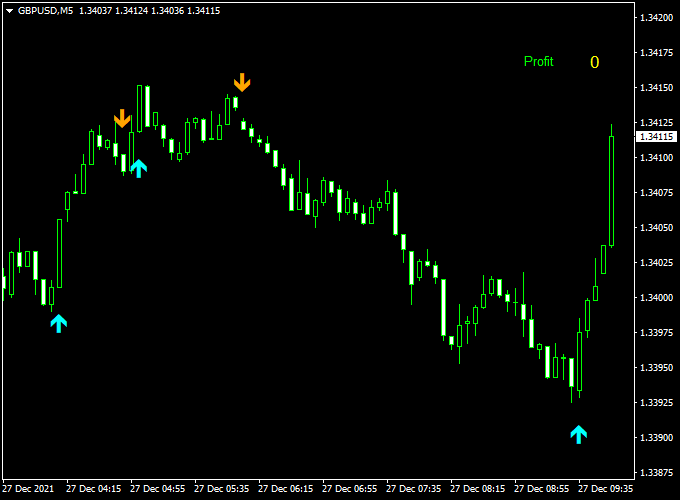
The indicator plots blue and orange arrows directly on the price chart.
Blue arrows indicate buy opportunities, while orange arrows signal sell opportunities.
By following these arrows, traders can quickly identify short-term trends and scalping setups, improving trade timing and consistency.
Free Download
Download the “forex-space-indicator.ex4” indicator for MT4
Key Features
- Non-repaint scalping indicator for MT4
- Blue arrows signal buy trades
- Orange arrows signal sell trades
- Plots signals directly on the main chart window
- Generates multiple entries and exits per session
- Beginner-friendly and easy to use
Indicator Chart
The chart below shows the Forex Space Scalper Indicator applied to a live MT4 chart.
Blue arrows appear during short-term bullish setups, while orange arrows indicate bearish setups.
Traders can use these signals to scalp efficiently and take advantage of intraday market movements.
Guide to Trade with the Forex Space Scalper Indicator
Buy Rules
- Wait for a blue arrow to appear on the chart
- Confirm the market is not in strong opposition to the signal
- Open a buy trade at the next candle open
Sell Rules
- Wait for an orange arrow to appear on the chart
- Confirm the market is not facing immediate support
- Open a sell trade at the next candle open
Stop Loss
- For buy trades, place the stop loss below the most recent swing low
- For sell trades, place the stop loss above the most recent swing high
- Adjust stop levels based on the chosen timeframe and market volatility
Take Profit
- Close trades at the next opposite arrow signal
- Alternatively, target nearby support or resistance levels
- Consider trailing stops for strong trending moves during sessions
Practical Tips
- Focus on major Forex pairs for smoother price action
- Trade during high-liquidity sessions like London and New York
- Use smaller lot sizes on volatile pairs to manage risk
- Combine with trend or momentum filters to avoid false signals
- Backtest the indicator on multiple timeframes to identify optimal setups
Forex Space Scalper + Stochastic 3 TF MT4 Intraday Scalping Strategy
This MT4 intraday strategy combines the Forex Space Scalper Indicator and the Stochastic 3 TF Forex Indicator to capture short-term price movements.
The Forex Space Scalper shows blue arrows for buy signals and orange arrows for sell signals.
The Stochastic 3 TF confirms the trend: a blue histogram above zero indicates a bullish trend, an orange histogram below zero indicates a bearish trend.
This strategy is designed for 1-minute to 5-minute charts, ideal for scalping a few pips profit.
Buy Entry Rules
- Confirm the Stochastic 3 TF shows a blue histogram above zero, indicating a bullish trend.
- Wait for a blue arrow from the Forex Space Scalper Indicator.
- Enter a buy trade at the close of the candle with the blue arrow.
- Set a stop loss just below the recent swing low.
- Set take profit at 5–15 pips or exit when the histogram turns orange.
Sell Entry Rules
- Confirm the Stochastic 3 TF shows an orange histogram below zero, indicating a bearish trend.
- Wait for an orange arrow from the Forex Space Scalper Indicator.
- Enter a sell trade at the close of the candle with the orange arrow.
- Set a stop loss just above the recent swing high.
- Set take profit at 5–15 pips or exit when the histogram turns blue.
Advantages
- Fast signals suitable for short-term scalping trades.
- Trend confirmation reduces false entries.
- Clear buy and sell signals simplify decision-making.
Drawbacks
- Requires constant monitoring due to short-term trades.
- Broker spreads and execution speed can affect performance.
- Small pip targets require frequent trading to accumulate profits.
Case Study 1: EUR/CHF M1 Chart
The Stochastic 3 TF displayed a blue histogram above zero, indicating a bullish trend.
A blue arrow appeared on the Forex Space Scalper Indicator.
Entered a buy trade at 0.9935, with a stop loss at 0.9930 and take profit at 0.9940.
Price moved up, hitting the take profit within 5 minutes.
Case Study 2: AUD/JPY M1 Chart
The Stochastic 3 TF displayed an orange histogram below zero, indicating a bearish trend.
An orange arrow appeared on the Forex Space Scalper Indicator.
Entered a sell trade at 89.55, with a stop loss at 89.60 and a take profit at 89.43.
Price declined, reaching the take profit target within 6 minutes.
Strategy Tips
- Use 1-minute to 5-minute charts for optimal scalping opportunities.
- Trade during active sessions like London and New York for better volatility.
- Employ tight stop losses and predefined take profit levels for risk management.
- Practice this strategy on a demo account to gain confidence before live trading.
Download Now
Download the “forex-space-indicator.ex4” indicator for Metatrader 4
FAQ
Does the indicator repaint its signals?
No, the Forex Space Scalper is a non-repaint indicator. Once an arrow appears, it remains fixed on the chart.
Can beginners use this indicator?
Yes, the clear blue and orange arrows make it very beginner-friendly and easy to follow.
Which timeframes are most suitable for scalping?
M1, M5, and M15 are ideal for scalping, providing frequent signals while keeping trades short-term.
Can it be used for swing trading?
While designed for scalping, it can be combined with other indicators for short-term swing trading setups on higher timeframes.
Summary
The Forex Space Scalper Indicator for MT4 offers a simple and effective way to scalp the Forex market.
Its blue and orange arrow signals help traders enter and exit trades quickly during active sessions.
The non-repaint design ensures reliability and confidence in each signal.
For better results, many traders combine it with a trend or support/resistance filter.
Used with proper risk management, the Forex Space Scalper can become a valuable tool for beginner and experienced scalpers alike.





