About the Extremum Forex Signal Indicator
The Extremum Forex Signal Indicator for MT4 is a free technical tool designed to highlight trade opportunities for both scalpers and day traders.
It appears in a separate MT4 chart window as a multi-color trend histogram, allowing traders to see market direction at a glance.
By analyzing short-term momentum shifts, the indicator helps identify high-probability entry points daily.
Traders can use it independently or as a confirmation tool for existing strategies to improve trade accuracy.
The Extremum Forex Signal Indicator works on all currency pairs and shows clear, actionable signals to help traders capture potential profits quickly and efficiently.
Free Download
Download the “extremum.mq4” indicator for MT4
Key Features
- Multi-color trend histogram for clear trade signals
- Designed for scalping and day trading
- Highlights high-probability buy and sell opportunities
- Can be used alone or with other strategies
- Easy to read for beginners and experienced traders alike
Indicator Chart
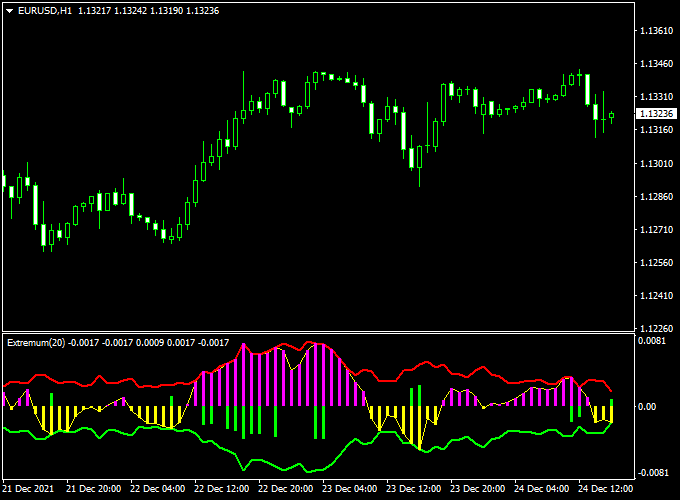
The chart below shows the Extremum Forex Signal Indicator in action on an MT4 chart.
Purple trend bars signal potential buy trades, while yellow trend bars signal potential sell trades.
This histogram format makes it easy to monitor the market and react quickly to changing conditions.
Guide to Trade with the Extremum Forex Signal Indicator
Buy Rules
- Enter a buy trade as soon as the first purple trend bar appears
- Focus on trades aligned with the main trend
Sell Rules
- Enter a sell trade as soon as the first yellow trend bar appears
- Prefer trades aligned with the overall market direction
Stop Loss
- Place your stop loss just beyond the most recent swing point against your trade direction
- For scalping, keep stops tighter to protect profits; for longer trades, allow more room for price swings
- Consider ATR-based stops to adapt dynamically to market conditions
Take Profit
- Target the next significant support or resistance level for your first take profit
- Partial profits can be taken at key pivot zones to lock in gains
- Exit the trade if the histogram changes color, signaling a reversal
- Trailing stops can be used to maximize profits during strong trends
Practical Tips
- Use higher timeframe analysis to confirm the overall trend before taking trades
- Combine with other indicators like moving averages or oscillators for added confirmation
- Focus on pairs with high liquidity to reduce false signals
- Monitor active trading sessions for better response to histogram signals
Extremum Forex Signal Indicator + Free Forex Scalping Indicator MT4 Strategy
This scalping strategy uses two highly responsive tools: the Extremum Forex Signal Indicator MT4 and the Free Forex Scalping Indicator MT4.
The Extremum indicator shows a purple histogram bar to indicate bullish conditions and a yellow histogram bar to indicate bearish conditions.
The Free Forex Scalping indicator confirms direction with a green histogram for bullish bias and a red histogram for bearish bias.
This setup works best on 1-minute and 5-minute charts of major currency pairs during active market sessions (London and New York).
It’s designed for traders who want fast, confluence-based entries and tight risk control.
Buy Entry Rules
- Wait for the Extremum Forex Signal Indicator to display a purple histogram bar, indicating a bullish trend.
- At the same time, the Free Forex Scalping Indicator must show a green histogram bar, confirming bullish momentum.
- Enter long at the close of the bar where both indicators align.
- Stop loss: a few pips below the most recent swing low.
- On 5-minute charts, typically 8–15 pips; on 1-minute charts, 4–8 pips depending on volatility.
- Take profit: target 1–2× the risk.
- For example, if SL = 8 pips, aim for 8–16 pips profit. Consider partial exits at 1R and trail the remainder.
Sell Entry Rules
- Wait for the Extremum Forex Signal Indicator to display a yellow histogram bar, indicating a bearish trend.
- At the same time, the Free Forex Scalping Indicator must show a red histogram bar, confirming bearish momentum.
- Enter short at the close of the bar where both indicators align.
- Stop loss: a few pips above the most recent swing high.
- On 5-minute charts, typically 8–15 pips; on 1-minute charts, 4–8 pips depending on volatility.
- Take profit: target 1–2× the risk. Use partial exits and move SL to breakeven after 1R if desired.
Advantages
- Two indicators with colour-coded histograms make the trend direction instantly clear.
- Fast entry and exit signals are ideal for scalping conditions.
- Clear stop loss and take profit levels improve discipline and consistency.
- Works on multiple timeframes and currency pairs, especially majors with low spreads.
Drawbacks
- False signals may occur during flat or news-driven markets.
- Requires constant monitoring and quick execution to catch moves.
- Transaction costs can eat into profits if spreads are wide or commissions are high.
- Conflicting readings can appear briefly during transitions, which can confuse inexperienced traders.
- Short profit targets mean one losing trade can offset several small winners if not managed well.
Case Study 1 — EUR/USD 5m (Buy)
Setup
The Extremum indicator prints a purple histogram bar. The Free Forex Scalping indicator simultaneously turns green on the 5-minute chart.
Trade
- Entry: 1.0850 long at the bar close.
- Stop loss: 1.0840 (10 pips below swing low).
- Take profit: 1.0865 (15 pips = 1.5× risk). Partial exit at 1.0858 (1R).
- Outcome: price rose steadily and hit the final target for +15 pips.
Case Study 2 — GBP/JPY 1m (Sell)
Setup
The Extremum indicator prints a yellow histogram bar while the Free Forex Scalping indicator turns red on the 1-minute chart after a small retracement.
Trade
- Entry: 186.40 short at the bar close.
- Stop loss: 186.48 (8 pips above swing high).
- Take profit: 186.28 (12 pips = 1.5× risk). Partial exit at 186.34 (1R).
- Outcome: price dropped quickly and hit the target. Net +12 pips.
Strategy Tips
- Trade only when both indicators agree on direction. Skip mixed signals.
- Focus on liquid pairs (EUR/USD, GBP/USD, USD/JPY) during active sessions for tighter spreads.
- Adjust stop loss and take profit according to the volatility of the pair and timeframe.
- Use partial exits to lock in profits and move the stop loss to breakeven after 1R.
Download Now
Download the “extremum.mq4” indicator for Metatrader 4
FAQ
How does the Extremum Forex Signal Indicator work?
The indicator uses a multi-color histogram to signal potential buy and sell trades.
Purple bars indicate a buying opportunity, while yellow bars indicate a selling opportunity, based on short-term momentum shifts.
Can it be used for both scalping and day trading?
Yes. Lower timeframes are ideal for scalping, while higher timeframes can be used for intraday or day trading strategies.
Does it work with other strategies?
Absolutely. The Extremum Forex Signal Indicator can confirm trade setups from other indicators or strategies, enhancing trade accuracy and confidence.
Summary
The Extremum Forex Signal Indicator for MT4 is a versatile tool that helps traders identify high-probability buy and sell trades using a multi-color trend histogram.
Its simple visual signals make it suitable for scalpers and day traders alike, while also serving as a confirmation tool for other strategies.
By following the histogram signals systematically, traders can capture short-term opportunities more efficiently, manage risk better, and improve overall trade performance.





