About the Super Signals Histogram Indicator
The Super Signals Histogram Indicator for MT4 is a momentum oscillator designed to highlight bullish and bearish pressure using simple zero-line logic.
The indicator plots histogram bars that fluctuate above and below the 0.00 level.
These movements help traders quickly assess whether buyers or sellers control the market.
When histogram bars rise above zero, bullish momentum builds. When they fall below zero, bearish pressure increases.
Traders often use it for intraday momentum trades, but it also performs reliably for short swing setups.
Free Download
Download the “coeffoline-histogram.ex4” MT4 indicator
Key Features
- Histogram oscillator based on a central zero level.
- Red bars indicate bullish or bearish momentum shifts.
- Suitable for momentum and continuation strategies.
Indicator Chart
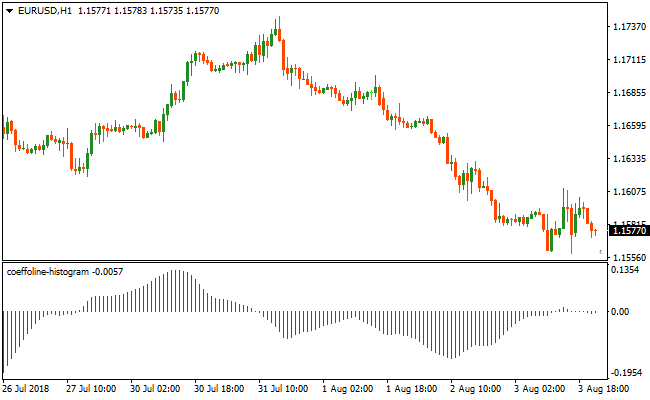
The Super Signals Histogram Indicator appears beneath the main chart as a momentum histogram.
Bars rising above zero reflect bullish pressure, while bars dropping below zero signal bearish momentum.
Traders use these shifts to time entries in the direction of the move.
Guide to Trade with Super Signals Histogram Indicator
Buy Rules
- Wait for the histogram bars to approach the zero level.
- Enter when a red bar closes above zero.
- Confirm momentum continues to build upward.
Sell Rules
- Wait for the histogram bars to approach the zero level.
- Enter when a red bar closes below zero.
- Confirm downward momentum holds after the signal.
Stop Loss
- Place the stop beyond the most recent price swing.
- Allow extra room during volatile sessions.
Take Profit
- Close the trade when the histogram flips to the opposite side of zero.
- Alternatively, target support or resistance levels.
Super Signals Histogram and Elite Pro Scalper MT4 Scalping Strategy
This MT4 scalping strategy combines the precision of the Super Signals Histogram Metatrader 4 Forex Indicator with the timely entry arrows of the Elite Pro Scalper Indicator MT4.
The goal of this strategy is to capitalize on short, high-probability moves in trending conditions while minimizing false entries that often occur in low-momentum environments.
The Super Signals Histogram provides a clear picture of market bias by displaying a histogram above zero for bullish trend conditions and below zero for bearish trend conditions.
This helps you trade with the underlying trend rather than against it.
The Elite Pro Scalper indicator adds precise entry timing by generating blue arrows for buy opportunities and red arrows for sell opportunities.
By combining these two tools, scalpers can focus on moments when both trend and entry align for higher quality setups.
This strategy works best on shorter timeframes where scalping performs well, such as M5 and M15.
You do not need to catch large moves. Instead, this method focuses on smaller, consistent gains that add up over multiple trades.
It suits both beginners who want clear signals and experienced scalpers seeking a structured edge.
Buy Entry Rules
- The Super Signals Histogram is above zero, indicating bullish trend pressure.
- The Elite Pro Scalper Indicator shows a blue arrow, signaling a buy entry opportunity.
- Enter a buy trade at the close of the candle where the blue arrow appears while the histogram remains above zero.
- Place the stop loss a few pips below the most recent swing low or a few pips below the histogram support zone.
- Exit the trade when the histogram turns toward zero from above or when a red arrow appears from the Elite Pro Scalper Indicator.
Sell Entry Rules
- The Super Signals Histogram is below zero, indicating bearish trend pressure.
- The Elite Pro Scalper Indicator shows a red arrow, signaling a sell entry opportunity.
- Enter a sell trade at the close of the candle where the red arrow appears while the histogram remains below zero.
- Place the stop loss a few pips above the most recent swing high or a few pips above the histogram resistance zone.
- Exit the trade when the histogram turns toward zero from below or when a blue arrow appears from the Elite Pro Scalper Indicator.
Advantages
- Combines trend direction and precise entry signals for better quality scalping opportunities.
- Eliminates many false entries seen when using entry arrows alone in choppy markets.
- Clear histogram trend bias makes it easy to know which side to trade at any moment.
- Works on multiple short timeframes, giving scalpers flexibility.
Drawbacks
- May miss fast price spikes that occur between signal candles on lower timeframes.
- Signals can cluster during consolidation, requiring patience to avoid low probability trades.
- Requires strict discipline to exit when conditions reverse rather than holding too long.
Case Study 1
On EURUSD M5 during a European session, the Super Signals Histogram moved above zero and maintained positive bars, signaling a clear bullish bias.
Shortly after, the Elite Pro Scalper Indicator generated a blue arrow.
A buy position was executed at the candle close with the histogram still above zero.
The stop loss was placed a few pips below the recent swing low.
Price continued higher as the histogram expanded upward, and the position was closed when the histogram began to turn down.
The trade captured a series of small gains that combined to a solid profit on this scalping setup.
Case Study 2
On GBPCGF M15 during New York trading hours, the Super Signals Histogram dropped below zero, indicating bearish pressure.
A red arrow from the Elite Pro Scalper Indicator appeared while the histogram remained negative.
A sell trade was entered at the close of the signal candle with the stop loss placed just above the recent swing high.
The market continued its downward move and the histogram strengthened.
The trade was exited when a blue arrow formed, capturing 32 pips.
Strategy Tips
- Only take signals that match both histogram direction and arrow color to avoid random price noise.
- Place stop losses just beyond support/resistance levels rather than using fixed pip values to account for real market volatility.
- Avoid entering trades when the histogram is close to zero as this often signals weak momentum and choppy price action.
- Scalp during the most active hours, such as London open and the early New York session, for better follow through.
- Consider trailing your stop as price moves in your favor to lock in profits while allowing the move to extend.
- Keep your risk per trade small to ensure consistent gains without overexposure.
Download Now
Download the “coeffoline-histogram.ex4” Metatrader 4 indicator
FAQ
Does the indicator work better in trending markets?
Yes. Zero-line momentum signals tend to perform best when the market already shows directional bias.
Can this indicator be used for scalping?
It can. Lower timeframes produce more frequent signals, though proper filtering becomes more important.
Summary
The Super Signals Histogram Indicator focuses on momentum direction through a simple zero-level framework.
By tracking how histogram bars behave above and below this level, traders can quickly identify bullish and bearish phases without overcomplicating analysis.
The indicator works especially well for traders who prefer clean signals, fast interpretation, and momentum-based entries across multiple timeframes.





