About the Accelerator Indicator
The Accelerator Indicator for MT4, designed by Bill Williams, helps traders identify early changes in market momentum.
It is also known as the Accelerator/Deceleration indicator.
The indicator draws green and red bars above and below the zero level to signal bullish or bearish momentum.
Bars above zero indicate upward momentum, while bars below zero indicate downward momentum.
Its fast reaction to momentum changes makes it a good choice for scalping, especially during active market sessions with strong price movement.
Traders often combine the Accelerator indicator with a longer period moving average, such as the 100 EMA, to confirm the overall trend and improve trade accuracy.
Free Download
Download the “Accelerator.mq4” MT4 indicator
Key Features
- Detects early momentum changes in the market.
- Identifies potential trend shifts before price confirms.
- Displays green and red bars above or below zero for bullish/bearish momentum.
- Compatible with other indicators like moving averages for confirmation.
Indicator Chart
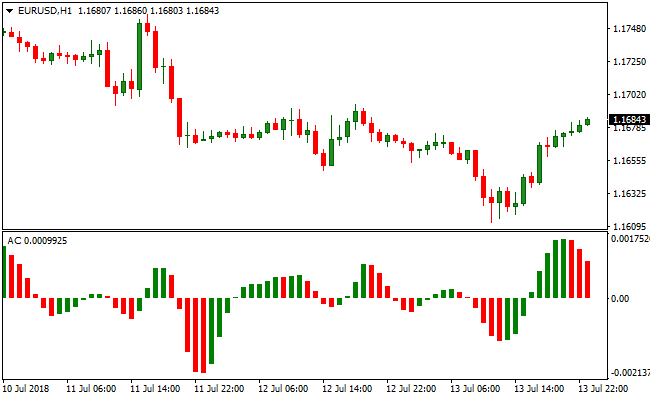
The image below showcases the Accelerator indicator plotted below the main price chart.
Green bars above zero suggest bullish momentum, red bars above zero indicate a weakening uptrend.
Below zero, green bars suggest weakening downtrend, while red bars indicate bearish momentum.
Traders can use these signals to anticipate trend changes when combined with a trend indicator like the 100 EMA.

Guide to Trade with Accelerator
Buy Rules
- Look for green or red bars above the zero line.
- Confirm the price is above the 100 EMA to follow the trend.
- Enter a buy trade when momentum aligns with the trend and bars remain above zero.
- Optionally, wait for multiple bars to confirm trend continuation.
Sell Rules
- Look for green or red bars below the zero line.
- Confirm the price is below the 100 EMA to follow the trend.
- Enter a sell trade when momentum aligns with the trend and bars remain below zero.
- Optionally, wait for multiple bars to confirm trend continuation.
Stop Loss
- For buy trades, place the stop below the nearest support level or swing low.
- For sell trades, place the stop above the nearest resistance level or swing high.
Take Profit
- For buy trades, close the trade when bars appear below the zero line.
- For sell trades, close the trade when bars appear above the zero line.
- Adjust dynamically if momentum continues strongly in your favor.
Accelerator Indicator and Cougar MT4 Forex Scalping Strategy
This MT4 scalping strategy combines momentum analysis with trend confirmation using the Accelerator Indicator and the Cougar Indicator.
The Accelerator indicator generates buy signals when the histogram turns green above zero and sell signals when it turns red below zero, capturing short-term momentum shifts.
The Cougar indicator confirms trend direction with blue arrows for bullish trends and red arrows for bearish trends.
Combining these indicators on M1 and M5 charts allows traders to scalp quick, high-probability trades across multiple currency pairs with defined entry and exit rules.
Buy Entry Rules
- Wait for the Accelerator histogram to turn green above zero, indicating bullish momentum.
- Confirm the trend with a blue arrow from the Cougar indicator.
- Enter a buy trade at the close of the confirmation candle.
- Place a tight stop loss a few pips below the recent swing low.
- Take profit when the Accelerator histogram turns red or the Cougar arrow signals a trend reversal.
Sell Entry Rules
- Wait for the Accelerator histogram to turn red below zero, indicating bearish momentum.
- Confirm the trend with a red arrow from the Cougar indicator.
- Enter a sell trade at the close of the confirmation candle.
- Place a tight stop loss a few pips above the recent swing high.
- Take profit when the Accelerator histogram turns green or the Cougar arrow signals a trend reversal.
Advantages
- Combines momentum and trend confirmation for higher probability scalping setups.
- Accelerator histogram captures early short-term momentum shifts.
- The Cougar indicator provides clear visual trend confirmation.
- Works effectively on M1 and M5 charts for fast intraday scalps.
- Tight stop losses reduce potential losses in fast-moving markets.
- Filters out countertrend trades by requiring trend confirmation.
Drawbacks
- Trend reversal signals may lag slightly, causing late exits in rapid moves.
- Limited opportunities during quiet market periods.
- High frequency of trades may increase transaction costs and slippage.
Example Case Study 1
On EURUSD M1, the Accelerator histogram turned green above zero and a blue Cougar arrow appeared.
A buy trade was entered with a tight stop below the recent swing low.
Price moved quickly upward and the trade was closed when the histogram turned red, capturing a 5 pip scalp.
Combining momentum and trend confirmation enabled a fast, high-probability entry.
Example Case Study 2
On GBPJPY M5, the Accelerator histogram turned red below zero and a red Cougar arrow confirmed the bearish trend.
A sell trade was opened with a stop above the recent swing high.
Price dropped steadily and the trade was closed when the histogram turned green, securing an 27 pip gain.
Using both indicators ensured a disciplined and effective scalping setup.
Strategy Tips
- Focus on trending market sessions to increase the probability of successful scalps.
- Monitor multiple currency pairs to identify the best opportunities simultaneously.
- Consider higher timeframes like M15 to confirm overall trend direction before scalping on M1 or M5.
- Combine with small support and resistance levels to refine entries and exits.
- Use alerts or notifications for Cougar and Accelerator signals to avoid missing quick moves.
- Analyze past trades to determine which pairs provide the most consistent scalping results.
Download Now
Download the “Accelerator.mq4” Metatrader 4 indicator
FAQ
Why combine it with a moving average?
Combining with a moving average like the 100 EMA helps confirm the trend direction and filter false momentum signals.
Can it identify trend reversals?
Yes. The indicator highlights changes in momentum, which often precede price reversals when confirmed with trend analysis.
Can the Accelerator indicator signal trend continuation?
Yes. When bars stay consistently above or below zero in the direction of the trend, it suggests that momentum is continuing and the trend may persist.
How do I combine it with other indicators for better entries?
You can combine it with moving averages, trend lines, or support/resistance levels to confirm the direction of the trend before entering trades. This helps reduce false signals.
Summary
The Accelerator MT4 indicator highlights early momentum changes to help traders anticipate trend shifts.
Using green and red bars above or below zero, it signals bullish or bearish momentum.
Combining it with a trend-following tool like the 100 EMA increases trade reliability.
Overall, the Accelerator indicator is a versatile tool for spotting early trend changes and timing entries effectively.






