
About the Atron Scalper Indicator
The Atron Scalper Indicator for MT4 is a channel based forex scalping system designed for traders who focus on fast intraday moves.
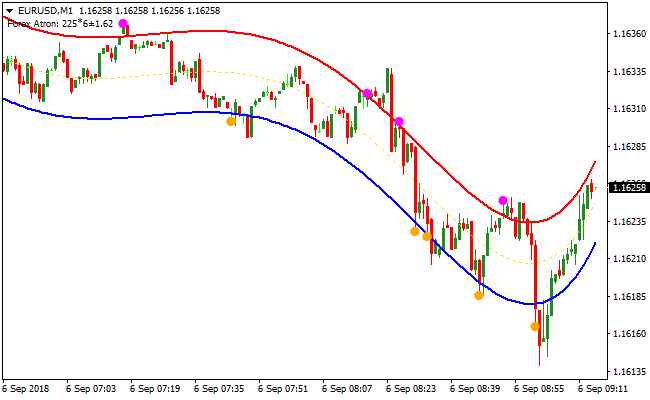
It plots two adaptive bands directly on the chart, one red and one blue, which define short term price direction and active trading zones.
The indicator identifies the scalping trend by the slope of both bands.
When the bands are angled upward, the market is in a bullish scalping phase.
When the bands are angled downward, bearish conditions dominate.
This directional filter helps traders avoid counter trend entries during high activity periods.
In addition to the bands, the Atron Scalper Indicator prints colored dots that highlight precise entry areas.
Orange dots appear near the lower band during bullish conditions, while magenta dots appear near the upper band during bearish conditions.
These dots act as timing tools rather than standalone signals.
The indicator performs best on the M1 and M5 charts, especially during the London and New York sessions when liquidity is highest.
Free Download
Download the “forex-atron.mq4” MT4 indicator
Key Features
- Dual band trading channel that adapts to short term price movement.
- Directional trend filter based on band slope.
- Colored dot signals for refined scalping entries.
- Optimized for M1 and M5 charts.
- Designed for use during high liquidity trading sessions.
Indicator Chart
The chart shows price action on a M1 scalping setup during an active trading session.
The red and blue bands define the trading channel, while orange and magenta dots mark potential buy and sell entry areas.

Guide to Trade with Atron Scalper Indicator
Buy Rules
- Confirm that both Atron bands are pointing upward.
- Wait for price to pull back toward the lower band.
- Enter a buy trade when an orange dot appears near the lower band.
- Avoid buy trades if the bands flatten or turn downward.
Sell Rules
- Confirm that both Atron bands are pointing downward.
- Wait for price to retrace toward the upper band.
- Enter a sell trade when a magenta dot appears near the upper band.
- Avoid sell trades if the bands flatten or turn upward.
Stop Loss
- Place the stop loss a few pips beyond the opposite band.
- Keep stop losses tight to match the scalping nature of the system.
- Exit early if price breaks and holds outside the channel.
Take Profit
- Close the trade near the opposite band of the channel.
- Exit fully if the bands change direction against the trade.
- Target small consistent gains rather than extended moves.
Atron Scalper and ZWinner Trend MT4 Scalping Strategy
This MT4 scalping strategy combines the accuracy of the Atron Scalper MT4 Forex Indicator with the trend confirmation of the ZWinner Trend Forex Indicator MT4.
The strategy is built for traders who want fast entries while staying aligned with the dominant market direction.
The ZWinner Trend indicator defines the overall trend using a clear histogram.
A green histogram confirms bullish conditions while a red histogram confirms bearish conditions.
The Atron Scalper is used for precise entry timing through colored dot signals, making it suitable for short-term scalping.
This approach works best on the M1 and M5 charts during active trading sessions.
It is ideal for traders who prefer quick trades with clear visual rules and minimal chart clutter.
Buy Entry Rules
- The ZWinner Trend histogram must be green, confirming a bullish trend.
- Price should be trading above recent support or showing higher lows.
- An orange dot must appear on the chart from the Atron Scalper.
- Enter a buy trade at the close of the candle where the orange dot appears.
- Place the stop loss a few pips below the most recent swing low.
- Set the take profit at the next visible band resistance level.
Sell Entry Rules
- The ZWinner Trend histogram must be red, confirming a bearish trend.
- Price should be trading below recent resistance or showing lower highs.
- A magenta dot must appear on the chart from the Atron Scalper.
- Enter a sell trade at the close of the candle where the magenta dot appears.
- Place the stop loss a few pips above the most recent swing high.
- Set the take profit at the next visible band support level.
Advantages
- Clear trend confirmation from the ZWinner histogram helps traders stay on the right side of the market.
- Precise dot-based entries from the Atron Scalper allow fast and confident decision making.
- Well suited for short-term scalping on M1 and M5 charts.
- Performs best during active sessions where momentum is present.
- It can be applied to different currency pairs without complex adjustments.
Drawbacks
- Scalping requires constant screen time and fast execution.
- Signal quality decreases during low volatility or sideways markets.
- Dot signals can appear frequently, increasing the risk of overtrading.
- Requires discipline to skip trades that do not fully meet the rules.
Case Study 1
On EURJPY M5 during the London session, the ZWinner Trend histogram remained green for an extended period.
After a brief pullback, an orange dot appeared from the Atron Scalper near a previous support zone.
A buy trade was entered with a tight stop loss below the swing low.
Price resumed the bullish move and reached the next band resistance area, allowing the trade to be closed with a solid intraday profit.
Case Study 2
On GBPUSD M1 during the New York open, the ZWinner Trend histogram turned red following a sharp bearish move.
After a small retracement, a magenta dot appeared on the chart.
A sell trade was entered with a stop loss above the recent high.
Price quickly dropped toward a nearby band support level, where the trade was manually closed as momentum began to slow.
Strategy Tips
- Always confirm the ZWinner histogram direction before acting on any dot signal.
- A green histogram means the market is controlled by buyers while a red histogram means sellers are dominant.
- Only trade Atron Scalper dots that appear after a small pullback within the active trend, not after extended price moves.
- Give more weight to signals that form near clear intraday support or resistance zones.
- On the M1 chart, be selective and avoid overtrading. Fewer high quality setups often perform better than many random entries.
- On the M5 chart, wait for cleaner structure and smoother price action before entering.
Download Now
Download the “forex-atron.mq4” Metatrader 4 indicator
FAQ
How do the Atron bands help identify scalping direction?
The slope of both bands defines short term market pressure.
When they rise together, buying pullbacks becomes the priority.
When they fall together, selling rallies offers better probability.
Why are the dots placed near the bands instead of the middle?
The dots appear close to the bands to highlight pullback zones rather than breakout entries.
This allows scalpers to enter with reduced stop distance and tighter risk control.
Can the Atron Scalper Indicator handle fast market spikes?
The channel adjusts dynamically, but sudden news spikes can stretch price beyond the bands.
During high impact news, waiting for the bands to realign improves trade quality.
Summary
The Atron Scalper Indicator provides a focused channel based approach for short term forex traders.
Combining directional bands with precise dot entries helps scalpers trade in sync with immediate market momentum.
Its strength lies in simplicity and speed, especially on M1 and M5 charts during active trading sessions.
Traders looking to refine their lower timeframe execution will find the Atron Scalper Indicator a practical and efficient trading tool.





