
About the BB Stops 2 MACD Indicator
The BB Stops 2 MACD Indicator for MT5 combines Bollinger Bands volatility analysis with MACD momentum into a powerful signal generator.
It displays multiple colored lines in a separate oscillator window below your main price chart.
This fusion helps traders identify high-probability trend shifts with built-in risk management levels.
Blue lines signal bullish momentum when BB Stops align with positive MACD readings, while orange lines mark bearish conditions.
The indicator automatically adjusts its sensitivity through configurable risk multipliers, making it versatile across different market conditions and trading styles.
Key inputs include MACD periods (fast, slow, signal), BB deviation settings, and three risk multipliers that control how aggressively the indicator responds to price action.
Free Download
BB stops 2 – MACD.mq5 Indicator (MT5)
Key Features
- Combines Bollinger Bands stops with MACD oscillator for filtered momentum signals.
- Configurable risk multipliers (Risk, Risk 2, Risk 3) fine-tune signal sensitivity.
- Provides dynamic support/resistance levels through BB-based stop calculations.
- Reduces false signals by requiring both volatility expansion and momentum confirmation.
Indicator Chart
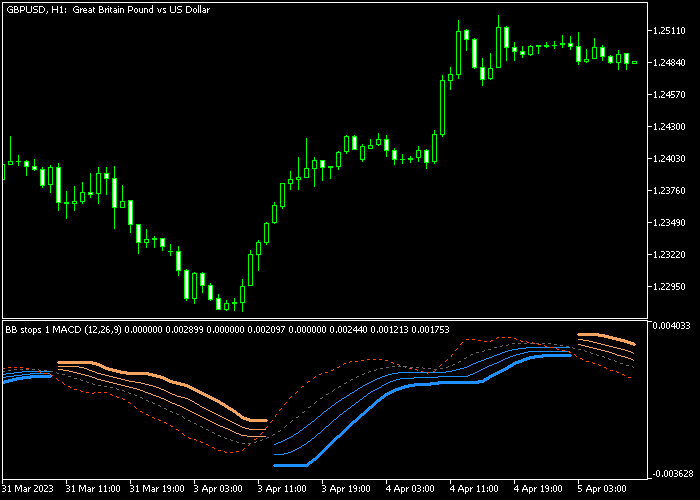
The BB Stops 2 MACD Indicator appears as colored lines in an oscillator window beneath your price chart.
Blue lines rising above the zero level indicate bullish alignment between MACD momentum and BB volatility expansion.
Orange lines dropping below zero signal bearish conditions with contracting volatility and negative momentum.
Guide to Trade with the BB Stops 2 MACD Indicator
Buy Rules
- Wait for the blue BB + MACD lines to appear and move upward in the oscillator window.
- Enter buy trades when price breaks above recent swing highs alongside blue line confirmation.
Sell Rules
- Look for orange BB + MACD lines forming and trending downward.
- Enter sell trades when price rejects recent swing highs confirmed by orange signals.
Stop Loss
- Place buy stops below the most recent swing low or visible BB support band.
- Set sell stops above the latest swing high or dynamic BB resistance level.
- Add 5-10 pips buffer on volatile pairs to account for spread and minor retracements.
Take Profit
- Target previous swing highs/lows or round number psychological levels.
- Scale out half position at 1:1 risk-reward, trail remainder with BB stops.
- Exit fully when the opposite color signal appears (orange for longs, blue for shorts).
Download Now
BB stops 2 – MACD.mq5 Indicator (MT5)
FAQ
What are the best MACD settings for BB Stops 2 MACD?
Default settings work well (12,26,9) but scalpers prefer faster settings like 5,13,1. Swing traders use 21,55,8 for smoother signals.
Always test risk multipliers first, as they impact signal frequency more than MACD periods.
Which risk multiplier setting works best for forex pairs?
Risk 1 suits conservative trading with fewer but higher-quality signals. Risk 2 balances frequency and accuracy for most pairs.
Risk 3 generates frequent signals best for scalping volatile pairs like GBPJPY or XAUUSD.
Should I trade against the main trend using this indicator?
Counter-trend trades work during strong opposite signals but carry higher risk. Best results come from trading in the direction of higher timeframe BB Stops 2 MACD alignment.
Use Risk 1 settings for trend continuation setups.
Summary
The BB Stops 2 MACD Indicator delivers precise buy/sell signals by merging Bollinger Bands volatility with MACD momentum confirmation.
Configurable risk multipliers let traders dial in signal frequency from conservative to aggressive scalping styles.
Blue lines signal bullish entries above zero, orange lines mark bearish opportunities below.
Dynamic BB-based stops provide logical exit levels while MACD filters reduce whipsaws.




