About the Bid/Ask Panel Indicator
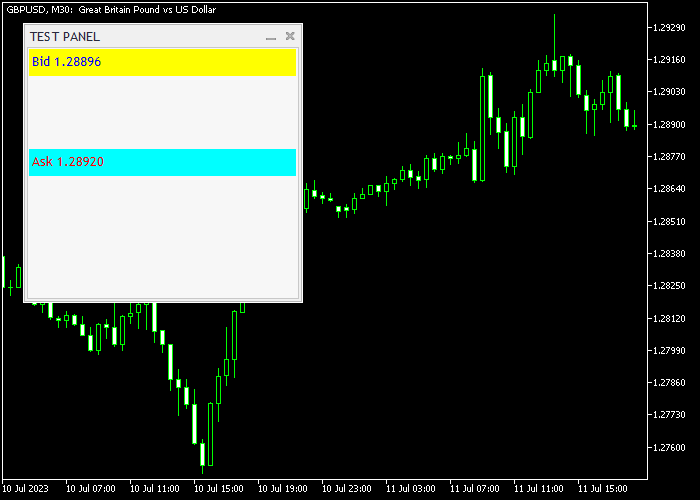
The Bid/Ask Panel Indicator for MT5 displays the current bid and ask prices in a clear panel format on the chart.
This allows currency traders to monitor real-time market conditions without switching platforms or checking multiple sources.
The panel is typically positioned in the upper left corner of the chart and can be customized in terms of colors to fit your chart layout.
It updates dynamically as market prices change, providing accurate and timely information for trade entries and exits.
This indicator works with all trading instruments available on MT5, making it suitable for Forex, commodities, indices, and other markets.
Its simplicity and clarity make it a practical tool for scalpers, day traders, and swing traders.
Free Download
Key Features
- Displays real-time bid and ask prices on the chart.
- Shows the spread between bid and ask for better trade management.
- Customizable colors to match your chart preferences.
- Easy to read and updates dynamically.
- Enhances precision for entries, exits, and scalping strategies.
Indicator Chart
The Bid/Ask Panel Indicator appears in the upper left corner of the chart, showing the current bid and ask prices.
The spread is displayed alongside the prices, allowing traders to quickly assess market conditions.
This tool is particularly useful for scalping and intraday trading where tight spreads and accurate price information are essential.
The panel’s color and layout can be adjusted for better visibility on any chart background.

Guide to Trade with Bid/Ask Panel Indicator
Buy Rules
- Monitor the bid price to identify the optimal entry for a buy order.
- Confirm that the spread is acceptable for your trade size.
- Open a buy trade at or slightly above the current ask price.
- Use the panel information to adjust stop loss and take profit levels.
Sell Rules
- Monitor the ask price to identify the optimal entry for a sell order.
- Confirm that the spread is within acceptable limits.
- Open a sell trade at or slightly below the current bid price.
- Use the panel to fine-tune stop loss and take profit placement.
Stop Loss
- Set stops based on recent support or resistance levels.
- Use spread information from the panel to avoid overly tight stops.
- Adjust stops dynamically if the market shows increased volatility.
- Maintain risk management consistent with your trading plan.
Take Profit
- Target price levels based on support/resistance or pip goals.
- Use spread information to set realistic profit targets.
- Close trades manually if the spread widens beyond acceptable limits.
- Combine with other technical tools for improved exit precision.
Download Now
FAQ
Can I customize the colors of the panel?
Yes. You can adjust the bid, ask, and spread colors to match your chart layout and preferences.
Where is the panel located by default?
It is positioned in the upper left corner of the chart by default, but you can adjust its location if needed.
Is this indicator suitable for scalping?
Yes. Its real-time display of bid, ask, and spread makes it especially useful for scalpers and intraday traders.
Summary
The Bid/Ask Panel Indicator provides real-time bid, ask, and spread information in a convenient chart panel.
It enhances trading precision and helps manage entries, exits, and risk efficiently.
Fully customizable and compatible with all MT5 instruments, this indicator is a simple yet essential tool for traders seeking accurate market data at a glance.





