
About the Bid Ask Spread Indicator
The Bid Ask Spread indicator for MT4 is a practical utility tool that displays live bid price, ask price, and spread directly on the trading chart.
It is designed to help traders stay aware of transaction costs in real time, especially during volatile market conditions.
Instead of relying on the Market Watch window, this indicator places the information where it matters most, right next to price action.
The spread value updates tick by tick, allowing traders to instantly see when spreads widen or tighten.
All visual elements can be customized from the indicator settings.
Traders can adjust font size, colors, and placement to match their chart layout. This makes it easy to integrate into any trading setup without clutter.
The indicator is particularly useful for scalpers, news traders, and anyone trading lower timeframes, where spread fluctuations can have a direct impact on trade performance.
Free Download
Download the “Bid-Ask-Spread.ex4” MT4 indicator
Key Features
- Displays real-time bid price on the chart.
- Displays real-time ask price on the chart.
- Shows live spread value in pips.
- Fully customizable fonts, colors, and positioning.
- Works on all MT4 currency pairs and timeframes.
Indicator Chart
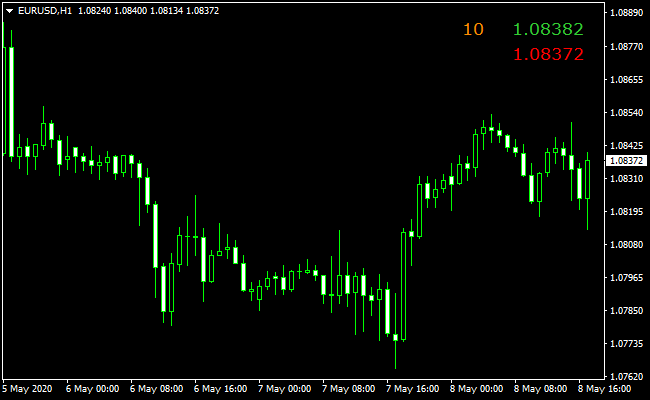
The chart shows the Bid Ask Spread indicator applied to an MT4 chart.
The bid price, ask price, and spread are displayed clearly on the screen and update in real time.
Traders can quickly assess current trading costs before entering or managing positions.
Guide to Trade with Bid Ask Spread Indicator
Buy Rules
- Check the current spread before opening a buy trade.
- Avoid buy entries when the spread is unusually wide.
- Prefer buy trades during active market sessions with tighter spreads.
- Confirm spread stability before executing market orders.
Sell Rules
- Check the current spread before opening a sell trade.
- Avoid sell entries when spreads spike unexpectedly.
- Prefer sell trades during liquid trading hours.
- Monitor spread behavior during fast price movements.
Stop Loss
- Account for spread size when placing stop loss levels.
- Allow extra buffer during periods of higher spread volatility.
Take Profit
- Factor the spread into take profit calculations.
- Use realistic profit targets relative to the current spread size.
- Adjust take profit levels if spread conditions change.
- Lock in profits when spreads normalize after volatility.
Aggressive Bid/Ask Spread + Flat Trend Forex Scalping Strategy
This aggressive version uses the Bid/Ask Spread MT4 Indicator and the Flat Trend MT4 Indicator for ultra-fast scalping.
It focuses on very short-term movements during high-liquidity sessions.
The Bid/Ask Spread indicator ensures you only trade when execution costs are minimal.
Flat Trend bars give precise entries, with green bars for buy setups and red bars for sell setups.
This method is ideal for M1 and M5 charts and works best during London and New York sessions when market volatility is high.
Aggressive traders can capture multiple quick pips per trade while avoiding low-liquidity periods.
Buy Entry Rules
- Bid/Ask Spread must be very low (typically under 1 pip for major pairs).
- Flat Trend shows a green bar.
- Enter long immediately at the close of the green bar candle.
- Stop loss placed just 3–5 pips below the recent swing low (tight risk control).
- Take profit options:
- Fixed target: 5–8 pips on M1, 8–12 pips on M5.
- Exit immediately if the Flat Trend bar switches from green to red.
- Partial exit: take half profits at 5 pips (M1) or 8 pips (M5), hold the rest until bar color changes.
Sell Entry Rules
- Bid/Ask Spread must be very low.
- Flat Trend shows a red bar.
- Enter short at the close of the red bar candle.
- Stop loss placed just 3–5 pips above the recent swing high.
- Take profit options:
- Fixed target: 5–8 pips on M1, 8–12 pips on M5.
- Exit immediately if the Flat Trend bar switches from red to green.
- Partial exit: take half profits at 5 pips (M1) or 8 pips (M5), hold the rest until bar color changes.
Advantages
- Quick entries and exits maximize the number of trades in high-liquidity sessions.
- Tight stops limit risk on each micro-trade.
- Clear visual signals make it simple to follow, even for very short-term trades.
- Flexible exit methods allow traders to adapt to changing momentum.
- High probability setups when spreads are monitored carefully.
Drawbacks
- Requires very fast execution and a low-latency broker.
- Small profit targets mean spreads and commissions are more significant.
- Constant attention is needed due to rapid trades.
- Not suitable for traders who prefer longer-term or relaxed trading styles.
Example Case Study 1: EUR/USD on M1
During the London session, EUR/USD displayed tight spreads of 0.8 pips.
A green Flat Trend bar appeared on M1. A buy entry was taken with a 3-pip stop.
Price moved up quickly, hitting the 5-pip target within a few minutes.
The bar later switched to red, closing the remaining position.
Example Case Study 2: GBP/USD on M5
GBP/USD during the New York session had spreads of around 1 pip.
A red Flat Trend bar appeared, signaling a sell entry.
A short trade was executed with a 4-pip stop above the swing high.
Price moved down fast, achieving a 10-pip target.
The remaining position was closed when the bar changed from red to green.
Strategy Tips
- Always check spreads before entering; avoid high-cost periods.
- Focus on major and highly liquid pairs like EUR/USD, GBP/USD, and USD/JPY.
- Stick to tight stops and small targets; aggressive scalping requires discipline.
- Consider using a one-click execution tool to speed up order placement.
- Avoid trading during major news releases to prevent slippage.
Download Now
Download the “Bid-Ask-Spread.ex4” Metatrader 4 indicator
FAQ
Why is monitoring the spread important?
The spread represents the cost of entering and exiting trades.
Monitoring it helps traders avoid poor entries during expensive market conditions.
Does the indicator affect trade execution?
No, it only displays information. Trade execution depends on your broker and order type.
Can this indicator help during news trading?
Yes, it allows traders to see real-time spread expansion during news releases and decide whether to stay out of the market.
Is this indicator useful for higher timeframes?
While most valuable on lower timeframes, it can still help swing traders monitor trading costs during entries and exits.
Summary
The Bid Ask Spread indicator for MT4 is a simple yet effective tool for improving trade awareness.
Displaying live bid, ask, and spread values directly on the chart helps traders make more informed decisions.
Its flexibility, ease of use, and real-time updates make it a valuable addition to any trading setup, especially for traders who prioritize cost control and precise execution.





